TL;DR:
- Proactive network monitoring relies on key metrics like latency, packet loss, and bandwidth to ensure reliability.
- Proper scoping, choosing the right tools, and establishing baselines are essential for effective monitoring.
- Continuous trend analysis and sector-specific adjustments improve network resilience and reduce downtime.
Network disruptions in schools and factories rarely announce themselves in advance. A single overloaded switch can bring down an entire building’s connectivity, halting lessons, stalling production lines, and costing far more than the original fault ever warranted. Yet the majority of these incidents are entirely preventable. With the right monitoring strategy, IT managers and network administrators can move from reactive firefighting to informed, proactive control. This guide walks you through the practical methodology for building robust network health monitoring, covering key metrics, tooling, implementation steps, and sector-specific guidance for both education and manufacturing environments.
Table of Contents
- Understanding network health fundamentals
- Preparing your monitoring environment
- Implementing network health monitoring step by step
- Troubleshooting, benchmarking, and sector-specific tips
- Going beyond the basics: Our take on robust network health monitoring
- Ready to strengthen your network health?
- Frequently asked questions
Key Takeaways
| Point | Details |
|---|---|
| Monitor essential metrics | Tracking latency, packet loss, and bandwidth ensures reliable operations and early issue detection. |
| Use baselines and dynamic thresholds | Comparing live metrics to established norms enables smarter, context-aware alerting. |
| Segment for your sector | Tailor your approach for education or manufacturing with targeted tools and risk focus. |
| Automate monitoring and response | Automated discovery, mapping, and event response improve uptime and reduce manual work. |
| Validate with recognised benchmarks | Testing against standards like RFC 2544 confirms your network meets performance commitments. |
Understanding network health fundamentals
Network health is not a single number or a green light on a dashboard. It is a composite picture of how well your infrastructure delivers reliable, performant connectivity to every user and device that depends on it. Understanding what to measure is the essential first step.
What does network health actually mean?
At its core, network health covers two distinct concerns: reachability and performance. Reachability asks whether packets are getting from source to destination at all. Performance asks how well they are getting there. A network can be technically reachable whilst delivering a poor user experience due to high latency or excessive jitter. Both dimensions must be monitored simultaneously.
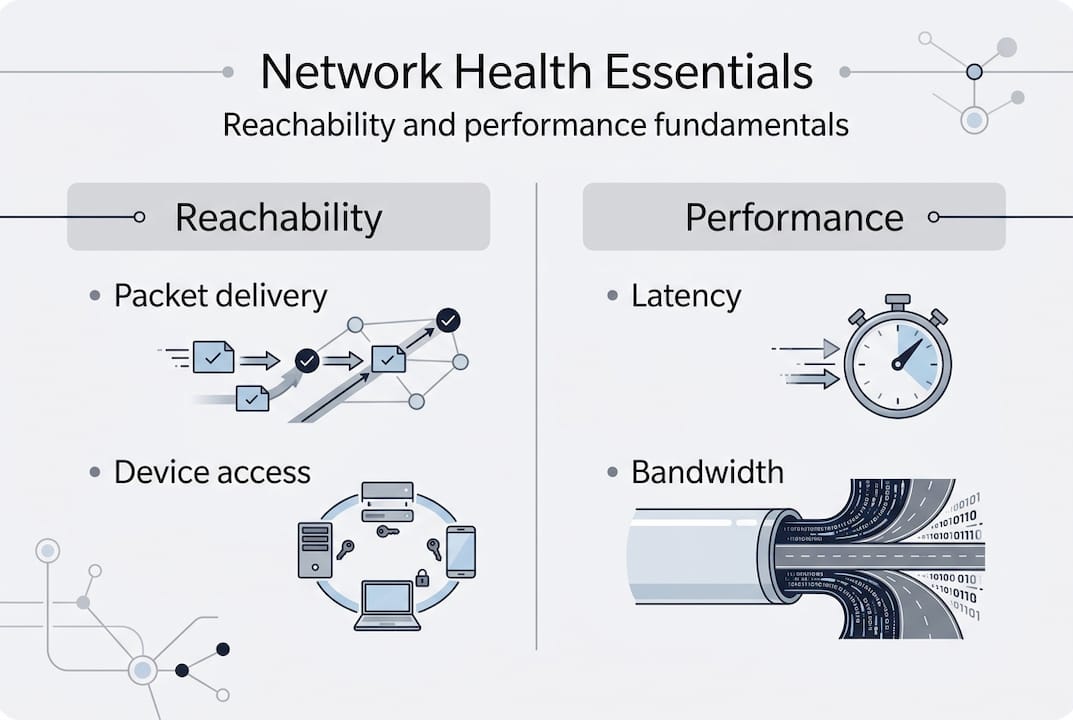
Core methodologies for network health monitoring include continuous performance tracking of key metrics: latency, jitter, packet loss, bandwidth utilisation, interface errors, CPU and memory on devices, and flow data analysis. Each of these tells a different part of the story.
Key metrics and what they reveal
- Latency: Round-trip delay between two points. High latency disrupts real-time applications such as VoIP and video conferencing.
- Packet loss: The percentage of packets that fail to arrive. Even 1% loss can degrade application performance significantly.
- Jitter: Variation in packet arrival times. Critical for voice and video quality.
- Bandwidth utilisation: How much of available capacity is in use. Sustained utilisation above 80% signals saturation risk.
- Interface errors: CRC errors, input/output drops, and collisions indicate physical layer or duplex mismatches.
- CPU and memory utilisation: High resource consumption on routers and switches can cause forwarding delays.
- Flow data (NetFlow/sFlow): Reveals which applications and users are consuming bandwidth.
You can explore a broader set of network monitoring techniques to supplement these foundational metrics.
The role of baselines and OSI layers
Raw metric values mean little without context. A latency reading of 20ms may be perfectly normal on one network and alarming on another. Establishing baselines, meaning the normal operating range for your specific environment, transforms raw data into actionable intelligence.

It is also worth thinking in terms of the OSI model. Monitoring should span from Layer 1 (physical, cabling and interface errors) through Layer 3 (routing and IP reachability) and into Layer 7 (application performance). Gaps at any layer create blind spots.
| Metric | What it measures | Benchmark target |
|---|---|---|
| Latency | Round-trip delay | Under 20ms (LAN), under 150ms (WAN) |
| Packet loss | Dropped packets | Below 0.1% |
| Jitter | Delay variation | Under 10ms for VoIP |
| Bandwidth utilisation | Capacity in use | Below 80% sustained |
| Interface errors | Physical/data link faults | Zero CRC errors |
| CPU utilisation | Device processing load | Below 70% sustained |
Use the infrastructure checklist to ensure your monitoring scope maps to every layer of your environment.
Preparing your monitoring environment
With a grasp of what to measure, you now need to set the stage for effective monitoring tailored to your environment. Preparation determines whether your monitoring programme delivers genuine insight or simply produces noise.
Scoping your monitoring coverage
Begin by identifying every device and path that is critical to your operations. This is not just core switches and routers. It includes access layer devices, wireless access points, firewalls, WAN links, and any cloud or SaaS connectivity paths. In education, this often means hundreds of access points serving concurrent users across multiple buildings. In manufacturing, it means traditional IT devices alongside operational technology (OT) assets such as PLCs, SCADA systems, and IoT sensors.
A practical scoping checklist:
- Identify all network segments and VLANs
- Map critical application paths (e.g., SaaS platforms, ERP systems)
- List all device types including IoT and OT assets
- Document WAN and internet egress points
- Flag high-availability dependencies (redundant links, failover paths)
Selecting monitoring tools
Establish comprehensive baselines by segmenting the network into critical paths and peak versus off-peak periods, using dynamic thresholds rather than static values, implementing proactive alerting on sustained trends, and automating discovery and mapping. This approach reduces manual effort and catches drift before it becomes an incident.
| Tool type | Examples | Best for |
|---|---|---|
| SNMP polling | PRTG, LibreNMS | Device health, interface stats |
| Flow analysis | SolarWinds NTA, ntopng | Bandwidth, application visibility |
| Log aggregation | Splunk, Graylog | Security events, error correlation |
| Synthetic monitoring | ThousandEyes | SaaS path quality, end-user experience |
| Unified platforms | Cisco DNA Centre | Multi-function, Cisco environments |
Role-based dashboards are important. Network operations staff need real-time fault visibility. Management need capacity and availability trends. Security teams need anomaly and event data. Centralised logging ensures all data is correlated rather than siloed.
Pro Tip: Automating network discovery using tools that periodically scan and update device inventories saves hours of manual mapping and ensures your monitoring scope stays current as devices are added or replaced. Pair this with automated baseline tracking to detect gradual performance degradation before users notice.
For organisations planning formal network audits, the preparation phase described here directly informs the audit scope and accuracy.
Implementing network health monitoring step by step
Armed with your preparations, it is time to move into hands-on implementation. A structured approach prevents common gaps and ensures your monitoring solution is production-ready from day one.
Implementation steps
- Deploy your monitoring platform across all identified network segments. Ensure SNMP community strings or API credentials are configured on every managed device.
- Enable flow export (NetFlow or sFlow) on core and distribution switches to feed traffic analysis tools.
- Configure centralised logging so syslog and SNMP traps from all devices aggregate to a single platform.
- Run initial discovery to build a complete device inventory and confirm there are no gaps in coverage.
- Capture baseline data over a representative period (typically two to four weeks) before setting alert thresholds.
- Set up role-based dashboards for operations, management, and security teams.
- Define alerting tiers: informational, warning, and critical, each with clear escalation paths.
- Test end-to-end visibility by simulating faults (e.g., disabling a test interface) and confirming alerts fire correctly.
Deploy monitoring at all critical points with no blind spots, using real-time traffic analysis via NetFlow or sFlow, centralised logging, role-based dashboards, and automated remediation workflows where possible.
‘Missing a single switch can leave a school building offline or a production line stalled.’
Configuring alerting effectively
Layered alerting is the difference between actionable intelligence and noise. Informational alerts log events without paging anyone. Warning alerts flag sustained degradation for investigation. Critical alerts trigger immediate escalation.
Pro Tip: Reduce alert fatigue by implementing event correlation. Rather than sending an alert for every downstream device that goes offline following a core switch failure, configure your platform to suppress child alerts when a parent device event is active. This single configuration change can reduce alert volume by over 60% during major incidents.
Regular advanced monitoring methods reviews ensure your alerting logic stays aligned with network changes. For structured assessments, network health checks provide an independent validation of your monitoring completeness.
Troubleshooting, benchmarking, and sector-specific tips
Once monitoring is in place, you must validate accuracy and address issues unique to your sector. Even a well-designed monitoring environment requires ongoing calibration.
Common pitfalls to address
- Alert storms: Too many alerts during a single fault, usually caused by not implementing event correlation.
- Blind spots: Devices or segments not covered because discovery was not thorough or assets were added without notification to IT.
- Uncalibrated thresholds: Static thresholds set without baselines lead to excessive false positives or missed degradation.
- Polling interval mismatches: Polling too infrequently misses transient spikes; polling too frequently overloads device CPU.
Benchmarking for validation
Benchmarks give your monitoring data external reference points. RFC 2544 defines standardised tests for throughput, latency, frame loss, and back-to-back frames, and is widely used to validate link performance. ITU-T M.3042 provides a framework for network health indices. Vendor tools offer their own differentiated benchmarks, particularly for wireless environments.
| Benchmark | Type | Sector fit |
|---|---|---|
| RFC 2544 | Throughput, latency, frame loss | Both |
| ITU-T M.3042 | Health index framework | Both |
| Wi-Fi 6 SNR thresholds | Wireless signal quality | Education, manufacturing |
| OEE indirect metrics | Production uptime via network | Manufacturing |
Manufacturing-specific guidance
Monitor IoT and OT convergence carefully. EMI interference from heavy machinery, legacy device integration, wireless dropouts, edge device health, and high device density all require specific monitoring attention. Segment OT from IT networks and track cycle time and OEE indirectly via network performance data. Legacy PLCs and SCADA systems often cannot run modern monitoring agents, so agentless SNMP or flow-based approaches are essential.
For broader context on optimising infrastructure in industrial environments, see our guidance on manufacturing network tips.
Education-specific guidance
High concurrent users and devices, campus WiFi density, remote and hybrid access visibility, and integration with SIEM tools for security are the primary focus areas for schools and universities. SaaS path quality (Microsoft 365, Google Workspace) deserves dedicated synthetic monitoring. SIEM integration ensures network anomalies are correlated with security events.
For practical detail on managing these challenges, explore our resources on school network management.
Going beyond the basics: Our take on robust network health monitoring
The technical steps covered above provide a solid foundation. But in our experience working with schools, manufacturers, and other complex environments over more than 35 years, the organisations that achieve genuinely resilient networks do something different. They focus on trend anomalies rather than threshold breaches.
A device that is running at 65% CPU is technically below most alert thresholds. But if that same device was running at 30% CPU six weeks ago, the trend itself is the signal. Generic dashboards set to fire at 80% will miss this entirely. Baseline-driven, dynamic threshold monitoring will catch it early.
Alert fatigue is a real operational risk. When IT teams are desensitised by constant low-priority alerts, critical ones get missed. Investing time in event correlation and threshold refinement pays dividends that no tool purchase alone can replicate.
Sector context also matters. A monitoring configuration optimised for a university WiFi estate needs fundamental rethinking before it is applied to a factory floor with OT device density and EMI exposure. Generic tools applied generically produce generic results.
Pro Tip: Review your monitoring scope every quarter. Networks evolve constantly, and blind spots emerge when new devices or segments are added without updating the monitoring configuration. Our monitoring approach addresses exactly this kind of systematic scope drift.
Ready to strengthen your network health?
If you want truly resilient network health and less downtime, expert help is at your fingertips. Re-Solution has supported schools, manufacturers, and complex multi-site organisations for over 35 years, delivering monitoring solutions that are practical, scalable, and tailored to your environment.

Whether you need professional network audits to identify gaps, a fully managed Network As A Service solution, or broader IT infrastructure help, our team is ready to support you. Contact Re-Solution today to discuss how we can help you build a monitoring framework that keeps your network performing at its best, every day.
Frequently asked questions
What are the most important network health metrics to monitor?
Critical network metrics include latency, packet loss, jitter, bandwidth utilisation, interface errors, and device CPU and memory usage. Each reveals a different aspect of network performance and reliability.
How do baselines improve network monitoring accuracy?
Dynamic thresholds over static values allow monitoring tools to detect genuine anomalies relative to normal operating conditions, reducing both false positives and missed degradation events.
What benchmarks should IT managers use for network health validation?
RFC 2544 and ITU-T M.3042 are the most widely recognised frameworks for validating throughput, latency, and overall network health indices across both LAN and WAN environments.
How should schools and factories adapt network monitoring?
Schools must prioritise WiFi density and SaaS paths, whilst factories need to segment OT from IT and address EMI and IoT convergence challenges specific to operational technology environments.
Recommended
- Top Network Monitoring Techniques 2025 | Re-Solution
- Network infrastructure checklist: optimise compliance
- Peak network performance: smart optimisation strategies
- Best Practices for Network Design Explained | Re-Solution