Schools today manage hundreds or thousands of connected devices, from student Chromebooks and staff laptops to BYOD smartphones and IoT printers. Each device represents a potential entry point for cyber threats, and with 82% of schools experiencing security incidents, the stakes have never been higher. Effective network access management protects sensitive student data, ensures compliance, and supports uninterrupted digital learning. This guide walks IT decision-makers through preparing, implementing, and verifying robust network access controls tailored specifically for educational environments.
Table of Contents
- Key takeaways
- Preparing for network access management in schools
- Executing network access management steps effectively
- Verifying and optimising school network access management
- Enhance your school network security with expert IT solutions
- Frequently asked questions
Key Takeaways
| Point | Details |
|---|---|
| Device and user mapping | Assess device types and user roles to tailor access policies and prevent gaps. |
| Layered access controls | Implement layered controls including NAC, network segmentation and multi factor authentication to protect the network edge. |
| Pilot programme first | Run a pilot programme in a department before a school wide rollout to identify issues. |
| Policy verification and adaptation | Verify policies regularly and adapt them as the environment evolves. |
Preparing for network access management in schools
Successful network access management starts long before you deploy any technology. You need a clear picture of your current environment and specific requirements. Begin by identifying every device type connecting to your network. Managed Chromebooks typically dominate classrooms, but don’t overlook BYOD smartphones, tablets, and unmanaged IoT devices like printers, security cameras, and interactive whiteboards. Each category requires different authentication and control methods.
Next, conduct thorough user role assessments. Teachers need access to grading systems and learning management platforms. Students require filtered internet access and educational resources. Administrative staff handle sensitive data requiring stricter controls. Maintenance personnel might need limited network access for specific equipment. Mapping these roles now prevents access gaps or overly restrictive policies later.
Evaluate your existing network infrastructure carefully. Network Access Control (NAC) solutions enforce policies at the network edge through authentication, authorisation, and device posture assessment. Your NAC must integrate seamlessly with identity providers like Google Workspace or Active Directory, mobile device management platforms, and any cloud services your school uses. Document current network architecture, including switches, wireless access points, and firewall configurations.
Define clear access policies balancing security with educational needs. Students shouldn’t reach financial systems, but blocking legitimate educational websites frustrates learning. Teachers need broader access than students but shouldn’t control network infrastructure. Create tiered access levels with specific permissions for each user group. Consider time-based restrictions, location-based policies, and device health requirements.
Pro Tip: Start with a pilot programme on a single department or grade level before rolling out network access controls school-wide. This approach identifies configuration issues and user experience problems without disrupting your entire institution.
Select NAC solutions compatible with your existing infrastructure. If you’re already invested in Cisco equipment, solutions like Cisco ISE integrate naturally. Schools using Meraki wireless infrastructure might prefer Meraki’s built-in access controls. Evaluate whether you need agent-based NAC for managed devices or agentless MAC authentication for IoT equipment. Review our detailed network access controller guide for comprehensive comparison of approaches.
| Preparation task | Timeline | Key stakeholders |
|---|---|---|
| Device inventory and classification | 2-3 weeks | IT staff, department heads |
| User role mapping and policy design | 3-4 weeks | IT leadership, senior management |
| Infrastructure assessment | 1-2 weeks | Network administrators |
| NAC solution selection and procurement | 4-6 weeks | IT leadership, procurement |
Executing network access management steps effectively
With preparation complete, you’re ready to implement robust network access controls. Follow these steps systematically to build layered security without disrupting daily operations.
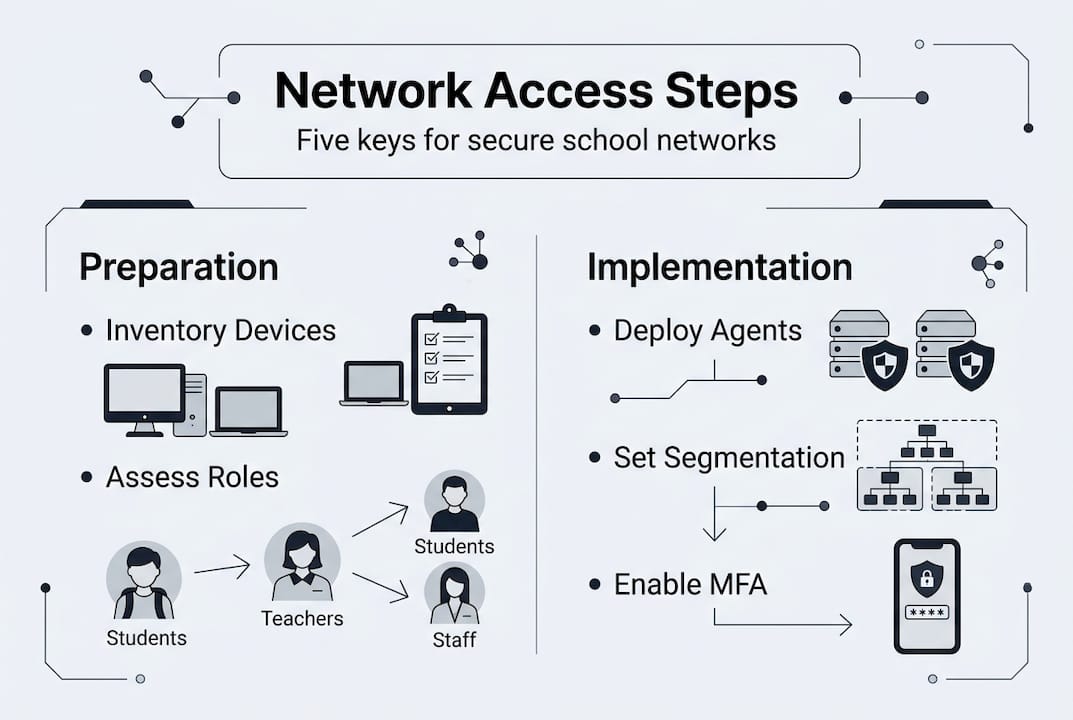
Step one involves deploying NAC agents on managed devices. Install authentication software on school-owned Chromebooks, staff laptops, and tablets. These agents verify device health, check for required security updates, and enforce compliance policies before granting network access. For unmanaged IoT devices like printers and cameras that cannot run agent software, configure MAC address authentication as a fallback. While less secure than agent-based approaches, MAC authentication prevents these devices from being completely blocked.

Step two implements automatic VLAN segmentation to isolate different device groups. Create separate network segments for student devices, staff equipment, guest access, and IoT infrastructure. When a Chromebook authenticates, your NAC automatically assigns it to the student VLAN with appropriate filtering and bandwidth policies. Staff devices join a different segment with broader access. This segmentation contains potential breaches, preventing attackers from moving laterally across your network.
Step three configures multi-factor authentication and role-based authorisation. Require MFA for administrative access to sensitive systems like student information databases and financial platforms. Implement single sign-on through your identity provider so users authenticate once and gain appropriate access across all authorised resources. Configure role-based access control policies matching the user roles you defined during preparation.
Step four integrates mobile device management and identity providers to enhance device trust. Connect your NAC to your MDM platform so only enrolled, compliant devices can access the network. Link to Google Workspace or Active Directory for centralised user authentication. This integration creates a trust framework where both user identity and device health determine access permissions. Learn more about setting up device trust for comprehensive security.
Step five applies flexible filtering policies that protect without blocking educational resources. Configure web filtering to block malicious sites, inappropriate content, and known threat sources whilst allowing educational platforms, research databases, and collaboration tools. Avoid overly aggressive blocking that frustrates teachers and students. Implement different filtering levels for different user groups, giving teachers broader access than students.
Pro Tip: Create an exception request process where teachers can quickly request access to blocked educational resources. Review these requests weekly to refine your filtering policies and reduce false positives.
Comparing NAC approaches helps you choose the right implementation for your school’s specific needs. Agent-based NAC provides the strongest security through continuous device health monitoring and detailed compliance checks. It works brilliantly for managed Chromebooks and staff laptops but cannot protect unmanaged IoT devices. MAC address authentication covers IoT equipment but offers weaker security since MAC addresses can be spoofed. Certificate-based authentication provides strong security without requiring agent software but demands more complex initial setup. Most schools need a hybrid approach combining these methods.
| NAC approach | Best for | Security level | Implementation complexity |
|---|---|---|---|
| Agent-based | Managed Chromebooks, staff devices | High | Medium |
| MAC authentication | IoT devices, printers, cameras | Medium | Low |
| Certificate-based | BYOD devices, contractor access | High | High |
| 802.1X | Enterprise-grade wired and wireless | Very high | High |
For detailed comparison of specific platforms, review our analysis of Meraki access control vs Cisco ISE to understand which solution fits your school’s requirements and existing infrastructure.
Verifying and optimising school network access management
Implementation is just the beginning. Continuous verification and optimisation ensure your network access controls remain effective against evolving threats whilst supporting educational objectives.
Monitor network traffic and access logs vigilantly for unusual activity. Configure alerts for failed authentication attempts, devices attempting to access unauthorised network segments, or unusual data transfers. Review logs weekly to identify patterns suggesting compromised credentials or misconfigured policies. Modern NAC solutions provide dashboards showing real-time network health, connected devices, and policy violations.
Measure key metrics demonstrating return on investment and security effectiveness. Track the number of security incidents before and after NAC implementation. Monitor help desk tickets related to network access problems. Measure network uptime and performance to ensure security controls don’t degrade user experience. Calculate time saved through automated device onboarding versus manual network access provisioning.
Conduct regular security audits examining segmentation effectiveness, MFA adoption rates, and policy compliance. Test whether network segmentation actually prevents lateral movement by simulating breach scenarios in controlled environments. Verify that all administrative accounts use MFA. Check that device health policies remain current as new threats emerge. Schedule quarterly audits as a minimum, with more frequent reviews after major infrastructure changes.
Pro Tip: Establish a security metrics dashboard visible to school leadership showing key indicators like percentage of compliant devices, security incidents prevented, and network uptime. This visibility builds support for continued investment in network security.
Collect user feedback balancing security with educational access needs. Survey teachers about whether filtering policies block legitimate educational resources. Ask IT staff if NAC automation reduces their workload. Gather student feedback about connection reliability and speed. Use this input to refine policies, adjust filtering rules, and improve the user experience without compromising security.
Update policies and tools proactively to counter emerging threats. Schools face increasing ransomware attacks targeting educational institutions. Review threat intelligence feeds regularly and adjust access controls accordingly. Update NAC software and security patches promptly. Revise access policies as your school adopts new technologies or changes operational procedures.
| Verification metric | Target | Review frequency |
|---|---|---|
| Security incidents | 50% reduction year-over-year | Monthly |
| Policy compliance rate | >95% of devices | Weekly |
| Network uptime | >99.5% | Daily |
| Access-related help desk tickets | 30% reduction | Monthly |
| Failed authentication attempts | <5% of total attempts | Weekly |
Network segmentation limits breach radius and integration with MDM and identity providers strengthens your security posture. Hybrid cloud and on-premises filtering approaches provide flexibility whilst avoiding over-blocking that hinders learning. Regular optimisation based on metrics and feedback ensures your network access management evolves with your school’s needs.
Stay informed about ransomware attacks and prevention strategies specific to educational institutions. Understanding the growing threat of ransomware helps you anticipate attacks and strengthen defences proactively rather than reactively.
Enhance your school network security with expert IT solutions
Implementing comprehensive network access management requires significant expertise and ongoing attention. Professional IT services specialising in educational environments can tailor solutions to your school’s unique requirements whilst reducing the burden on small IT teams.

Managed services provide continuous monitoring, policy updates, and threat response without expanding your internal team. Modern NAC solutions integrated with cloud and on-premises systems deliver robust protection across hybrid infrastructures common in schools. Whether you need help selecting the right network access controller or want comprehensive Cisco managed IT services handling everything from implementation to optimisation, partnering with specialists accelerates results whilst improving security outcomes. Explore Network as a Service options designed specifically for educational institutions seeking predictable costs and enterprise-grade security.
Frequently asked questions
What is network access management and why is it important for schools?
Network access management controls who and what can connect to your school network, protecting sensitive student data and ensuring safe learning environments. It’s vital for managing diverse devices and users securely, from Chromebooks to BYOD smartphones. Effective controls prevent unauthorised access whilst supporting the digital learning experiences students need. Learn more in our comprehensive network access controller guide.
How does network segmentation help protect schools against cyberattacks?
Network segmentation divides your network into isolated zones, preventing attackers from moving freely if one area is breached. This containment strategy limits damage from ransomware and other cyberattacks targeting schools. Given that 82% of schools experience threats, segmentation provides essential defence layers. Discover specific strategies in our guide to ransomware attacks and prevention.
What devices should be prioritised when implementing network access controls in schools?
Begin with managed Chromebooks and Bring Your Own Device setups since these represent the largest attack surface in most schools. Also include unmanaged IoT devices like printers and cameras for comprehensive control. Practical implementation starts with pilots on Chromebooks and BYOD, measuring ROI through reduced tickets and improved uptime. Explore setting up device trust for detailed guidance.
How can small school IT teams manage complex network access controls effectively?
Use automation tools and integrate mobile device management and identity providers to reduce manual work. Integration with MDM and IdP streamlines device onboarding and policy enforcement without expanding your team. Consider Cisco managed IT services to offload ongoing monitoring and optimisation whilst maintaining control over policies and priorities. Hybrid cloud and on-premises filtering approaches provide flexibility without overwhelming limited resources.
Recommended
- Network Access Controller Guide | Secure Network | Re-Solution
- IT Infrastructure for Education in 2025 | Re-Solution
- Cisco Access Manager: Zero Trust Security Made Easy for Modern Networks | Cisco Cloud, Security & Datacenter Experts
- DfE Switching Standards & Cisco Meraki | Re-Solution UK
- Network Security – IT Start