TL;DR:
- Proper school network planning begins with capacity assessment and site surveys to prevent coverage gaps and budget waste.
- Implementing standards like ANSI/TIA-4966 and accurate VLAN segmentation ensures future-proof infrastructure and security.
School network access planning is the process of designing infrastructure capacity, security, and management to meet the specific connectivity demands of educational environments. Getting it right means every student and staff member has reliable, secure access to the tools they need, from interactive whiteboards to cloud-based learning platforms. The industry standard for how to plan network access for schools starts with capacity: 3 devices per person is the baseline for modern classrooms, accounting for laptops, tablets, and IoT devices. Standards such as ANSI/TIA-4966 and funding programmes like E-Rate Category 2 give administrators a clear framework to build from. The goal is a network that performs today and scales without replacement tomorrow.
What do you need to assess before planning school network access?
The most expensive mistake in school internet access planning is skipping the assessment phase. Ordering hardware before you understand your building’s physical layout, device density, and bandwidth demands leads directly to coverage gaps and wasted budget.
A professional wireless site survey is the starting point. It maps your building’s physical structure, identifies high-traffic zones such as libraries, dining halls, and computer suites, and produces a wireless coverage heat map. That heat map tells you exactly where access points are needed and at what power levels, before you spend a penny on hardware.
Beyond physical layout, you need to assess:
- Device density: Project at least 3 devices per person across classrooms and staff areas, including IoT sensors, interactive boards, and personal devices.
- Current hardware lifecycle: Switches and access points have a recommended refresh cycle of 3 to 5 years. Anything older than that is likely a performance bottleneck.
- Cabling and power infrastructure: Check IDF (Intermediate Distribution Frame) locations, existing Cat6A or fibre runs, and whether your switches support Power over Ethernet (PoE) for access points and cameras.
- Bandwidth requirements by user group: Students, staff, administrative systems, and IoT devices each have different traffic profiles. Map them separately.
Pro Tip: Ask your site survey provider to model future technology demands, not just current usage. Interactive video, AI-assisted learning tools, and 1:1 device programmes will increase bandwidth requirements significantly within three years.
How to design and implement school network infrastructure step by step
Effective network planning for education follows a clear sequence. Skipping steps creates technical debt that costs more to fix than it would have cost to plan correctly.
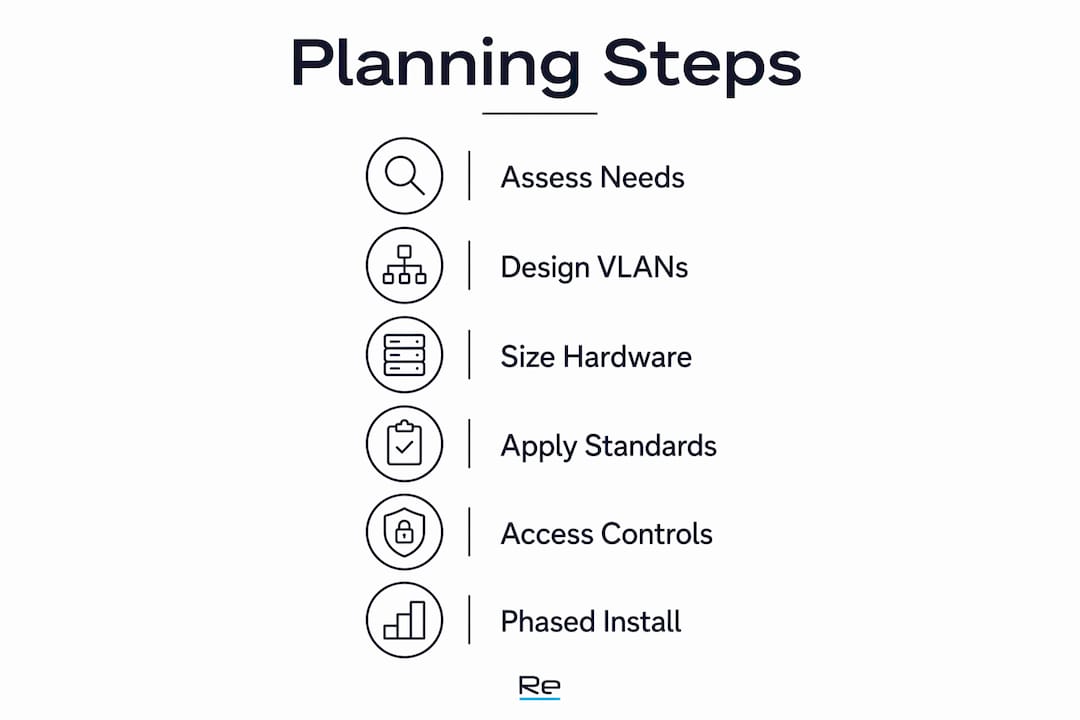
1. Start from the edge inward
Planning from classroom-level device needs outward reduces overspending on core hardware that never gets fully utilised. Define how many devices each classroom, lab, or common area requires, then size your access points, switches, and uplinks accordingly.

2. Design VLAN segmentation
VLAN segmentation separates student, staff, IoT, administrative, and guest traffic onto distinct logical networks. This enforces access policies, limits the blast radius of any security incident, and prevents bandwidth-hungry devices from degrading critical systems.
3. Size switches and access points correctly
Calculate your PoE budget carefully. Proper PoE budget calculation is mandatory when access points, IP cameras, and door access controllers all draw power from the same switch. Undersized PoE budgets cause devices to drop offline under load, which is a common and avoidable failure.
4. Apply ANSI/TIA-4966 standards
ANSI/TIA-4966 compliance specifies multiple Cat6A runs per classroom and fibre backbone connections between IDFs. Following this standard means your cabling infrastructure supports the next generation of hardware without replacement.
5. Implement network access controls
Assign unique credentials to every user group. Use captive portals for guest access and role-based access management (RBAC) to control what each group can reach. A network access controller automates policy enforcement and simplifies auditing.
6. Phase the installation
Structure deployment in logical phases: cabling first, then core switching, then access point installation, then commissioning and testing. Document every stage for E-Rate compliance tracking.
The table below outlines the key design decisions and their primary purpose:
| Design decision | Primary purpose |
|---|---|
| VLAN segmentation | Isolates traffic and enforces security policies |
| PoE budget calculation | Prevents device dropouts under load |
| ANSI/TIA-4966 cabling | Future-proofs infrastructure for hardware upgrades |
| Role-based access control | Limits user access to appropriate resources |
| Phased installation | Maintains compliance documentation and reduces disruption |
Pro Tip: Commission a post-installation heat map survey to verify coverage matches your design. Discrepancies are far cheaper to fix before the academic year begins than after.
How does E-Rate funding work for school network projects?
E-Rate Category 2 funding covers the internal network infrastructure costs that most school budgets cannot absorb alone. Eligible items include wireless access points, switches, cabling, and installation labour. Reimbursement rates range from 40% to 90% of eligible costs, depending on the school’s discount rate, which is calculated from the proportion of students eligible for free or reduced-price meals.
Accessing that funding requires following a strict competitive bidding process:
- Post Form 470: This opens the competitive bidding window. Vendors have at least 28 days to submit proposals.
- Evaluate bids on price and technical merit: Document your evaluation criteria before reviewing submissions.
- Submit Form 471: This is the formal funding request. It must reference the winning vendor and include all cost details.
- Maintain full documentation: Every decision, every communication, and every contract amendment must be on record.
Rushing the bidding phase or missing documentation requirements risks losing E-Rate eligibility entirely. Factor in 4 to 6 months for the full bidding and procurement cycle when aligning projects with funding windows.
Vendor selection criteria matter beyond price. Confirm that your chosen supplier holds a valid SPIN (Service Provider Identification Number) and has demonstrable experience working within SLED (State, Local, and Education) procurement environments. A vendor unfamiliar with E-Rate compliance processes can inadvertently disqualify your application through incorrect invoicing or contract changes after award.
What are the most common mistakes in school network access planning?
Most school network failures trace back to decisions made, or skipped, during the planning phase. Recognising these patterns before you start saves significant time and budget.
- Ordering hardware before completing site surveys. Experts consistently warn that this leads to over-purchasing in some areas and coverage gaps in others. A heat map costs a fraction of the hardware it prevents you from wasting.
- Underestimating device density. A single classroom running a 1:1 device programme with interactive boards and IoT sensors can easily exceed 40 concurrent connections. Plan for peak load, not average load.
- Ignoring hardware lifecycle planning. Infrastructure older than five years is unlikely to support Wi-Fi 6 or the bandwidth demands of modern learning platforms. Adhering to ANSI/TIA-4966 and planning refresh cycles prevents premature replacement costs.
- Neglecting security segmentation. Placing student devices on the same network segment as administrative systems creates serious compliance and data protection risks. VLAN design is not optional.
- Poor documentation discipline. Incomplete records of installation phases, hardware serial numbers, and vendor contracts jeopardise both E-Rate reimbursements and future audit outcomes.
Pro Tip: Build a network infrastructure checklist before procurement begins. It forces every stakeholder to confirm requirements are captured before any purchase order is raised.
Key takeaways
Effective school network access planning requires capacity assessment, standards-aligned design, and disciplined E-Rate documentation before a single piece of hardware is ordered.
| Point | Details |
|---|---|
| Plan for 3 devices per person | Device density projections must include IoT, interactive boards, and personal devices. |
| Complete site surveys first | Heat mapping before hardware purchase prevents coverage gaps and budget waste. |
| Apply ANSI/TIA-4966 standards | Standards-aligned cabling supports future hardware without infrastructure replacement. |
| Use VLAN segmentation | Separate student, staff, IoT, and guest traffic to enforce security and manage performance. |
| Allow 4–6 months for E-Rate | Bidding, documentation, and procurement cycles require significant lead time to protect funding. |
Why planning school networks from usage outward changes everything
The most persistent mistake I see in school network projects is starting with hardware. An administrator sees a new access point model, gets a quote, and begins procurement before anyone has walked the building with a spectrum analyser. The result is predictable: dead zones in the science block, congestion in the library during exam periods, and a budget that ran out before the sports hall was covered.
The correct sequence is the reverse. Start with how the network will be used, by whom, and at what density. That usage model drives every subsequent decision, from access point placement to switch port counts to uplink capacity. When you build from usage outward, you buy exactly what you need and nothing you do not.
I also think the education sector underestimates the value of standards compliance as a long-term cost control. Following ANSI/TIA-4966 is not bureaucratic box-ticking. It means your cabling plant survives three or four hardware refresh cycles without replacement. That is a significant saving over a decade, and it is the kind of argument that wins budget approval from governors and finance committees who are sceptical of IT spending.
Finally, E-Rate is genuinely transformative for schools that use it correctly. The schools that lose funding are almost always the ones that treated documentation as an afterthought. Treat it as the primary deliverable, and the reimbursement follows.
— Jacob
Re-solution’s approach to school network infrastructure planning
Re-solution has over 35 years of experience delivering Cisco IT infrastructure for organisations where network reliability is non-negotiable, including educational institutions with complex device density and compliance requirements.
For school administrators and IT coordinators working through network access planning, Re-solution provides professional site surveys, infrastructure audits, and end-to-end deployment support aligned with E-Rate compliance requirements. Whether you are upgrading ageing switching infrastructure or designing a new campus network from the ground up, Re-solution’s team brings the technical depth and procurement experience to protect your funding and future-proof your connectivity. Explore Re-solution’s IT infrastructure planning guidance or speak to the team directly about your school’s requirements.
FAQ
What is the minimum device capacity to plan for in a school network?
Industry guidance recommends planning for at least 3 devices per person, covering student laptops, tablets, IoT sensors, and interactive classroom technology. This figure applies to both classroom and staff areas.
What does E-Rate Category 2 funding cover?
E-Rate Category 2 covers internal network infrastructure including wireless access points, switches, cabling, and installation costs. Reimbursement rates range from 40% to 90% depending on the school’s calculated discount rate.
Why is VLAN segmentation important in school networks?
VLAN segmentation places student, staff, IoT, and guest devices on separate logical networks. This enforces access policies, protects administrative systems, and prevents bandwidth contention between user groups.
How long does the E-Rate procurement process take?
The full bidding and procurement cycle requires 4 to 6 months from Form 470 posting to contract award. Starting late risks missing the funding window entirely.
What standard governs school network cabling infrastructure?
ANSI/TIA-4966 is the primary standard for educational facility cabling. It specifies multiple Cat6A runs per classroom and fibre backbone connections, supporting current and future hardware without recabling.
Recommended
- Effective network access management for schools in 2026
- Streamline your school network planning workflow
- Network Access Controller Guide | Secure Network | Re-Solution
- Network Access Controller Guide | Secure Network | Re-Solution