For most UK enterprises, “IP Connect” refers to a managed site-to-site IP connectivity service, typically delivered as an MPLS/IPVPN, an SD-WAN overlay, or a subscription-based Network as a Service (NaaS). The standard industry term is IP VPN or IPVPN, and the right choice between MPLS, SD-WAN, and NaaS depends on your cloud egress patterns, latency requirements, and appetite for managed versus self-operated infrastructure.
The recommended approach for most UK organisations in 2026: a managed IP VPN or NaaS with an SD-WAN overlay where cloud acceleration is required. This combination delivers SLA-backed availability, centralised policy control, and the flexibility to blend multiple transports without locking into a single carrier.
Key considerations at a glance:
- What you need first: a clear picture of your site count, bandwidth requirements, and cloud dependencies before any provider conversation
- Managed vs. self-operated: managed services include design, monitoring, and SLA-backed support; self-managed options require in-house NOC capability
- BT IP Connect: a widely recognised branded MPLS/IPVPN product in the UK market, useful as a benchmark when evaluating alternatives
- Re-solution: a UK Cisco partner with over 35 years of experience delivering managed IP VPN, NaaS, and SD-WAN solutions across education, manufacturing, logistics, and hospitality sectors
To scope a proposal or request a network discovery, speak to Re-solution directly.
Key takeaways
For UK IT teams evaluating IP Connect options, the core principle is this: choose the connectivity model that matches your cloud egress patterns and operational capacity, then select a provider with contractually explicit SLAs and end-to-end accountability.
| Point | Details |
|---|---|
| Define requirements first | Document throughput, cloud dependencies, and latency sensitivity before approaching any provider. |
| Match model to operational capacity | NaaS or managed SD-WAN suits teams without a dedicated NOC; MPLS suits latency-critical, carrier-managed environments. |
| Scrutinise SLA granularity | Require per-class latency and jitter commitments, not just aggregate availability figures. |
| Troubleshoot host-level first | Run ipconfig /all, check gateway alignment, and capture packets before escalating to the carrier. |
| Re-solution as managed partner | Re-solution delivers NaaS, managed IPVPN, SD-WAN, and audits on Cisco infrastructure with 35 years of UK experience. |
Table of Contents
- What does “IP Connect” actually mean?
- How do MPLS, SD-WAN, and NaaS actually work?
- Why do businesses choose managed IP Connect services?
- Service options: what is included in each model?
- How should you evaluate and select an IP Connect provider?
- What does deployment look like, and what drives the cost?
- Security and UK compliance considerations
- A practical troubleshooting checklist for IP connection issues
- Why Re-solution recommends managed IP Connect services
- Re-solution’s managed IP VPN and NaaS services
- Useful sources and further reading
What does “IP Connect” actually mean?
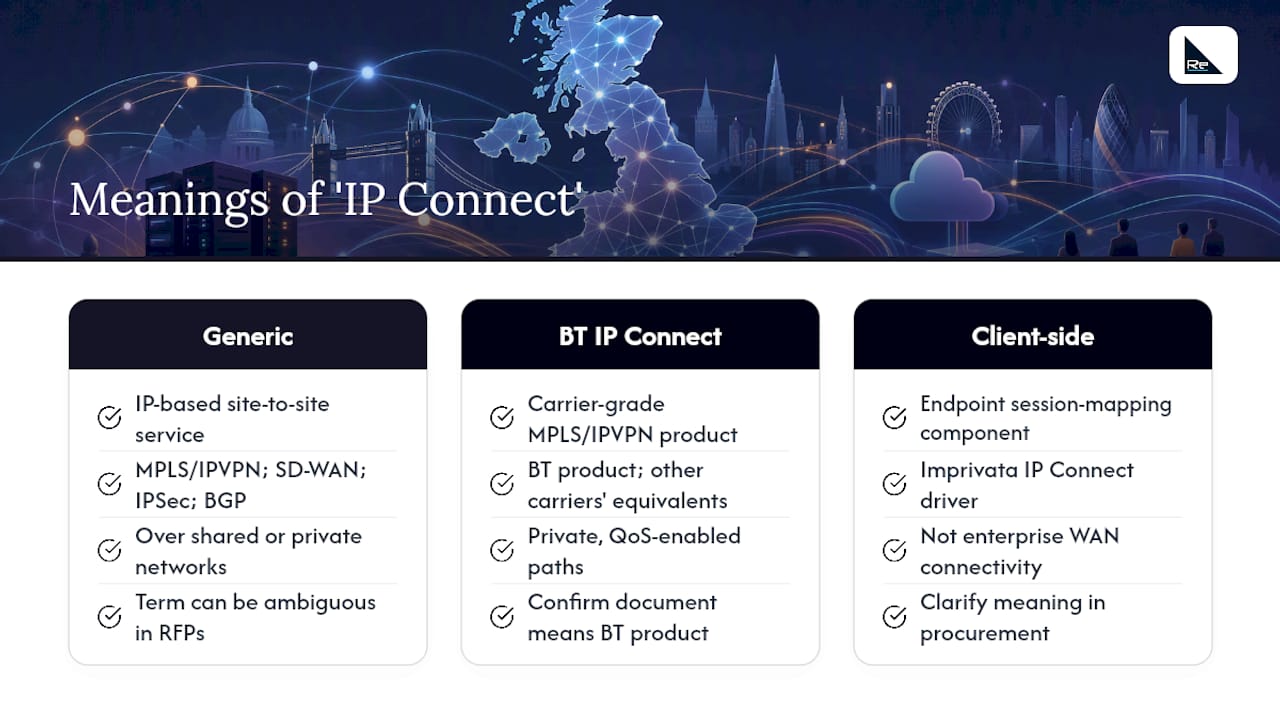
The phrase “IP Connect” is used in two distinct ways, and conflating them causes procurement confusion.
Generic meaning: any IP-based site-to-site connectivity service. This covers private IP VPNs (MPLS/IPVPN), public internet with encrypted overlays (SD-WAN or IPSec tunnels), and direct internet access with BGP control. The unifying characteristic is that sites exchange IP traffic over a shared or private network infrastructure rather than dedicated point-to-point circuits.
Branded uses: BT IP Connect is the most commonly encountered branded product in the UK market. It is a carrier-grade MPLS/IPVPN service providing private, QoS-enabled paths between sites, typically sold with defined SLAs for latency, jitter, and availability. Other carriers offer equivalent products under different names. When you see “IP Connect” in a procurement context, confirm whether the document refers to this specific BT product or to the generic service category.
A third, narrower use appears in client-side software: some endpoint access tools, such as the Imprivata IP Connect driver, use the name for a session-mapping component that requires admin permissions and supports multiple operation modes. This is unrelated to enterprise WAN connectivity.
Pro Tip: When issuing an RFP, specify “managed IPVPN” or “managed SD-WAN overlay” rather than “IP Connect” to avoid ambiguous responses from carriers who may interpret the term differently.
Re-solution delivers managed IP VPN and NaaS services built on Cisco infrastructure, including Cisco Meraki cloud-managed switching and SD-WAN, giving UK organisations a single accountable partner from design through to ongoing monitoring.
How do MPLS, SD-WAN, and NaaS actually work?
Understanding the mechanics helps you match the technology to your operational reality.
MPLS/IPVPN operates at Layer 2.5, using label-switched paths inside a carrier’s private network. Traffic never traverses the public internet, which means predictable latency, configurable QoS classes (voice, video, data), and a clear SLA boundary. The trade-off is cost and lead time: circuits typically take 30–90 days to provision, and bandwidth upgrades require carrier involvement.

SD-WAN sits as a software overlay across any combination of transports, including MPLS, broadband, 4G/5G, and dedicated internet access. A centralised controller applies application-aware routing policies, steering latency-sensitive traffic (VoIP, video conferencing) over the best available path in real time. This makes SD-WAN well suited to organisations with heavy SaaS or cloud workloads, where the destination is a public cloud region rather than a private data centre.
NaaS (Network as a Service) bundles hardware, software, connectivity, and management into a subscription. Managed IP Connect services can provide blended internet from multiple Tier-1 upstreams, BGP control, and instant provisioning with speeds from 10 Mbps to 10 Gbps with redundant architecture. NaaS removes capital expenditure and shifts operational responsibility to the provider, which suits organisations without a dedicated NOC.
At-a-glance trade-offs:
- Performance predictability: MPLS is highest; SD-WAN over broadband is variable but policy-managed; NaaS with blended upstreams sits between the two
- Cost profile: MPLS carries the highest per-Mbps cost; SD-WAN over broadband is lowest; NaaS is subscription-based with predictable monthly spend
- Cloud friendliness: SD-WAN and NaaS are optimised for direct cloud breakout; MPLS typically requires backhauling cloud traffic through a hub
- Management model: MPLS and NaaS are carrier/provider-managed; SD-WAN can be self-managed or co-managed
- Provisioning speed: NaaS and SD-WAN over broadband provision in days; MPLS circuits take weeks to months
Colocation and digital exchange services that permit bring-your-own-IP and BGP give advanced customers greater control over IP advertisement and reduce renumbering work during migrations, a point worth raising with any provider during procurement.
Why do businesses choose managed IP Connect services?
The operational case for managed IP connectivity goes beyond simple connectivity. The benefits that consistently drive procurement decisions are:
- SLA-backed availability: defined uptime commitments (typically 99.95% or higher for MPLS) with financial remedies for breaches, removing ambiguity about carrier accountability
- Consistent application performance: QoS policies prioritise voice, video, and ERP traffic, preventing bandwidth contention from degrading critical workloads
- Centralised control: a single management plane across all sites reduces the operational overhead of managing per-site configurations independently
- Security posture: private MPLS paths or encrypted SD-WAN tunnels reduce exposure compared to unmanaged public internet connections
- Simplified multi-site management: education trusts, logistics hubs, and multi-site retailers benefit from a single provider managing circuit diversity, failover, and change windows
Enterprise-grade network monitoring is a core component of any managed service, providing visibility that consumer-grade utilities such as lightweight IP status tools cannot replicate.
Re-solution holds Cisco partner certification, which means the infrastructure underpinning its managed services meets Cisco’s validated design and support standards. For UK organisations in regulated sectors, that certification provides a verifiable proof point during procurement and audit.
Service options: what is included in each model?
Managed IP connectivity services vary significantly in scope. Understanding what each model includes prevents gaps in accountability.
Managed MPLS/IPVPN typically includes circuit design, last-mile provisioning, CPE (customer premises equipment) configuration, QoS policy management, and a carrier-backed SLA covering latency, jitter, and packet loss. NOC monitoring and incident management are usually included at higher service tiers.
Managed SD-WAN adds centralised orchestration, application-aware routing policies, and cloud gateway integration. The provider manages firmware updates, policy changes, and failover testing. Hardware may be supplied as CPE or as a virtual network function.
NaaS is the most comprehensive model: hardware, software licences, connectivity, monitoring, and support are all bundled into a monthly subscription. Capital expenditure is eliminated, and the provider carries responsibility for the full stack.
Hybrid (MPLS + SD-WAN overlay) suits organisations transitioning from legacy MPLS to a more cloud-oriented architecture. MPLS carries latency-sensitive traffic; SD-WAN manages cloud breakout and failover.
Contractual inclusions that matter:
- Latency and jitter SLAs (specify per traffic class, not just aggregate)
- Mean time to repair (MTTR) commitments, with escalation paths
- Defined change windows and change management processes
- Support hours (24/7 NOC vs. business hours only)
- IP addressing scope: who manages BGP, ASN, and address space
Multiple VPNs and segmentation: enterprise deployments often require more than one VPN instance on the same physical infrastructure. Customer/partner VLANs, guest access, IoT segmentation, and multi-tenancy in shared workspaces all require separate VPN instances with distinct routing and security policies. Confirm that your provider supports this natively and that the management overhead is included in the service scope.
How should you evaluate and select an IP Connect provider?
A structured evaluation prevents the most common procurement mistakes: selecting on price alone, overlooking SLA granularity, or assuming end-to-end accountability that the contract does not actually provide.
- Define your requirements baseline: document required throughput per site, cloud egress patterns (which SaaS platforms, which cloud regions), application latency sensitivity (VoIP, real-time ERP), and redundancy requirements (active-active, active-passive, or single-homed).
- Assess BGP and address management needs: if you operate your own ASN or plan to bring your own IP addresses, confirm the provider supports BGP peering and public IPv4/IPv6 bring-your-own-address.
- Evaluate security posture: ask specifically about encryption in transit, edge firewall capabilities, Zero Trust Network Access (ZTNA) integration, and whether the provider can deliver network segmentation as part of the managed service.
- Scrutinise SLAs: request per-class latency and jitter figures, not just availability percentages. Ask for historical SLA performance data.
- Test before committing: ask whether a proof of concept (PoC) is available. A PoC on a representative site de-risks the full deployment and surfaces integration issues early.
- Clarify escalation paths: who owns the problem when a fault spans the last mile, the carrier core, and the CPE simultaneously? End-to-end accountability must be contractually explicit.
- Understand the pricing model: ask for componentised quotes separating circuit costs, hardware, managed service fees, and IP addressing work. Burstable bandwidth options can reduce cost for sites with variable traffic profiles.
Red flags to watch for:
- SLAs expressed only as aggregate availability with no per-class performance commitments
- No defined MTTR or escalation SLA beyond “best efforts”
- Undocumented change management processes
- Missing clarity on who owns CPE at end of contract
- No PoC or trial option offered
Pro Tip: Request a reference from a customer in your sector before signing. A logistics operator’s experience with a provider differs materially from a school trust’s, even when both use the same product.
What does deployment look like, and what drives the cost?
Realistic timeline expectations prevent project delays. A typical managed IP VPN deployment follows these stages:
- Discovery and design (2–4 weeks): site surveys, traffic analysis, addressing plan, redundancy design, and SLA definition
- Procurement and ordering (1–2 weeks): CPE ordering, circuit orders placed with last-mile providers
- Circuit lead time (4–12 weeks): the single largest variable; leased line lead times in the UK vary by location and last-mile provider
- Site installation and CPE configuration (1–2 weeks per site, parallelised where possible)
- Testing and handover (1–2 weeks): end-to-end testing, failover validation, and NOC handover
Cost drivers to understand:
| Cost factor | What drives the variation |
|---|---|
| Circuit bandwidth | Higher bandwidth tiers carry proportionally higher monthly recurring costs |
| Circuit diversity | Dual-homed or active-active configurations roughly double last-mile costs |
| Last-mile provider | Rural or remote sites attract premium pricing due to limited provider choice |
| CPE hardware | SD-WAN appliances vary from entry-level to enterprise-grade; NaaS bundles this cost |
| Managed service fees | NOC coverage, monitoring depth, and SLA tier all affect the monthly fee |
| IP addressing and BGP | Bring-your-own-IP and BGP configuration add one-off professional services cost |
Pro Tip: Ask for a staged PoC on your highest-risk site first. This validates the design, surfaces last-mile issues, and gives your operations team time to build familiarity with the management platform before full rollout.
Security and UK compliance considerations
Security requirements should be defined before selecting a connectivity model, not retrofitted afterwards.
Security controls to require:
- Encryption in transit for all inter-site traffic (IPSec or MPLS with private path guarantees)
- Edge firewall with stateful inspection at every site CPE
- Network segmentation: separate VPN instances or VLANs for guest, IoT, and corporate traffic
- Centralised policy enforcement with audit logging
- SIEM integration: confirm that the provider’s management platform can export logs to your SIEM in a compatible format
UK-specific compliance considerations:
- Data residency: confirm contractually where management data, configuration backups, and logs are stored. UK organisations subject to UK GDPR should require that management data remains within the UK or EEA unless explicit adequacy or transfer mechanisms are in place.
- Regulatory sectors: education trusts, NHS-adjacent organisations, and financial services firms may face additional requirements around network segmentation and audit trails. Ask providers for ISO 27001 certification, SOC 2 reports, or equivalent audit evidence.
- Cyber Essentials and Cyber Essentials Plus: the UK government’s Cyber Essentials scheme requires boundary firewalls, secure configuration, and access control. A managed IP connectivity service should support, not undermine, your Cyber Essentials posture.
When troubleshooting VPN connectivity, L2TP/IPSec setups require a live internet connection before the VPN tunnel establishes; missing certificates or NAT without NAT-Traversal support are common causes of silent VPN failures that can be mistaken for a carrier fault.
A practical troubleshooting checklist for IP connection issues
Before escalating to your carrier or MSP, work through these checks in order. Most IP connection issues resolve at the host or edge layer.
- Run
ipconfig /all(Windows) orip a(Linux/macOS). Confirm DHCP status, IPv4 address, subnet mask, and default gateway. On a standard Class C network, the first three octets of the IPv4 address and the default gateway should match. A mismatch here explains most connectivity failures before any packet leaves the host. Microsoft’s TCP/IP troubleshooting guidance recommends comparing these values against a known-working device on the same segment. - Check physical and logical connectivity. Ping the default gateway, then a known external address. If the gateway responds but external addresses do not, the issue is upstream of the CPE.
- Review firewall logs carefully. An “IP connection error” in Fortinet logs often indicates a session that closed because no response was received, not an explicit firewall block. Correlate log entries with path metrics and server responsiveness before assuming a policy issue.
- Enable Windows Filtering Platform (WFP) auditing if host-level drops are suspected. Event logs will show whether the local firewall is silently dropping packets before they reach the wire.
- Capture packets. Packet captures are the most authoritative diagnostic artefact for complex failures. Capture simultaneously at source and destination where possible. Look for SYN/ACK/RESET patterns: an ACK+RST from the server indicates the server rejected the connection after receiving packets; retransmissions followed by ACK+RST typically indicate an intermediary device altering or dropping packets.
- Check device-level configuration for on-premise hardware. Many IP devices use private addresses and default ports. Accessing an IP camera remotely, for example, requires verifying the device IP, confirming port forwarding on the router, and checking the WAN IP. The same principle applies to any on-premise device with a private address.
- For VPN-specific failures: confirm the internet connection is active before the tunnel attempts to establish. IPSec negotiation can take from a few seconds up to around two minutes. Common failure modes include missing or misconfigured certificates, incorrect pre-shared keys, and NAT without NAT-Traversal support.
- Escalate with evidence. When escalating to your carrier or MSP, provide simultaneous source/destination packet captures, traceroute output, and netstat state tables. This evidence eliminates the most common back-and-forth in carrier fault management.
Packet captures taken simultaneously at source and destination are the highest-value evidence for intermittent packet loss. Pair them with traceroutes and netstat output to pinpoint exactly which hop drops or alters traffic. Without this evidence, carrier escalations typically stall at “no fault found on our network.”
Lightweight tools such as desktop IP status utilities can surface external and internal addresses and notify on connection changes. They are useful for quick checks but are not a substitute for packet capture or enterprise monitoring. For a structured approach to ongoing visibility, Re-solution’s network monitoring guidance covers active and passive techniques suited to enterprise environments.
For edge connectivity issues involving mobile or eSIM-connected devices, the Lumo eSIM troubleshooting guide covers device-level diagnostics that complement the host-level checks above.
A network audit from Re-solution can identify structural issues, such as misconfigured subnets, undocumented VLANs, or missing redundancy, that repeated troubleshooting cycles will not resolve without a baseline.
Why Re-solution recommends managed IP Connect services
The organisations that get the most from managed IP connectivity are those that treat the provider relationship as a design partnership, not a commodity purchase. What consistently separates successful deployments from difficult ones is the quality of the discovery phase: understanding traffic patterns, cloud dependencies, and redundancy requirements before a single circuit is ordered.
Re-solution’s Cisco partnership and 35 years of infrastructure experience mean that the design work is grounded in validated architectures, not generic templates. The case studies on the Re-solution website reflect deployments across education trusts, logistics operators, and manufacturing environments, each with distinct latency, segmentation, and compliance requirements. A PoC or discovery audit is available for organisations that want to validate the approach before committing to a full deployment.
The managed services model Re-solution operates means that monitoring, change management, and escalation are handled by the same team that designed the network. That continuity reduces the handover risk that often causes problems when design and operations are split between different suppliers.
Re-solution’s managed IP VPN and NaaS services
Re-solution delivers the full range of managed IP connectivity services UK organisations need, from initial discovery through to ongoing NOC-backed monitoring.

Services available include:
- NaaS (Network as a Service): subscription-based managed connectivity with Cisco infrastructure, monitoring, and SLA-backed support bundled into a single monthly cost
- Managed MPLS/IPVPN and SD-WAN: end-to-end design, deployment, and management of site-to-site IP VPN and SD-WAN overlays
- Infrastructure audits: structured network audits that establish a baseline before procurement or migration
- Ongoing monitoring and support: 24/7 NOC visibility with defined escalation paths
Trial and proof-of-concept engagements are available for qualifying organisations. To request a scoped proposal, schedule a discovery call, or discuss your specific requirements, contact Re-solution via the contact page or speak to the team directly. The first step is a network discovery conversation, not a sales pitch.
Useful sources and further reading
The following sources were used in preparing this article and are recommended for further reading on IP connectivity, troubleshooting, and managed services:
- TCP/IP connectivity issues troubleshooting, Microsoft Learn: the authoritative reference for host-level diagnostics, packet capture methodology, and WFP auditing on Windows
- L2TP/IPSec VPN client connection troubleshooting, Microsoft Learn: step-by-step VPN failure analysis covering certificate, NAT-Traversal, and IPSec negotiation issues
- IP connection error entries, Fortinet Community: practical explanation of session-termination log entries and how to distinguish them from explicit firewall blocks
- IP Connect overview, Center Square DC: feature reference for managed IP connectivity including BGP, blended upstreams, and bring-your-own-IP options
- IP Connect installation guide, Imprivata: reference for client-side IP Connect driver modes and permission requirements
- IPConnect utility, GitHub (pawong): lightweight IP address status tool; useful for quick checks, not enterprise monitoring
Recommended
- Benefits of digital connectivity for UK IT decision makers
- Infrastructure scaling step by step: a 2026 guide for UK IT teams
- Cloud networking in hospitality: a guide for IT leaders
- Wireless Aruba for IT directors: a decision-maker’s guide