TL;DR:
- Effective workspace bandwidth management relies on thorough capacity planning, traffic prioritization, and continuous adjustment to meet evolving user demands. Implementing QoS policies, VLAN segmentation, and DNS filtering can optimize performance without unnecessary hardware upgrades. Regular monitoring and quarterly reviews ensure sustained network efficiency across shared environments.
Workspace bandwidth management is the practice of controlling, prioritising, and allocating network capacity across all users, devices, and applications in a shared environment. IT managers who understand how to manage workspace bandwidth effectively use a combination of Quality of Service (QoS) policies, VLAN segmentation, DSCP markings, and network monitoring tools to protect critical traffic and prevent congestion. Without this structure, a single bandwidth-heavy application can degrade performance for every user on the network. The techniques covered here apply directly to office networks, co-working spaces, education campuses, and manufacturing environments where connectivity underpins productivity.
What does managing workspace bandwidth actually require?
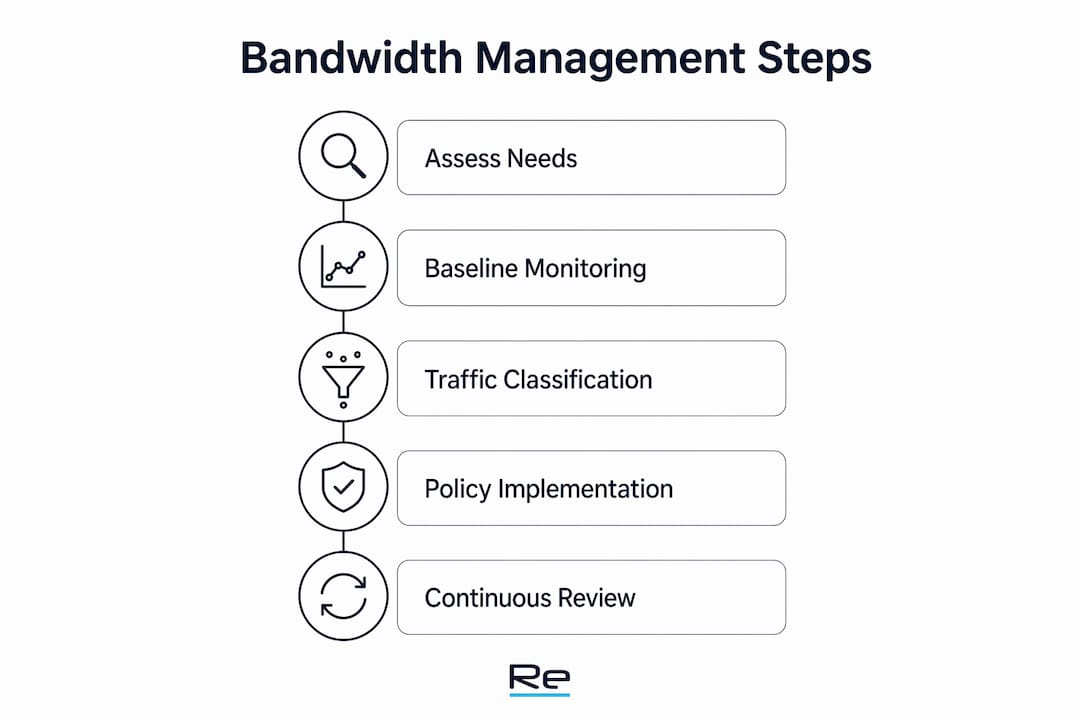
Effective bandwidth management begins with a clear picture of what your network currently carries. Before applying any QoS policy or rate limit, IT administrators need baseline data: WAN throughput, peak utilisation periods, device counts, and application profiles. Skipping this step means applying controls to a network you do not fully understand, which often creates new problems rather than solving existing ones.
The foundational steps break down as follows:
- Measure WAN throughput and utilisation patterns. Use tools such as PRTG Network Monitor, SolarWinds Network Performance Monitor, or Cisco DNA Center to capture traffic volumes across the day. Look for peak periods, not just averages.
- Audit network hardware. Check cabling categories, switch port speeds, and access point (AP) models. Connecting WiFi 7 APs to older Cat5e or 100 Mbps ports creates a bottleneck that no software policy can fix. Upgrading to 2.5 GbE or 10 GbE switch ports removes this constraint.
- Profile every device type. Identify legacy devices, IoT endpoints, staff laptops, and guest devices separately. Legacy hardware consumes disproportionate network resources relative to its actual data needs.
- Establish a bandwidth budget. A 10% overhead buffer at the WAN gateway prevents interface saturation and bufferbloat. On a symmetric 1 Gbps connection, this leaves 900 Mbps of assignable bandwidth for internal allocation across all traffic classes.
- Document application requirements. VoIP, video conferencing, cloud ERP, and backup jobs all have different latency and throughput needs. Map each application to a traffic class before writing any policy.
For a structured approach to this phase, Re-solution’s network capacity planning guide provides a technical framework suited to office and multi-site environments.
Pro Tip: Run your baseline monitoring for a full working week, not just a single day. Tuesday to Thursday typically shows peak demand; monday and friday often underrepresent real usage patterns.

How to prioritise and classify network traffic
Traffic classification is the core mechanism of bandwidth management. Without it, a background software update competes equally with a live video call. Failing to differentiate traffic by business value leads directly to degraded performance for the applications that matter most.
A proven QoS tiering model for shared workspaces allocates bandwidth across three primary classes:
- Critical traffic: VoIP and real-time communications (40% of assignable bandwidth). Map this class to DSCP Expedited Forwarding (EF). VoIP packets require low latency and minimal jitter. Use Low Latency Queueing (LLQ) to guarantee this class is served first.
- Business applications: cloud platforms, ERP, video conferencing (35% of assignable bandwidth). Map to DSCP AF41. Apply Class-Based Weighted Fair Queueing (CBWFQ) to maintain throughput without starving other classes during congestion.
- Guest and general traffic: web browsing, social media, background updates (25% of assignable bandwidth). Map to DSCP CS1. This class receives remaining capacity and is the first to be throttled under load.
The table below compares static rate caps against dynamic per-user rate limiting, which is the more effective approach for variable-occupancy environments.
| Approach | Behaviour under load | User experience | Recommended for |
|---|---|---|---|
| Static rate cap | Hard ceiling per user at all times | Degraded during bursts | Fixed-desk, predictable headcount |
| Dynamic rate limiting with token bucket | Allows bursts, enforces baseline during peak | Consistent and fair | Hot-desking, co-working, education |
Dynamic per-user rate limiting with token bucket shaping allows traffic bursts while maintaining a guaranteed baseline during peak hours. A practical example is a Hot-Desk VLAN configured with 50 Mbps download burstable and a guaranteed 10 Mbps baseline per client. This approach prevents any single user from saturating shared capacity while still allowing short bursts for large file transfers.
Application-layer filtering adds a further control. Throttling peer-to-peer (P2P) traffic and blocking background operating system updates during business hours reclaims meaningful capacity without affecting productivity. Cisco Meraki and Fortinet FortiGate both provide application-aware firewall rules that enforce these policies at the packet level.
Pro Tip: Apply DSCP markings at the network edge, not at the endpoint. Endpoint-applied markings can be overridden or spoofed; edge marking gives the network administrator full control.
What wireless strategies improve workspace bandwidth performance?
Wireless performance problems are frequently misdiagnosed as insufficient bandwidth. The actual cause is often poor AP placement, co-channel interference, or legacy devices consuming airtime. Adding more access points without channel planning increases co-channel interference and makes congestion worse, not better.
The following wireless optimisation practices address the most common causes of poor performance:
- Conduct a professional site survey before deploying or repositioning APs. A site survey identifies signal dead zones, interference sources, and optimal AP placement for capacity rather than just coverage.
- Tune channels and transmit power. In the 2.4 GHz band, use only channels 1, 6, and 11 to avoid overlap. In the 5 GHz and 6 GHz bands, use Dynamic Frequency Selection (DFS) channels to reduce congestion. Lower transmit power on dense AP deployments to reduce co-channel interference.
- Segregate legacy 2.4 GHz devices onto dedicated SSIDs with rate limiting. Legacy devices slow wireless networks by consuming disproportionate airtime, even when their data volumes are low. Isolating them protects modern devices from this overhead.
- Enable Wireless Multimedia (WMM), airtime fairness, and band steering. WMM provides QoS at the wireless layer. Airtime fairness prevents slow clients from monopolising the medium. Band steering pushes capable devices to 5 GHz or 6 GHz, freeing 2.4 GHz for legacy hardware.
The table below summarises wireless standards and their practical relevance for workspace deployments.
| Standard | Max theoretical throughput | Key advantage for workspaces |
|---|---|---|
| WiFi 5 (802.11ac) | Up to 3.5 Gbps | MU-MIMO for multiple simultaneous clients |
| WiFi 6 (802.11ax) | Up to 9.6 Gbps | OFDMA reduces latency in high-density environments |
| WiFi 6E | Up to 9.6 Gbps | 6 GHz band eliminates legacy device interference |
| WiFi 7 (802.11be) | Up to 46 Gbps | Multi-Link Operation for reliability and throughput |
Re-solution’s guidance on Wi-Fi bandwidth optimisation covers AP placement and interference management in practical detail for IT teams managing dense environments.
Pro Tip: Do not rely on vendor-supplied heatmaps alone. Passive survey tools such as Ekahau Sidekick or NetSpot capture real-world signal and interference data that vendor simulations frequently miss.
How to monitor, maintain, and adjust bandwidth policies
Bandwidth management is not a one-time configuration task. User counts change, applications evolve, and new devices appear on the network. Regular audits and analytics enable dynamic tuning of rate limits and network priorities based on current demand rather than assumptions made months earlier.
A structured monitoring and maintenance cycle includes the following steps:
- Deploy continuous monitoring tools. PRTG, Cisco DNA Center, and SolarWinds NPM all provide real-time utilisation dashboards and alerting. Set threshold alerts at 70% and 90% WAN utilisation to catch saturation before users report problems.
- Identify bandwidth hogs through traffic analytics. NetFlow or sFlow data reveals which applications, users, or devices consume the most capacity. This data drives policy decisions rather than guesswork.
- Apply DNS-layer filtering. DNS filtering blocks up to 30% of bandwidth-consuming non-business traffic, including ad networks and telemetry, before a connection is even established. Tools such as Cisco Umbrella and Cloudflare Gateway enforce this at the DNS resolver level without requiring hardware changes.
- Schedule maintenance tasks outside business hours. Windows Update, antivirus definition downloads, and backup jobs should run overnight or at weekends. Configure group policy or endpoint management platforms such as Microsoft Intune to enforce these schedules.
- Review and update QoS policies quarterly. Application portfolios change. A cloud platform that consumed minimal bandwidth last year may now carry video-heavy workflows. Quarterly reviews keep policies aligned with actual usage.
Alongside scheduled reviews, maintain a change log for every policy modification. This log is invaluable when troubleshooting unexpected performance drops, as it allows IT administrators to correlate changes with observed behaviour. Re-solution’s network improvement strategies guide provides a structured framework for ongoing network enhancement across diverse environments.
DNS filtering also carries a security benefit. Blocking known malicious domains at the resolver level reduces the attack surface without adding latency or requiring endpoint agents. This makes it one of the highest-value, lowest-cost controls available to IT administrators managing shared workspaces.
Key takeaways
Effective workspace bandwidth management requires structured capacity planning, traffic prioritisation through QoS, and continuous monitoring to sustain performance as user demands evolve.
| Point | Details |
|---|---|
| Baseline before configuring | Measure WAN utilisation and device profiles before applying any QoS or rate limiting policy. |
| Apply a 10% WAN buffer | Reserve 10% of WAN capacity as overhead to prevent bufferbloat and interface saturation. |
| Use dynamic rate limiting | Token bucket shaping with burst allowances outperforms static caps in variable-occupancy environments. |
| Segregate legacy wireless devices | Isolate 2.4 GHz legacy devices on dedicated SSIDs to protect airtime for modern clients. |
| Filter at the DNS layer | DNS filtering removes up to 30% of non-business traffic without hardware upgrades or added latency. |
What I have learned from years of managing workspace networks
The hardware-first instinct is usually wrong
The most common mistake I see IT administrators make is reaching for a hardware purchase before diagnosing the actual problem. A new router or additional access points feel like decisive action. They rarely solve the underlying issue, which is almost always a policy or configuration gap rather than a capacity shortfall.
The second mistake is applying static rate caps across the board. Hard caps feel fair because they treat every user equally. In practice, they degrade the experience for everyone during bursts and leave capacity unused during quiet periods. Token bucket shaping with a guaranteed baseline and a burstable ceiling is technically more complex to configure, but the user experience difference is significant.
What actually works, consistently, is the combination of a professional site survey, a properly tiered QoS policy, and DNS-layer filtering applied before any hardware decision is made. These three steps together resolve the majority of workspace bandwidth complaints without a single equipment purchase. The site survey in particular is underused. Most IT teams skip it because it has an upfront cost, then spend far more on misplaced access points and repeated troubleshooting visits.
Continuous monitoring is the final discipline that separates networks that stay healthy from those that degrade over time. Policies written for last year’s application mix do not serve this year’s users. Quarterly reviews are not optional maintenance. They are the mechanism that keeps the network aligned with the business.
— Jacob
How Re-solution supports workspace network performance
Re-solution has over 35 years of experience designing and managing Cisco network infrastructure for organisations across education, manufacturing, hospitality, and shared workspaces.
For IT teams looking to move beyond reactive fixes, Re-solution’s managed IT services cover end-to-end network management, including capacity planning, QoS configuration, wireless optimisation, and ongoing monitoring. The team also conducts professional network audits that provide the baseline data needed to make informed bandwidth management decisions. Whether the challenge is a congested co-working environment or a multi-site manufacturing network, Re-solution delivers structured, evidence-based solutions built on Cisco infrastructure.
FAQ
What is workspace bandwidth management?
Workspace bandwidth management is the practice of controlling how network capacity is allocated across users, devices, and applications using tools such as QoS policies, VLANs, and rate limiting. The goal is to protect critical traffic and maintain consistent performance for all users.
How much bandwidth overhead should I reserve at the WAN gateway?
A 10% overhead buffer at the WAN gateway is the recommended standard to prevent interface saturation and bufferbloat. On a 1 Gbps symmetric connection, this leaves 900 Mbps of assignable bandwidth for internal traffic classes.
What is the difference between static rate caps and token bucket shaping?
Static rate caps apply a hard ceiling to each user at all times, which degrades performance during legitimate bursts. Token bucket shaping allows short bursts above the baseline while enforcing a guaranteed minimum, producing a fairer and more consistent user experience.
How does DNS filtering help with bandwidth management?
DNS filtering blocks non-business traffic, including ad networks and telemetry, before a connection is established. This can reclaim up to 30% of consumed bandwidth without requiring hardware changes or additional infrastructure.
How often should QoS policies be reviewed?
QoS policies should be reviewed at least quarterly. Application portfolios and user counts change over time, and policies written for previous conditions will not reflect current network demands accurately.
Recommended
- Network security for shared spaces: IT manager’s guide
- Network improvement strategies list: 2026 guide for IT teams
- How to enhance network performance: 2026 IT guide
- Network capacity planning guide for IT teams