TL;DR:
- Effective Wi-Fi bandwidth management depends on application-aware policies, hardware, and organizational practices.
- Continuous monitoring, testing, and policy updates are essential for sustained Wi-Fi performance.
- Investing in long-term, adaptive management outweighs reliance on hardware upgrades alone.
Poor Wi-Fi performance rarely announces itself politely. It shows up during a critical video call in a hotel conference room, mid-shift in a warehouse when barcode scanners stall, or during exam season when hundreds of student devices compete for the same access point. These moments are not simply inconveniences. They represent operational failures with measurable costs. Bandwidth management is the discipline that prevents them. This guide walks IT managers and decision-makers through diagnosing Wi-Fi bottlenecks, assembling the right tools, deploying a structured framework, and maintaining performance over time. The goal is not just faster Wi-Fi. It is reliable, policy-driven connectivity that scales with your organisation.
Table of Contents
- Understanding Wi-Fi bandwidth challenges
- Key requirements and tools for Wi-Fi bandwidth management
- How to implement a bandwidth management framework
- Monitoring, troubleshooting, and continual improvement
- Our perspective: Rethinking Wi-Fi management for modern organisations
- Enhance your Wi-Fi strategy with expert solutions
- Frequently asked questions
Key Takeaways
| Point | Details |
|---|---|
| Dynamic management is crucial | Static settings and port-based rules are ineffective for today’s mixed-use Wi-Fi environments. |
| Upgrade with intent | Leveraging Wi-Fi 6/6E/7 features and app-aware QoS requires active management, not just new hardware. |
| Combine policy and monitoring | Ongoing data analytics and feedback loops ensure your bandwidth framework remains effective. |
| Proactive troubleshooting prevents outages | Regular audits and adaptive policies help avoid major disruptions and bottlenecks. |
Understanding Wi-Fi bandwidth challenges
Before implementing solutions, it is vital to identify the root causes of Wi-Fi bandwidth stress. Most organisations assume their wireless problems stem from insufficient internet capacity. In reality, the issue is usually how that capacity is distributed across devices, applications, and users.
Common sources of Wi-Fi congestion include:
- Device density: A single access point supporting 80 or more concurrent devices, common in classrooms, factory floors, and hotel lobbies, creates significant contention for airtime.
- Background applications: Software update services, cloud sync tools, and telemetry agents consume bandwidth silently, often during peak hours.
- Legacy clients: Older devices using 802.11n or earlier standards slow down the entire network by forcing access points to accommodate slower transmission rates.
- Unmanaged IoT: Smart sensors, CCTV systems, and building management devices add persistent low-level traffic that accumulates quickly across a large estate.
The rise of cloud applications and video conferencing has fundamentally changed traffic patterns. A single 4K video stream or a Microsoft Teams call can consume 10 to 25 Mbps per user. Multiply that across a manufacturing site or a university lecture hall, and the strain becomes clear. IoT devices in logistics and hospitality add further complexity, generating constant, low-priority traffic that competes with business-critical applications.
Traditional approaches to managing this traffic relied on port-based controls, blocking or throttling specific port numbers to limit certain application types. This method is now largely ineffective. As port-based solutions are outdated for modern traffic, app-aware QoS has become essential because applications increasingly use dynamic ports, encrypted tunnels, and shared protocols that simple port rules cannot distinguish.
Emerging standards offer genuine relief. Wi-Fi 6 matters because it introduces OFDMA (Orthogonal Frequency Division Multiple Access), which allows a single access point to serve multiple devices simultaneously rather than sequentially. This dramatically reduces latency in dense environments. Wi-Fi 6E and Wi-Fi 7 extend these gains into the 6GHz spectrum, providing cleaner channels with less interference. However, these standards only deliver their full potential when paired with active network bandwidth optimisation policies. Hardware alone does not solve the problem.
Key requirements and tools for Wi-Fi bandwidth management
Understanding what drives bandwidth constraints sets the stage for assembling the right toolkit. Effective bandwidth management requires a combination of hardware capability, software intelligence, and organisational readiness.
Physical and software requirements at a glance:
| Category | Requirement | Purpose |
|---|---|---|
| Hardware | Enterprise-grade access points (Wi-Fi 6/6E/7) | Support high device density and modern standards |
| Hardware | Managed switches | Enable VLAN segmentation and traffic prioritisation |
| Software | App-aware QoS platform | Classify and prioritise application traffic dynamically |
| Software | Network analytics dashboard | Provide real-time visibility into usage patterns |
| Policy | Guest traffic separation | Isolate non-business traffic from critical systems |
| Policy | Acceptable use policy | Define expectations and enforce compliance |
On the hardware side, enterprise-grade access points from vendors such as Cisco Catalyst or Meraki support the Wi-Fi 6 enhancements needed for dense deployments. Managed switches provide the VLAN infrastructure that keeps guest, staff, and IoT traffic on separate logical networks, preventing any one group from saturating shared resources.
Software tools are equally critical. App-aware QoS platforms inspect traffic at the application layer, recognising Microsoft Teams, Zoom, SAP, or a warehouse management system regardless of which port or protocol it uses. Network analytics dashboards surface usage trends, identify rogue devices, and flag policy violations before they escalate. These tools inform the network optimisation strategies that keep performance consistent across shifts, terms, or seasons.

Organisational prerequisites are often overlooked. A clear acceptable use policy ensures staff and students understand what is permitted on the network. Stakeholder buy-in from operations, facilities, and IT leadership is essential before deploying controls that affect day-to-day workflows. An ongoing monitoring plan ensures that policies remain relevant as device types and applications evolve.
Regarding spectrum, Wi-Fi 7 and 6E introduce the 6GHz band but require Automated Frequency Coordination (AFC) for outdoor deployments, adding a regulatory consideration for campuses and logistics yards.
Pro Tip: Always build a staging environment to test new QoS rules and policy changes outside core operational hours. Applying untested configurations to a live network during a busy period is a reliable way to create the very disruption you are trying to prevent.
How to implement a bandwidth management framework
With all tools and requirements in place, the focus shifts to practical action steps. A structured rollout avoids the common pitfall of deploying rules reactively, which typically results in inconsistent performance and frustrated users.
Step-by-step implementation process:
- Audit your network. Identify every connected device type, its location, and its typical usage pattern. Include IoT, BYOD (Bring Your Own Device), and any legacy hardware.
- Baseline your traffic. Run analytics for at least five to seven days to capture peak and off-peak patterns. This baseline is your reference point for measuring improvement.
- Categorise devices and applications. Group traffic into tiers: business-critical (video conferencing, ERP systems), standard (email, web browsing), and low-priority (software updates, streaming).
- Set and document your policy. Define bandwidth allocations and QoS rules for each tier. Document every rule so changes can be tracked and reversed if needed.
- Test in staging. Apply rules to a non-production segment of the network and validate performance against your baseline.
- Roll out incrementally. Deploy to one building, floor, or VLAN at a time. Monitor closely before expanding.
- Validate and adjust. Compare post-deployment metrics against your baseline. Adjust rules where performance targets are not met.
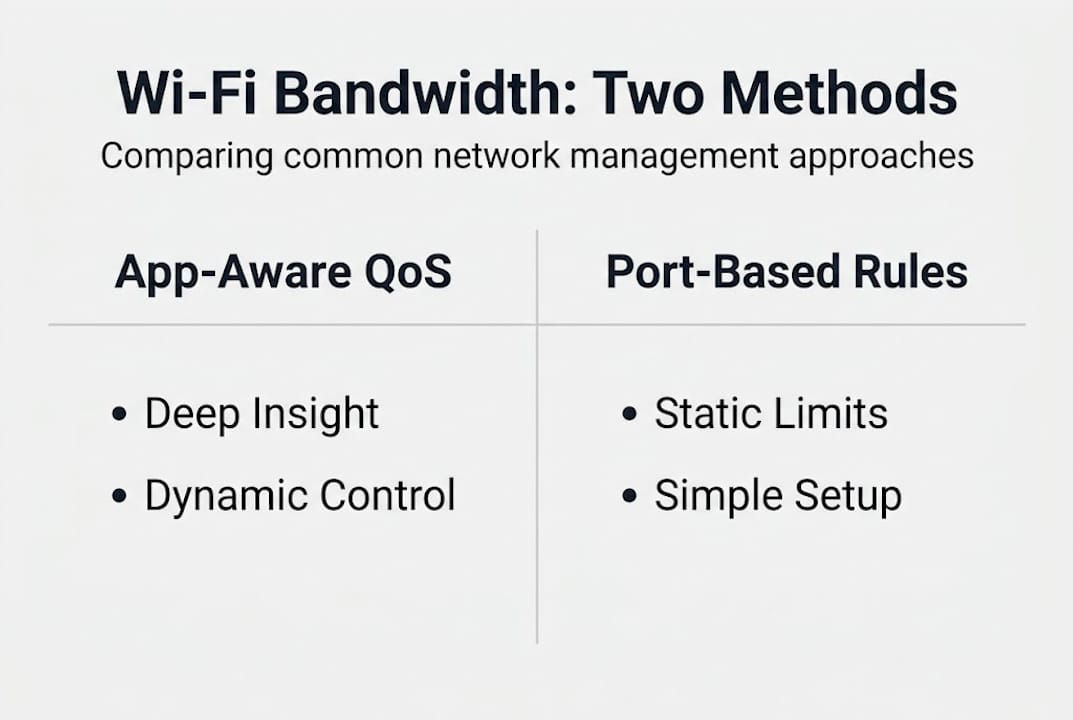
App-aware QoS vs. traditional port-based management:
| Feature | App-aware QoS | Port-based management |
|---|---|---|
| Application recognition | Deep packet inspection | Port/protocol only |
| Encrypted traffic handling | Yes | Limited |
| Dynamic rule adaptation | Yes | No |
| Suitability for modern apps | High | Low |
| Management complexity | Moderate | Low |
As app-aware QoS outperforms port-based controls for enterprise environments, the investment in more sophisticated tooling pays dividends quickly in environments with mixed device populations. For guidance on optimising network performance across complex sites, a structured approach is essential. Cisco’s enterprise wireless solutions support dynamic traffic recognition natively, simplifying policy enforcement at scale.
Pro Tip: Prioritise business-critical applications using dynamic traffic recognition rather than static rules. Applications change versions and protocols frequently, and static rules degrade in accuracy over time without regular updates.
Monitoring, troubleshooting, and continual improvement
Once basic controls are active, it is essential to shift into operational excellence for sustained results. Deploying a bandwidth management framework is not the finish line. It is the starting point for a cycle of measurement and refinement.
Establishing ongoing performance visibility:
- Set up automated alerts for unusual bandwidth spikes or policy violations.
- Schedule weekly or fortnightly reviews of your analytics dashboard to identify emerging application or device patterns.
- Collect user feedback from department heads and floor managers. Frontline staff often notice performance issues before monitoring tools flag them.
- Track key metrics: application response times, packet loss rates, client association quality, and peak-hour throughput.
Bandwidth management is not a one-off project. It is a continual cycle of monitoring, learning, and adapting. Organisations that treat it as a completed task inevitably find themselves back at square one within 12 to 18 months as device populations and application landscapes shift.
Troubleshooting common issues requires a methodical approach. Start by identifying whether the problem is localised to a specific access point, VLAN, or application type. Check firmware versions across your access point estate. Outdated firmware is a frequent but easily overlooked source of performance degradation. Audit your QoS policies to confirm they still reflect current application usage. An application that was low-priority two years ago may now be business-critical.
As active monitoring and analytics are crucial to maintaining high-quality user experiences, organisations that invest in real-time dashboards consistently outperform those relying on reactive support tickets. Reviewing wireless safety tips alongside performance monitoring ensures that security and connectivity improvements are pursued together rather than in isolation.
Regular review checklist:
- Review and update QoS policies quarterly.
- Audit connected device inventory every six months.
- Check access point firmware monthly.
- Reassess VLAN structure annually or after significant changes to operations.
- Validate guest network isolation after any infrastructure change.
Our perspective: Rethinking Wi-Fi management for modern organisations
There is a persistent belief in many organisations that a hardware refresh will resolve chronic Wi-Fi problems. New access points are ordered, installed, and within weeks the same complaints resurface. The underlying issue is rarely the hardware. It is the absence of intelligent, adaptive policy.
In our experience working across education, manufacturing, and hospitality, the organisations that achieve sustained Wi-Fi performance are those that treat bandwidth management as an ongoing operational discipline rather than a one-off infrastructure project. App-aware policies, regularly reviewed and updated, consistently outperform static rule sets regardless of the hardware generation in use.
The uncomfortable truth is that a well-configured Wi-Fi 5 network with active QoS management will outperform a poorly managed Wi-Fi 7 deployment in most real-world scenarios. Investment in long-term network optimisation processes, not just hardware cycles, is what separates organisations with reliable connectivity from those perpetually chasing the next upgrade. Technology leadership means building systems that adapt, not just systems that are new.
Enhance your Wi-Fi strategy with expert solutions
Applying the frameworks in this guide requires both the right tools and the confidence that your configuration aligns with your operational reality. That is where specialist expertise adds genuine value.
Re-Solution has over 35 years of experience delivering Cisco-based network solutions across education, manufacturing, logistics, and hospitality. Our managed IT services include proactive monitoring, policy management, and regular reviews that keep your bandwidth strategy current. Whether you need a full infrastructure audit or ongoing support, our team provides IT infrastructure guidance tailored to your sector. Contact Re-Solution to discuss how we can help you build a Wi-Fi environment that performs consistently, scales confidently, and supports your organisation’s long-term goals.
Frequently asked questions
What is the difference between bandwidth management and QoS?
Bandwidth management sets overall limits and allocations across traffic types, while QoS (Quality of Service) dynamically classifies and prioritises individual traffic flows. As app-aware QoS outperforms standard port-based bandwidth management for modern applications, the two are most effective when used together.
How do Wi-Fi 6E and Wi-Fi 7 improve bandwidth?
Wi-Fi 6E and Wi-Fi 7 expand available spectrum and support significantly more concurrent connections, reducing congestion and improving throughput in dense environments. Wi-Fi 7 and 6E unlock clean 6GHz spectrum, though outdoor deployments require AFC compliance.
Can I prioritise video conferencing traffic over guest Wi-Fi?
Yes. Using app-aware QoS with defined network policies allows you to assign higher priority to critical applications such as video conferencing while limiting guest or non-essential traffic. Application-aware policies offer fine-grained control over specific traffic types across VLANs.
What is AFC and when is it required?
AFC (Automated Frequency Coordination) is a regulatory requirement for outdoor use of the 6GHz spectrum under Wi-Fi 6E and Wi-Fi 7 standards. As 6GHz outdoor Wi-Fi operation requires AFC per regulatory standards, organisations deploying outdoor access points must account for this in their planning.
Recommended
- Bandwidth management: optimise your network and boost productivity
- Network optimisation explained: Smart strategies for IT leaders
- How to Optimize Networks for Peak Performance 2025 | Re-Solution