TL;DR:
- A firewall policy consists of ordered rules that determine which network traffic is permitted or denied across trust boundaries. Proper management includes ending with an explicit deny-all rule, maintaining correct rule order, and documenting owner and expiration details to ensure security and compliance. Regular reviews, testing, and disciplined governance are essential to prevent outdated rules and ensure the policy’s effectiveness.
A firewall policy is the complete, ordered set of rules that determines which traffic may cross a network trust boundary — while a single rule is one entry within that set. Getting the policy right matters far more than the hardware it runs on.
TL;DR: three things to do first
- Confirm your policy ends with an explicit deny-all rule and that implicit deny is your default posture, not an afterthought.
- Check rule order: specific rules must sit above general ones, or a broad permit will shadow your specific denies.
- Audit ownership metadata. Every permit rule needs a named owner, a change-ticket reference, and an expiry date.
Pro Tip: Before deleting a rule you suspect is stale, disable it first. Monitor for a week. If nothing breaks and hit counts stay at zero, then retire it. Immediate deletion of an undocumented rule is one of the most common causes of unexpected outages.
Table of Contents
- What does a firewall policy actually cover?
- What does every firewall rule contain?
- What types of firewall rules do you need to know?
- How does a firewall evaluate rules, and why does order matter?
- Firewall policy best practices every team should follow
- How do you manage firewall policies across a hybrid environment?
- How do you test and validate firewall policies safely?
- Re-solution practitioner notes: what we see in UK environments
- Key takeaways
- Why disciplined policy management is the real security control
- Re-solution’s firewall policy and audit services
What does a firewall policy actually cover?
A firewall policy is the governance document and the technical configuration combined. It defines which traffic is permitted, which is denied, and under what conditions. A firewall rule is a single, discrete entry within that policy — one row in the rulebase that matches specific traffic attributes and applies an action.
The distinction matters operationally. A policy can span dozens of enforcement points: a perimeter appliance, cloud security groups (AWS Security Groups, Azure NSGs), a host-based firewall (Windows Defender Firewall, iptables), a Web Application Firewall (WAF), and a forward proxy. Each enforcement point applies the same policy intent but through its own syntax and mechanism.
A firewall is only as good as its policy. Deny by default forces intentional, auditable access decisions and prevents ad-hoc permissive changes that accumulate silently over months.
Where policies apply — a three-zone model
Picture three zones separated by two enforcement points:
- Internet (untrusted) → Perimeter firewall → DMZ (web servers, reverse proxies, mail relays)
- DMZ → Internal firewall / segmentation → Private network (application servers, databases, management)
The perimeter policy controls inbound and outbound traffic between the internet and the DMZ. The internal policy controls lateral movement between the DMZ and private segments. Host firewalls add a third layer on individual servers. Cloud security groups replicate this model for virtual workloads. Each layer needs its own policy, but all policies should express the same organisational intent.
| Enforcement point | Typical scope | Common syntax |
|---|---|---|
| Perimeter firewall | North-south traffic | Vendor CLI / GUI rulebase |
| Cloud security group | East-west within VPC | AWS/Azure console or IaC |
| Host firewall | Per-server traffic | iptables, nftables, Windows Defender Firewall |
| WAF | HTTP/HTTPS application layer | Rule sets, signatures |
| Forward proxy | Outbound web traffic | URL categories, TLS inspection |

What does every firewall rule contain?
Stateful firewalls track connection state, so return traffic for established sessions is permitted automatically. That makes the rule parameters below the definitive checklist for authoring or auditing any rule.
- Source — IP address, subnet, or named object (e.g.
10.10.1.0/24,OBJ_AppSubnet). Never useanyunless you have a documented business justification. - Destination — IP address, subnet, FQDN, or named object (e.g.
192.168.50.10,OBJ_WebServer). - Service / port — Protocol and port number (e.g. TCP 443, UDP 53). Use named service objects rather than raw port numbers wherever the platform supports it.
- Protocol — TCP, UDP, ICMP, or application-layer identifier on next-generation firewalls.
- Direction — Inbound, outbound, or both. Stateful firewalls handle reply traffic automatically; stateless devices require explicit return rules.
- Action — Permit, deny, drop (silent deny), or inspect/redirect.
- State / session — Whether the rule applies to new connections only, established sessions, or both.
- Application / identity — On application-aware platforms, the application name or user identity group rather than a port number.
- Schedule — Time window during which the rule is active (e.g. business hours only for a vendor access rule).
- Logging — Whether matched traffic is logged, and at what verbosity. Deny rules should always log; high-volume permit rules may log only on session start.
- Metadata — Owner name, change-ticket ID, creation date, and expiry date.
| Field | Example value | Why it matters |
|---|---|---|
| Source | 10.10.1.0/24 |
Limits scope; prevents over-permissive rules |
| Destination | OBJ_WebServer |
Named objects update everywhere when the IP changes |
| Service | TCP 443 | Restricts to HTTPS only, not all TCP |
| Direction | Inbound | Avoids unintended outbound permits |
| Action | Permit | Explicit intent; no ambiguity |
| Schedule | Mon–Fri 09:00–17:00 | Reduces exposure window for vendor access |
| Owner | J.Smith / CHG-00421 | Enables audit and lifecycle tracking |
| Expiry | 2026-09-30 | Forces review before rule becomes stale |
Pro Tip: Document the business justification alongside the ticket ID. “Permit TCP 3389 — requested by IT” tells an auditor nothing. “Permit RDP from jump host to server farm — CHG-00421, approved by IT Director, expires 2026-09-30” tells them everything.
What types of firewall rules do you need to know?
Understanding the rule categories helps you choose the right control for each traffic flow.

Allow and deny rules are the foundation. An allow (permit) rule explicitly grants access; a deny rule blocks it. A drop rule silences the packet without sending an ICMP unreachable response, which is preferable for inbound internet traffic to avoid reconnaissance.
NAT and PAT rules translate addresses. Destination NAT (DNAT) maps a public IP to an internal server; source NAT (SNAT) or PAT hides internal addresses behind a single public IP for outbound traffic. NAT rules interact with security rules — on most platforms, NAT is evaluated before the security policy, so the post-NAT address is what the security rule matches.
Stateful vs stateless rules differ in how they handle return traffic. Stateful inspection tracks sessions and automatically permits reply packets. Stateless rules (common in cloud ACLs and older devices) require explicit return rules, which doubles the rule count and the risk of error. For context on how next-generation firewalls extend stateful inspection with application awareness, the differences are significant.
Application-layer (Layer 7) rules match on application identity rather than port. Port 443 carries HTTPS, but it also carries many SaaS applications, tunnelled protocols, and shadow IT tools. Application-aware controls add granularity that port-based rules cannot express — for example, permitting Microsoft 365 on TCP 443 while blocking generic HTTPS to uncategorised destinations.
When ports alone are insufficient to express policy intent, use application or user identity controls. A rule that permits TCP 443 to
anyis not a security control — it is an open door with a label on it.
Sample rules for common use cases
-
Public web server (HTTPS inbound)
Source:any| Destination:OBJ_WebServer_DMZ| Service: TCP 443 | Action: Permit | Log: session-start -
SSH from admin office only
Source:OBJ_AdminOffice_10.0.0.0/28| Destination:OBJ_Servers| Service: TCP 22 | Action: Permit | Log: all sessions -
Database access from application subnet
Source:OBJ_AppSubnet_10.10.1.0/24| Destination:OBJ_DBServer| Service: TCP 1433 | Action: Permit | Log: session-start -
Temporary vendor access with expiry
Source:OBJ_VendorVPN_IP| Destination:OBJ_TargetDevice| Service: TCP 22 | Action: Permit | Schedule: Mon–Fri 09:00–17:00 | Expiry: 2026-08-31 | Log: all sessions
Pro Tip: For vendor access rules, tie the rule to a named VPN user group rather than a source IP. IPs change; identity-based controls follow the person.
How does a firewall evaluate rules, and why does order matter?
Firewalls process rules top-to-bottom; the first rule that matches the traffic attributes wins, and no further rules are evaluated. This single fact is responsible for more production outages and security gaps than almost any other configuration error.
Directionality and stateful behaviour affect which rules you need. On a stateful firewall, a permit rule for an outbound connection automatically allows the reply. On a stateless device or a cloud ACL, you need an explicit inbound rule for the return traffic. Always confirm which model your enforcement point uses before authoring rules.
Ordering checklist
- Anti-spoofing rules (block traffic claiming to originate from internal ranges arriving on external interfaces) at the very top.
- Management access rules (restrict to named admin subnets).
- Specific permit rules (narrowest source, destination, and service).
- Broader permit rules (wider subnets or service groups).
- Explicit deny with logging at the bottom, even when implicit deny is active.
Why an explicit deny at the bottom? Implicit deny is often silent. An explicit deny rule with logging gives you audit evidence — a log entry for every packet that hit the catch-all. Auditors and SIEM platforms both value this.
A shadowed rule example:
| Position | Rule | Effect |
|---|---|---|
| 1 | Permit TCP any → OBJ_AppSubnet_10.10.1.0/24 port 22 |
Matches all SSH to the internal network |
| 2 | Deny TCP any → OBJ_DBServer port 22 |
Never reached — shadowed by rule 1 |
Rule 2 will never fire. Any SSH attempt to the database server matches rule 1 first and is permitted. The fix: move the specific deny above the broad permit, or narrow rule 1 to exclude the database server’s subnet.
- Place the most specific rules above the most general ones.
- Use simulation tools (Cisco Packet Tracer, vendor policy simulators) to verify order before deployment.
- Review hit counts regularly: a rule with zero hits over 90 days is either shadowed or redundant.
Firewall policy best practices every team should follow
Implicit deny, least privilege, and documented rule ownership are the three non-negotiable baseline requirements. Everything else builds on them.
- Start with deny-all. Define required traffic paths before deployment. Adding permits is safer than discovering what you forgot to block after go-live.
- Use named objects, not raw IPs. An object named
OBJ_PayrollServerupdated once propagates to every rule that references it. A raw IP changed in one rule but not others creates inconsistency. - Adopt a naming convention. Prefix rules with a zone pair and ticket ID (e.g.
EXT-DMZ_CHG00421_WebHTTPS). Consistent naming makes bulk audits far faster. - Log deny rules always; log permit rules selectively. Logging every permitted packet on a high-throughput link will overwhelm your SIEM. Log session-start for permits; log all packets for denies and management access.
- Set expiry dates on temporary rules. A vendor access rule without an expiry is a permanent rule with good intentions. Platforms that support scheduled rules should use them; where they do not, a calendar reminder tied to the change ticket is the minimum.
- Cover IPv6 explicitly. Many policies are written for IPv4 and leave IPv6 wide open by default. If your environment does not use IPv6, block it at the perimeter. If it does, mirror your IPv4 policy in IPv6 rules.
- Review at least annually. Treat the rulebase as living documentation. Schedule a formal review, check hit counts, and retire rules with zero hits after disabling them first.
Pro Tip: Apply network security best practices as a governance framework alongside your rulebase. Policy without governance is just configuration.
- Default configurations are often too permissive; treat vendor defaults as a starting point to harden, not a finished product.
- Separate duties: the person who requests a rule change should not be the same person who approves and deploys it.
- Document the business justification for every permit rule — owner, ticket ID, and expiry — to prevent rule bloat that increases attack surface over time.
How do you manage firewall policies across a hybrid environment?
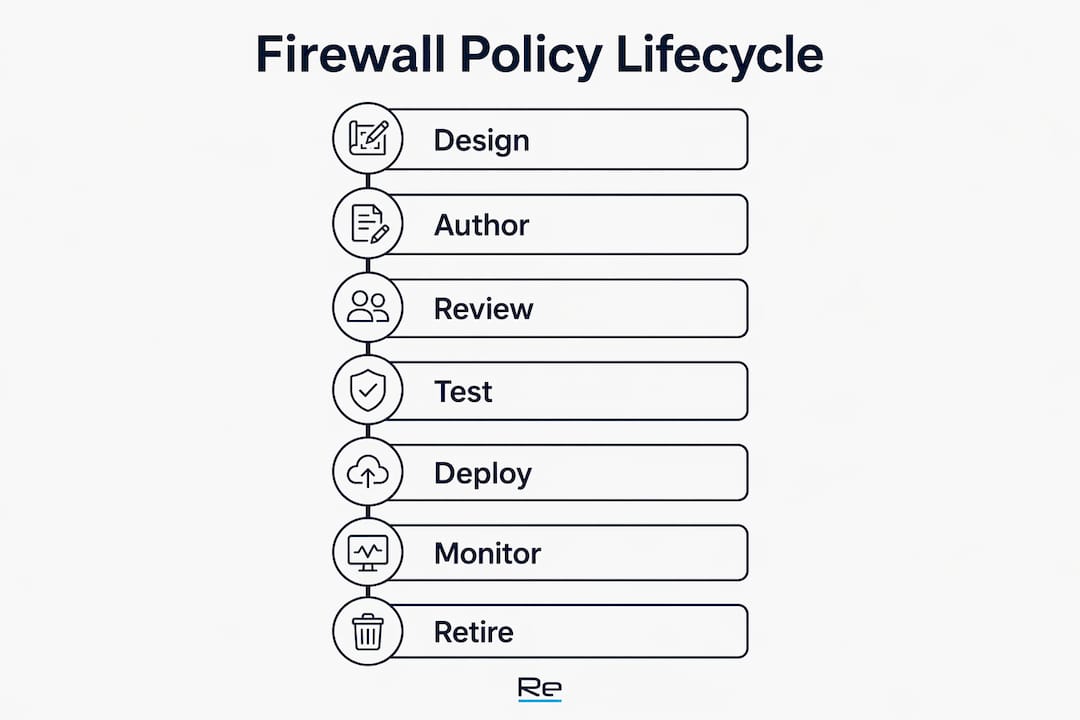
Policy lifecycle has seven stages: design (business requirement), author, review, test, deploy, monitor, and retire. Skipping any stage, particularly review and retire, is where policy drift begins.
Centralised policy management is increasingly critical in SD-WAN and multi-cloud environments. When policies live in separate consoles for on-premises firewalls, cloud security groups, and edge devices, gaps appear at the boundaries. A rule that permits traffic at the perimeter but has no corresponding cloud security group entry creates an inconsistency that attackers can exploit.
| Lifecycle stage | Owner | Artefacts | Test criteria | Frequency |
|---|---|---|---|---|
| Design | Business / IT architect | Requirement doc, data flow diagram | Requirement sign-off | Per change |
| Author | Network engineer | Rule draft, object definitions | Peer review | Per change |
| Review | Security team | Review checklist, approval record | No policy violations | Per change |
| Test | Network engineer | Simulation results, packet captures | Traffic matches intent | Pre-deployment |
| Deploy | Change manager | Change record, rollback plan | Zero unplanned outages | Per change |
| Monitor | SOC / NOC | Hit-count reports, SIEM alerts | No anomalous traffic | Continuous |
| Retire | Network engineer | Retirement record, hit-count evidence | Zero hits after disable period | Annual / on trigger |
Governance patterns that work at scale:
- Store rule definitions in a centralised policy repository (a version-controlled IaC repository works well for cloud-native environments).
- Tag every rule with owner, environment, and business unit metadata so bulk queries can identify orphaned rules.
- Use automated policy push via infrastructure-as-code (Terraform, Ansible) to reduce manual error and maintain consistency across enforcement points.
- Adopt a policy workflow process that enforces four-eyes approval before any rule reaches production.
Pro Tip: Synchronise cloud security groups and perimeter rules in the same change ticket. A rule permitted at the perimeter but blocked by a security group (or vice versa) is invisible in isolation but causes hours of troubleshooting. Map both enforcement points in every change record.
How do you test and validate firewall policies safely?
Validate in a staging environment or with simulation tools first, then use controlled rollouts with monitoring in production. Never deploy an untested rule change to a production firewall during business hours without a rollback plan.
Testing checklist
- Simulation / packet tracer — Use the firewall’s built-in policy simulator or Cisco Packet Tracer to confirm which rule matches a given traffic flow before deployment.
- Controlled connection attempts — After deployment, generate test traffic from the intended source to the intended destination and verify the action (permit or deny) and the log entry.
- Hit-count analysis — Review rule hit counts 24–48 hours after deployment. A new rule with zero hits may indicate a misconfigured source or destination object.
- Log correlation — Cross-reference firewall logs with SIEM alerts to confirm expected traffic is appearing and unexpected traffic is being blocked.
- Asymmetric routing checks — Confirm that both directions of a flow traverse the same stateful firewall. Asymmetric routing causes stateful firewalls to drop legitimate traffic because they have no record of the session initiation.
- State table review — On high-throughput environments, monitor state table utilisation. State table limits can cause dropped connections at scale; tune the table size for expected concurrent sessions.
Testing in production should use controlled rollouts, hit-count analysis, and SIEM correlation. Log volume strategy matters — SIEMs overwhelmed by permit-rule noise miss the deny events that actually signal a threat.
Troubleshooting common failures:
- Shadowed rules — Use the policy simulator to trace which rule matches first. Reorder or narrow the shadowing rule.
- Asymmetric routing — Check routing tables on both sides of the firewall. If traffic enters on one interface and exits on another, the stateful engine may not see both directions.
- NAT mismatches — Confirm whether the security rule matches the pre-NAT or post-NAT address. Most platforms evaluate security rules against the post-NAT destination; verify this in the vendor documentation.
- State table exhaustion — Increase state table limits or implement connection rate limiting. Investigate whether a specific source is generating abnormal session volumes.
Re-solution practitioner notes: what we see in UK environments
The most common root cause of firewall policy failures is not misconfiguration at deployment — it is accumulated exceptions that were never reviewed, owned, or retired.
In UK education environments, temporary rules created for third-party MIS integrations or edtech vendors frequently persist for years after the vendor relationship ends. In manufacturing and logistics, rules opened for OT/SCADA vendor access during commissioning are left active indefinitely because no one is certain what will break if they are removed. In hospitality, guest network segmentation rules are often incomplete, leaving paths between guest VLANs and back-office systems that should not exist.
The most dangerous rule in any rulebase is not the one you can see — it is the one nobody remembers creating.
Common mistakes and remediation steps:
- Stale vendor SSH access — A temporary rule permitting TCP 22 from a vendor IP, created during a maintenance window two years ago, still active. Remediation: disable the rule, monitor for 14 days, then retire with a change record. Implement a maximum 90-day expiry on all vendor access rules going forward.
- Shadowed deny allowing lateral movement — A broad permit for east-west traffic between server VLANs, placed above a specific deny for the finance segment. The deny never fires. Remediation: reorder rules, add an explicit deny for the finance VLAN above the broad permit, and log all matches.
- Missing IPv6 policy — IPv4 policy is thorough; IPv6 is wide open. Remediation: audit IPv6 traffic flows, then either block IPv6 at the perimeter or mirror the IPv4 policy in IPv6 rules.
UK regulatory context: UK organisations subject to Cyber Essentials or Cyber Essentials Plus must demonstrate that firewalls are configured to block unapproved inbound connections. ISO 27001 Annex A.8.20 (network controls) requires documented network security controls with defined responsibilities. A well-governed rulebase with ownership metadata, change records, and regular review cycles satisfies both frameworks. Organisations in financial services regulated by the FCA, or in healthcare under NHS Digital guidance, face additional requirements around network segmentation and audit trail completeness — areas where a disciplined policy lifecycle directly supports compliance.
Key takeaways
A firewall policy is only as strong as its rule order, ownership metadata, and review cadence — all three must be in place for the policy to remain defensible over time.
| Point | Details |
|---|---|
| Implicit deny is the baseline | Every policy must end with a deny-all; identify required traffic paths before deployment to avoid outages. |
| Rule order determines outcome | Firewalls match top-to-bottom; specific rules must sit above general ones to prevent shadowing. |
| Metadata enables governance | Every permit rule needs an owner, change-ticket ID, and expiry date to support audit and lifecycle management. |
| Test before and after deployment | Use simulation tools pre-deployment and hit-count analysis post-deployment to confirm rules behave as intended. |
| Re-solution supports policy audits | Re-solution’s network audit service provides structured rulebase reviews and remediation for UK organisations. |
Why disciplined policy management is the real security control
Most firewall breaches are not the result of a sophisticated zero-day exploit bypassing a well-configured device. They are the result of a rule that should have been retired three years ago, or a broad permit that was never narrowed after a project ended. The firewall hardware is rarely the problem.
Disciplined policy management — documented ownership, regular review cycles, simulation-tested changes, and a genuine deny-by-default posture — is what separates a firewall that provides real protection from one that provides the appearance of it. For teams that lack the internal resource to maintain this discipline consistently, a formal audit or a managed firewall service is not an optional extra. It is the mechanism that keeps the policy honest.
If your rulebase has not been formally reviewed in the past 12 months, that is the place to start.
Re-solution’s firewall policy and audit services
Re-solution gives UK IT teams a structured path from a policy that has accumulated years of undocumented exceptions to one that is auditable, defensible, and aligned with Cyber Essentials and ISO 27001 requirements — without the months of internal resource a full in-house rebuild demands.

The network audit service covers rulebase analysis, shadow rule identification, ownership gap reporting, and a prioritised remediation plan. For teams that need ongoing policy governance, Re-solution’s NaaS and managed services include centralised policy management across on-premises Cisco infrastructure and cloud enforcement points, with change control built in. Whether the need is a one-off audit or a fully managed policy lifecycle, Re-solution’s Cisco-certified engineers work within your environment and your change process. Contact Re-solution to discuss a rulebase review or to scope a managed firewall engagement for your organisation.
Useful sources and further reading
- NIST SP 800-41 Rev. 1 — Guidelines on Firewalls and Firewall Policy — The primary US federal reference for firewall policy design; the deny-by-default and risk analysis guidance applies directly to UK enterprise environments.
- CISA — Understanding Firewalls — Concise overview of firewall categories and the importance of hardening default configurations.
- SANS Firewall Checklist — Practical audit checklist covering rule review, logging, and change control; useful as a starting template for annual reviews.
- pfSense Firewall Fundamentals — Detailed documentation on stateful inspection, state table sizing, and rule evaluation order.
- Re-solution: managed firewall services — How managed firewall ownership models work and what centralised policy enforcement looks like in practice.
- Re-solution: network security best practices — Governance and review cadence guidance for UK IT teams.
- Zero Trust principles — Primer on identity-aware access controls and how Zero Trust architecture complements network-level firewall policies.
Recommended
- Understanding firewall security: a 2026 guide
- Role of firewalls in business: 2026 guide for IT teams
- Implement an effective network access policy workflow
- The role of managed firewalls in network security