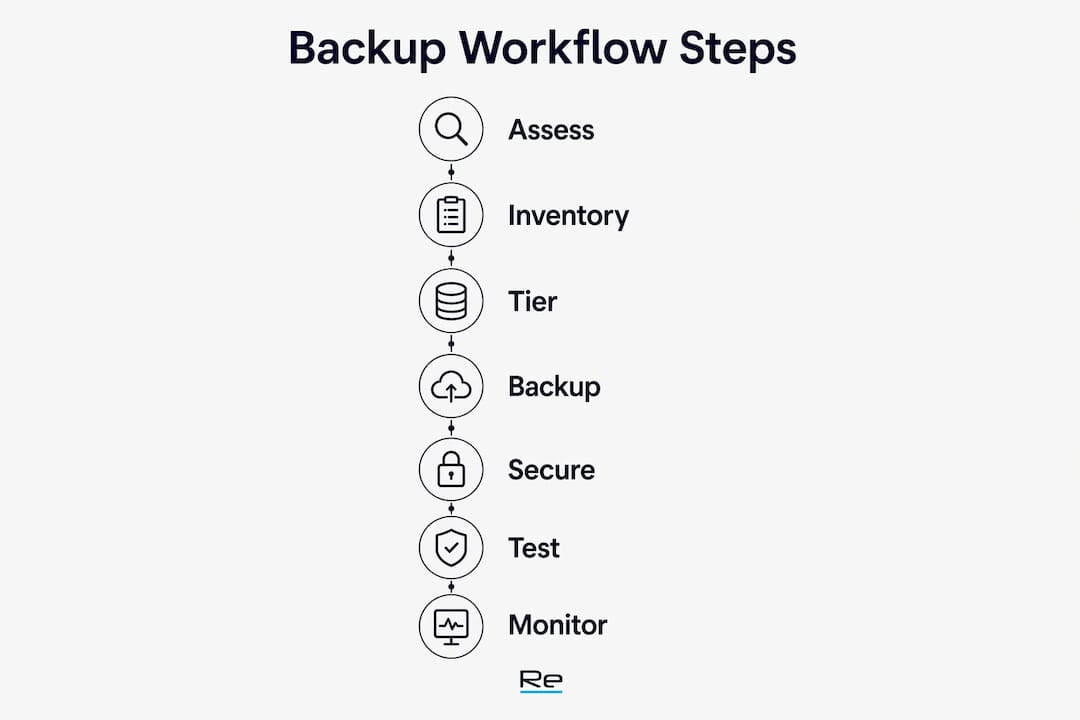
A well-designed critical systems backup workflow delivers one outcome: repeatable, verified restores that meet your agreed Recovery Time Objectives (RTO) and Recovery Point Objectives (RPO). Before selecting any technology, define those targets per system tier. The six components every workflow must address are: identify and prioritise critical systems; select an appropriate backup architecture; secure and isolate backup repositories; automate job scheduling and verification; validate through scheduled restore drills; and integrate the whole process with your disaster recovery (DR) and business continuity plan (BCP). Use this as a project brief checklist for your team or managed provider:
- Identify: Inventory all systems, assign RTO/RPO per tier
- Architect: Choose on-prem, cloud, or hybrid pattern per tier
- Secure: Isolate repositories, apply immutability, separate credentials
- Automate: Schedule jobs, post-job verification, anomaly alerting
- Validate: Monthly restore drills, documented pass/fail reports
- Integrate: Align with DR/BCP, maintain runbooks, schedule annual DR exercises
The sections below expand each component with practical guidance, tables, and checklists you can adapt directly.
Table of Contents
- How do you identify and prioritise critical systems for backup?
- Backup types, frequency, and retention: choosing the right mix
- What backup architecture suits your environment?
- How do you secure backups against ransomware and insider threats?
- How do you design a restore testing programme that produces evidence?
- Automating and monitoring backup jobs day to day
- Integrating backups with DR, BCP, and compliance requirements
- When should you engage a managed services provider?
- Key takeaways
- The gap between “backed up” and “recoverable” is wider than most teams realise
- Re-solution: from backup audit to managed recovery capability
- Useful sources and further reading
How do you identify and prioritise critical systems for backup?
Getting the inventory right is the foundation. Without a clear picture of what you are protecting and why, backup effort and cost will be misaligned with actual business risk.
Building your asset inventory
Your inventory should cover applications, databases, operating system images, OT and ICS devices, SaaS platforms, software licences, and the runbooks needed to restore each system. A simple spreadsheet works at the start; the CISA guidance on backing up government data recommends beginning with a plain inventory of what resides on your network before making any technology decisions. For OT environments, NIST SP 1339 goes further, requiring that configuration files, firmware, vendor engineering tools, and spare-parts lists are captured alongside data backups.

Tiering and RTO/RPO assignment
Once the inventory exists, assign each system to a recovery tier. A practical three-tier model works as follows:
- Tier 1 — Mission-critical: Systems whose failure immediately halts revenue or safety (ERP, core databases, authentication services, OT control systems). Target sub-hour RPO and RTO.
- Tier 2 — Business-important: Systems that degrade operations significantly but allow manual workarounds for a few hours (CRM, email, file services). Target RPO/RTO of two to four hours.
- Tier 3 — Standard: Systems where daily data loss is tolerable and recovery within 24 hours is acceptable (development environments, archival stores, non-critical reporting).
Technology follows the requirement, not the other way around. Tiered recovery requirements should drive technology selection; investing in continuous data protection (CDP) for a Tier 3 system wastes budget that belongs on Tier 1.
Sample RTO/RPO and risk matrix
| System tier | Example systems | Target RPO | Target RTO | Risk if missed |
|---|---|---|---|---|
| Tier 1 | ERP, core DB, AD, OT control | Very short RPO | Very short RTO | Revenue loss, safety risk |
| Tier 2 | CRM, email, file services | A few hours RPO | A few hours RTO | Operational degradation |
| Tier 3 | Dev environments, archives | Daily RPO | Daily RTO | Inconvenience, rework |
Dependency mapping
Restoring systems in the wrong order causes cascades. Map dependencies before an incident: Active Directory must come up before applications that authenticate against it; network services before anything that requires DNS or DHCP; licences and licence servers before licensed applications. Document the restore sequence in your runbook and test it.

Backup types, frequency, and retention: choosing the right mix
Choosing backup methods without reference to your RTO/RPO targets is a common mistake. Each method carries different trade-offs in recovery speed, storage cost, and operational complexity.
Methods and their trade-offs
- Full backup: Complete copy of all data. Simplest to restore, highest storage cost, longest backup window.
- Incremental backup: Only changed data since the last backup. Smallest storage footprint, but restore requires chaining multiple sets.
- Differential backup: Changed data since the last full. Faster restore than incremental; larger than incremental but smaller than full.
- Image-based / snapshot: Point-in-time copy of an entire volume or VM. Fast restore, low RPO achievable; storage-intensive for frequent snapshots.
- Replication: Near-real-time copy to a secondary site or cloud. Near-zero RPO; highest cost and complexity.
- Continuous Data Protection (CDP): Every write is captured. Sub-minute RPO; suited only to Tier 1 systems where cost is justified.
Method-to-tier mapping
| Method | Tier suitability | Typical RPO achievable | Relative cost | Restore complexity |
|---|---|---|---|---|
| CDP / replication | Tier 1 | Minutes or less | High | Medium |
| Image-based snapshot (hourly) | Tier 1–2 | 1 hour | Medium-high | Low |
| Incremental (daily) | Tier 2–3 | 24 hours | Low | Medium |
| Full weekly + differential | Tier 3 | 24 hours | Low | Low |
For critical systems, backup frequency should be based on the system’s change rate and acceptable data loss: frequent intervals for Tier 1, daily snapshots for Tier 3.
Retention policy guidance
Retention periods should reflect both recovery needs and compliance obligations. A typical baseline is to retain daily snapshots for several weeks and full backups for a longer period depending on tier.
Long-term archiving (beyond 12 months) applies where GDPR data-retention schedules, contractual obligations, or sector-specific regulation require it. Archive copies should be separated from active backup repositories and stored on lower-cost media.
3-2-1 and 3-2-1-1-0 rules
The 3-2-1 rule requires three copies of data, on two different storage media, with one copy stored off-site. The 3-2-1-1-0 variant adds a fourth requirement: one copy must be immutable (object lock, WORM, or write-once tape), and zero restore errors must be verified before the backup is considered complete. For any Tier 1 system, the 3-2-1-1-0 standard is the minimum acceptable baseline.
What backup architecture suits your environment?
Architecture choices determine recovery speed, isolation quality, and operational complexity. The right pattern depends on your estate composition and the RTO/RPO targets you have already defined.
Common patterns and their trade-offs
| Architecture pattern | Recovery speed | Isolation quality | Complexity | Cost |
|---|---|---|---|---|
| On-prem appliance + cloud replication | Fast local; slower cloud restore | Good if cloud account is separate | Medium | Medium |
| Cloud-native backup | Dependent on bandwidth | Good if separate cloud account | Low-medium | Variable (egress costs) |
| Hybrid with centralised management | Fast local for Tier 1; cloud for DR | Best when properly segmented | High | High |
Backup architecture guidance confirms that on-prem appliance plus cloud replication suits organisations with heavy on-premises estates, cloud-native backup suits cloud-first organisations, and centralised management supports hybrid environments.
Special environment considerations
Virtualised environments (VMware, Hyper-V): Use hypervisor-aware backup agents that capture VM snapshots without quiescing production workloads. Verify that application-consistent snapshots are enabled for databases.
Kubernetes and containers: Persistent volume data and configuration manifests both need protection. Tools that back up etcd state and persistent volumes separately from container images are required; backing up only the image misses runtime state.
SaaS applications: Microsoft 365, Salesforce, and similar platforms do not provide full backup by default. Third-party SaaS backup tools are needed to meet your RPO for email, SharePoint, and CRM data. Refer to cloud security measures when designing access controls for SaaS backup connectors.
OT and ICS devices: As NIST SP 1339 specifies, OT recovery requires not only data but also engineering software, configuration files, firmware, and a spare-parts plan. These assets must be stored in an air-gapped or out-of-band location.
When producing or requesting an architecture diagram from a provider, specify: network segmentation between backup repositories and production networks; separate cloud accounts or subscriptions for backup targets; immutable storage enabled at the object or volume level; and out-of-band administration paths that do not traverse production domain controllers.
How do you secure backups against ransomware and insider threats?
Backup security is a first-order requirement, not an afterthought. Ransomware operators routinely target backup stores before triggering encryption on production systems. Isolated, immutable backups with separated administrative credentials are the primary defence.
Isolation and network segmentation
- Place backup repositories on a separate network segment with no inbound access from production servers.
- Use out-of-band administration: manage backup infrastructure via a dedicated management VLAN or jump host, not through the same credentials and paths used for production.
- Disable SMB and RDP access to backup servers from general production networks.
- For cloud targets, use a separate AWS account, Azure subscription, or GCP project with no shared IAM roles.
Immutability options
Object lock (S3-compatible), WORM (Write Once Read Many) storage, and write-once tape each prevent modification or deletion of backup data for a defined retention period. On-domain backup repositories are a single point of failure if domain credentials are compromised; logically and physically separated backup targets with immutable configurations are the modern standard. Choose the immutability mechanism that matches your storage tier: object lock for cloud targets, WORM appliances for on-prem, tape for long-term archives.
Encryption and key management
Encrypt backups both at rest and in transit. Use a dedicated Key Management Service (KMS) rather than embedding keys in scripts or configuration files. Rotate encryption keys on a defined schedule and store key material separately from the backup data it protects. For UK organisations, this aligns with the ICO’s expectations under UK GDPR for protecting personal data in backup stores.
Pro Tip: Never store backup encryption keys on the same system or in the same cloud account as the backup data. A ransomware actor who compromises the backup server should not also gain access to the decryption key.
Credential separation and privileged access
Backup service accounts should have the minimum permissions required to write to the repository and no more. Separate backup administration credentials from domain admin accounts. Apply multi-factor authentication (MFA) to all backup management consoles. Audit access logs for backup repositories monthly and alert on any access outside scheduled job windows. For broader context on ransomware prevention controls, credential separation is consistently one of the highest-impact mitigations.
How do you design a restore testing programme that produces evidence?
A backup job that reports success is not a verified backup. Organisations frequently suffer from “hopeful backups” — jobs that complete without errors but have never been tested for restore, producing unusable copies when an incident occurs. The only reliable test is a live restore.
Monthly restore drill procedure
- Select the system: Rotate through Tier 1 and Tier 2 systems each month so every critical system is tested at least quarterly.
- Provision a non-production target: Restore to an isolated environment — a separate VM, a test network segment, or a cloud sandbox — never to production.
- Execute the restore from the runbook: Follow the documented steps exactly. Any deviation is a runbook defect to be corrected.
- Run validation queries: For databases, execute integrity checks and row-count comparisons. For application servers, confirm the service starts, authenticates, and returns expected data.
- Record pass/fail and time to restore: Log the start time, end time, any errors, and whether the restored system met the RTO target.
- Remediate and re-test: Any failure triggers a root-cause investigation and a re-test before the next scheduled drill.
The recommended cadence is automated verification for all jobs, regular restore drills for critical systems, and periodic full DR tests.
Daily automated verification
Automated verification covers: job completion status, backup size anomaly detection (a backup significantly smaller than the previous day’s may indicate a missed data source), checksum or hash verification of backup files, and log analysis for warning-level events. Automated verification catches infrastructure problems; it does not replace live restore testing.
Pro Tip: The most common restore failures are caused by missing software licences, missing runbooks, or unbacked dependencies such as a licence server or an authentication service. Capture these in your dependency map and verify them as part of every drill.
Evidence to retain
Keep restore logs, checksum reports, time-to-restore measurements, and pass/fail summaries. These are the audit artefacts that demonstrate your backup programme is functioning. Store them in a location accessible during an incident — not only on the systems being backed up. For guidance on verifying DR plan effectiveness, structured testing with documented outcomes is the standard approach.
Automating and monitoring backup jobs day to day
Automation removes human error from scheduling and catches failures before they become incidents. The goal is a workflow where every job is verified, anomalies are flagged immediately, and the on-call engineer receives actionable alerts rather than noise.
Automation flow
- Job scheduling: Define backup windows per tier in a central policy engine. Tier 1 jobs run continuously or on sub-hour schedules; Tier 3 jobs run nightly.
- Post-job verification: Trigger automated checksum verification and size comparison immediately after each job completes.
- Anomaly detection: Flag jobs where backup size deviates by more than a defined threshold from the rolling average, or where job duration exceeds the expected window.
- Escalation: Failed or anomalous jobs alert the on-call engineer promptly. Warning-level events generate notifications for timely review.
Essential monitoring metrics
- Job success rate (aiming for very high reliability for critical tiers)
- Time to complete per job (baseline and trend)
- RPO drift (actual time since last verified backup versus target RPO)
- Restore time measured in drills (tracked against RTO target)
- Repository capacity utilisation and growth rate
Integrations and ownership
Connect backup monitoring to your existing operations tooling: PagerDuty or equivalent for on-call alerting, Slack or Microsoft Teams for team notifications, and a central logging platform (Splunk, Elastic, or equivalent) for log aggregation and dashboard visibility. A phased SOP covering inventory, configuration, verification, monthly restore drills, incident triage, and postmortem review improves reliability significantly when combined with automation.
Assign a named Data Protection Owner responsible for the backup programme. This person owns the on-call rota, the monthly drill schedule, and the handover documentation. Without a named owner, backup programmes drift: jobs fail silently, drills are skipped, and runbooks go stale.
Integrating backups with DR, BCP, and compliance requirements
Backups are a component of DR, not a substitute for it. A disaster recovery plan describes how mission-essential functions will be sustained following a disruptive event; backups provide the data recovery mechanism within that plan. The two must be designed together.
Aligning backup RTO/RPO with BIA outcomes
Your Business Impact Analysis (BIA) defines the maximum tolerable downtime and data loss for each business function. Backup RTO/RPO targets must be at or better than the BIA thresholds for the systems that support those functions. Where a gap exists, either the backup architecture must be upgraded or the BIA must be revisited with the business. The Ready.gov IT disaster recovery guidance is explicit: IT recovery time for a resource must match the recovery time objective for the business function that depends on it.
Audit artefacts to maintain
For UK organisations seeking ISO 27001 certification or Cyber Essentials Plus, the following artefacts are required:
- Runbooks and playbooks stored with or alongside backups (not only on production systems)
- Restore logs with timestamps, pass/fail outcomes, and time-to-restore measurements
- Annual DR exercise reports with sign-off from a named responsible person
- Configuration snapshots for network devices, servers, and backup infrastructure
- Third-party audit or certification references (ISO 27001 scope, Cyber Essentials assessment)
- Audit trails for backup repository access, including any out-of-hours access events
Pro Tip: Schedule your annual full DR exercise at least six weeks before any planned ISO 27001 surveillance audit. Remediation findings from the DR exercise need time to be addressed and evidenced before the auditor arrives.
DR exercise scheduling
Run a full DR exercise at least once per year. This should test the end-to-end recovery of critical systems from backup to verified operation, including proper dependency restoration. Supplement the annual exercise with monthly component drills (individual system restores) and quarterly tabletop exercises where the team walks through a simulated incident scenario without touching production systems. For a broader view of how managed IT services and disaster recovery fit together, structured DR planning is consistently the differentiator between organisations that recover quickly and those that do not.
When should you engage a managed services provider?
Some organisations have the internal resource to own and operate a backup programme end to end. Many do not. The indicators that a managed provider is the right choice are usually clear:
- No named Data Protection Owner or backup administrator
- Restore tests have never been performed or are not documented
- The estate spans on-premises, cloud, SaaS, and OT systems with no central management
- Compliance requirements (ISO 27001, Cyber Essentials, UK GDPR) demand evidence you cannot currently produce
- Internal IT staff are stretched across too many priorities to run monthly drills and maintain runbooks
What to ask a provider before you engage
- Can you show restore logs and pass/fail reports from the last 90 days?
- Do you offer immutable storage options, and how is the backup administration account separated from production credentials?
- Are your SLAs mapped to our specific RTO/RPO targets, or are they generic uptime commitments?
- What runbooks and SOPs will you maintain, and where are they stored?
- How do you handle OT and SaaS backup requirements?
What a Re-solution audit and managed service delivers
Re-solution’s backup and DR audit service begins with a full asset inventory and dependency map, assigns systems to recovery tiers, and produces a gap analysis against your current backup architecture. The output includes documented RTO/RPO targets per tier, a prioritised remediation plan, and a set of SOPs covering job scheduling, verification, restore drills, and escalation paths. Ongoing managed monitoring covers daily job verification, anomaly alerting, monthly restore drills, and quarterly reporting. For organisations with complex Cisco network infrastructure, Re-solution’s managed services extend to the network layer, ensuring backup replication paths and DR connectivity are maintained alongside the backup programme itself.
Key takeaways
A reliable critical systems backup workflow requires defined RTO/RPO targets per tier, isolated and immutable repositories, automated daily verification, monthly restore drills with documented evidence, and integration with a tested disaster recovery plan.
| Point | Details |
|---|---|
| Define RTO/RPO per tier | Assign sub-hour targets to Tier 1, two to four hours to Tier 2, and 24 hours to Tier 3 before selecting any technology. |
| Isolate and apply immutability | Store backups in a separate account or network segment with object lock or WORM enabled; never share credentials with production. |
| Automate verification daily | Run checksum and size-anomaly checks after every job; page on-call promptly upon any failure. |
| Run monthly restore drills | Test at least one Tier 1 or Tier 2 system each month; retain pass/fail logs and time-to-restore measurements as audit evidence. |
| Integrate with DR/BCP | Align backup RTO/RPO with BIA outcomes; maintain runbooks, annual DR exercise reports, and ISO 27001 or Cyber Essentials artefacts. |
| Re-solution audit and managed service | Re-solution delivers inventory, tiering, SOPs, monthly drills, and managed monitoring for organisations that need a documented, compliant backup programme. |
The gap between “backed up” and “recoverable” is wider than most teams realise
Most backup failures are not technology failures. They are process failures: a restore that has never been tested, a runbook that lives only in one engineer’s head, or a backup repository that sits inside the same trust boundary as the systems it is supposed to protect.
The pattern repeats across organisations of every size. A backup job runs nightly, the dashboard shows green, and the team assumes they are covered. Then an incident occurs and the restore fails because the licence server was never included in the backup scope, or the runbook references a tool that was decommissioned two years ago, or the backup admin account was compromised in the same ransomware attack that encrypted production. Untested backups are the most common operational failure mode in backup programmes.
The fix is not more technology. It is institutionalising the process: named ownership, written runbooks, cross-trained staff, and a quarterly SOP review cycle. Backup knowledge that lives in one person’s head is a single point of failure as serious as a single backup copy. When that person leaves, is on holiday, or is unavailable during an incident, the organisation discovers the gap at the worst possible moment.
The other underestimated risk is the trust boundary problem. Backup repositories that are accessible via the same domain credentials as production systems offer no real protection against a credential-based attack. Separation is not optional; it is the architectural decision that determines whether your backups survive the same incident that took down production.
For organisations that want to move from “we have backups” to “we have a documented, tested, compliant recovery capability,” the path is straightforward: define the tiers, isolate the repositories, automate the verification, run the drills, and keep the evidence. Re-solution’s data protection guidance provides a practical starting point for teams building that capability.
Re-solution: from backup audit to managed recovery capability
Organisations that have defined RTO/RPO targets but lack the internal resource to operate a tested, documented backup programme consistently find the same gap: the technology exists, but the process, evidence, and ownership do not.

Re-solution closes that gap. As a Cisco-specialist managed services provider with extensive infrastructure experience, Re-solution delivers backup and DR audits that produce a complete asset inventory, tiered RTO/RPO mapping, gap analysis, and a set of SOPs your team can operate or hand back for ongoing management. Monthly restore drills, daily automated verification, anomaly alerting, and quarterly compliance reporting are included in the managed service. For organisations with Cisco network infrastructure, backup replication paths and DR connectivity are managed as part of the same engagement, through Re-solution’s NaaS and managed services portfolio.
To request a backup and DR audit, or to discuss managed monitoring for your critical systems, contact Re-solution directly via re-solution.co.uk/services/audit.
Useful sources and further reading
The following sources provide authoritative guidance for UK organisations building or auditing a backup and DR programme:
- IT Disaster Recovery Plan — Ready.gov: Practical framework for developing an IT DRP aligned with business continuity planning; covers inventory, prioritisation, recovery strategies, and testing. Directly applicable to UK organisations building BIA-aligned backup programmes.
- Back Up Government Data — CISA: Operational guidance on the 3-2-1 rule, encryption, offline copies, and restore testing. Relevant to any organisation managing critical infrastructure data, not only government bodies.
- Disaster Recovery Plan (DRP) Glossary — NIST CSRC: Authoritative definitions of DRP, RTO, and related terms from NIST SP 800-34 Rev. 1; useful for aligning internal documentation with recognised standards.
- NIST SP 1339: OT Backup and Recovery Guidance: Specific guidance for operational technology environments; covers configuration files, firmware, engineering tools, and spare-parts planning as backup components. Relevant to manufacturing, utilities, and logistics organisations.
- How to Develop an Effective IT Disaster Recovery Plan — NEDCC: Step-by-step DR planning methodology covering inventory, risk assessment, recovery strategies, documentation, and testing cycles.
- Why Backup and Disaster Recovery Matter — Re-solution: Business impact framing for UK IT managers evaluating the case for a formal backup and DR programme.
- Best Practices for Data Protection 2025 — Re-solution: Practical data protection guidance aligned with UK GDPR and ISO 27001 requirements; useful for building compliance evidence and audit artefacts.
Recommended
- How to Backup Data Securely and Protect Your Business | Re-Solution
- Why backup and disaster recovery matter for businesses
- Plan network upgrades: step-by-step logistics for success