TL;DR:
- Defining recovery objectives and following the 3-2-1-1-0 backup standard ensure resilient data protection. Assigning clear roles and testing restore procedures regularly prevent operational failure during incidents. Re-solution offers managed services to help UK organizations implement, monitor, and verify effective backup and recovery practices.
Start with these five actions before anything else. First, define Recovery Time Objective (RTO) and Recovery Point Objective (RPO) for every system tier. Second, adopt the 3-2-1-1-0 principle: maintain multiple copies of data across different media types, including offsite and immutable offline copies, and verify that all backups are successfully tested. Third, assign named roles: a Backup Owner who holds policy accountability, a Backup Administrator who manages daily operations, and a Restore Lead who takes charge during incidents. Fourth, map your critical data assets, set tiered RTO/RPO targets per system, and schedule automated backups promptly. Fifth, schedule a full restore test soon after implementation. Everything else in this guide builds on those five steps.
- Define RTO and RPO per system tier before selecting any technology
- Apply 3-2-1-1-0: three copies, two media, one offsite, one immutable offline, zero unverified
- Assign named accountability: Backup Owner, Backup Administrator, Restore Lead
- Map critical data, configure automated schedules, and set alert thresholds
- Schedule the first full restore test within 30 days of implementation
- Store all procedures and runbooks in version control (Git or equivalent)
- Review procedures annually and after every significant infrastructure change
Written, tested backup procedures do more than protect data. They reduce recovery time, limit regulatory exposure, and give IT teams a clear path to follow under pressure. Ad-hoc backups, by contrast, create ambiguity about what was saved, when, and whether it can actually be restored. For UK organisations, the stakes are concrete: backup and disaster recovery failures can trigger GDPR breach notifications, contractual penalties, and reputational damage that outlasts the incident itself.
The governing standards for UK organisations are ISO 27001 (which requires documented backup procedures and tested restore capabilities as part of Annex A controls), and NIS2 (which extends incident response and resilience obligations to a broader set of sectors). Both frameworks demand more than a scheduled job running in the background. They require documented procedures, named owners, and evidence of periodic testing. The 3-2-1-1-0 backup standard, an evolution of the original 3-2-1 rule, adds the immutable offline copy and the zero-unverified-backups requirement specifically to address ransomware scenarios where attackers target and delete backup repositories before deploying their payload.
RTO and RPO are the organising principles for all procedure design. RTO defines how quickly a system must be restored; RPO defines how much data loss is acceptable. Every technical choice, from backup frequency to storage topology, follows from those two numbers. Without them, backup procedures are built around convenience rather than business need.
Table of Contents
- How to create backup procedures: a step-by-step plan
- Which backup type should you use for each system?
- Security, immutability, and UK compliance considerations
- How do you write and test a restore runbook?
- Who is responsible for backups and restores?
- Procedure template and restore runbook example
- Common pitfalls and how to avoid them
- Expert recommendations: 3-2-1-1-0, accountability, and practitioner guidance
- Re-solution supports organisations that need more than a plan
- Key takeaways
How to create backup procedures: a step-by-step plan
NIST guidance for MSPs identifies five foundational actions: identify what to back up, establish RTO/RPO, map inter-system dependencies, secure offline copies, and test recovery. The sequence below operationalises those actions into a repeatable planning cycle.
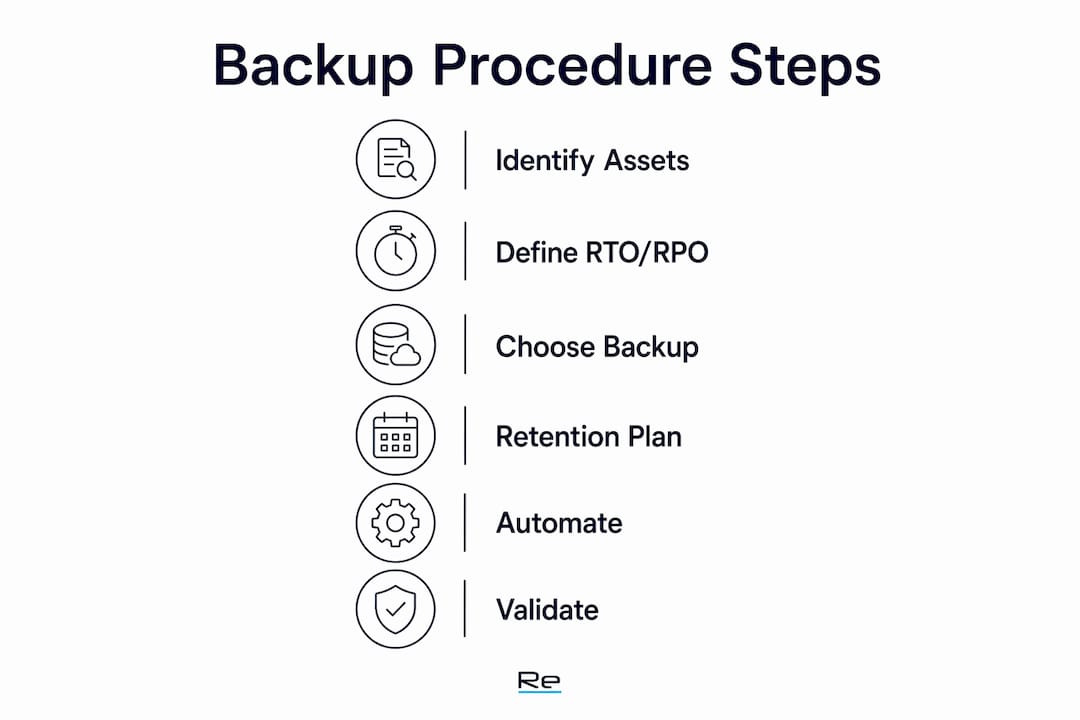
Step 1: scope and asset discovery
Inventory every system that holds business-critical data: on-premises servers, virtual machines, cloud workloads, SaaS platforms, network device configurations, and secrets stores (certificate authorities, password vaults). Map dependencies between systems. A database restore that succeeds in isolation may still fail if the application server it feeds cannot locate its configuration. Document the business impact of each asset losing availability for one hour, four hours, and 24 hours. That impact assessment directly informs tiering.

Step 2: define RTO and RPO per tier
Group systems into three tiers based on business impact. The table below provides a starting framework.
| Tier | Example systems | Target RTO | Target RPO | Recovery approach |
|---|---|---|---|---|
| 1 | ERP, core databases, authentication | < 1 hour | — | Continuous replication or CDP |
| 2 | File servers, email, secondary apps | < 4 hours | < 1 hour | Hourly incremental + image backup |
| 3 | Dev/test, archives, non-critical stores | < 24 hours | < 24 hours | Daily full or differential |
Step 3: choose backup types and storage topology
Select backup methods that can meet each tier’s RTO/RPO at an acceptable cost. Local snapshots and image-based backups support fast restores for Tier 1. Incremental or differential backups reduce storage overhead for Tier 2. Cloud exports and daily full backups suit Tier 3. For hybrid environments, a local appliance paired with cloud replication gives both speed (local restore) and resilience (offsite copy). The architecture choice between on-premises, hybrid, and cloud-first directly affects backup throughput and restore latency.
Step 4: design retention and lifecycle
Define retention periods per data class. Operational backups typically require daily recovery points retained for a period sufficient to meet business needs. Compliance or legal holds may require extended retention periods depending on sector. Document the retention schedule in the policy and configure lifecycle rules in the backup platform to enforce it automatically. Erasure obligations under GDPR interact with retention: a process for removing personal data from backup sets must be documented, even if it is operationally complex.
Step 5: automation and scheduling
Automation reduces manual errors in scheduling, monitoring, and reporting. Configure scheduled jobs for each tier, add event-driven triggers (for example, a snapshot before every major deployment), and set alert thresholds for failed or missed jobs. Every backup job should produce a verifiable success or failure status that feeds a monitoring dashboard. Silent failures are as dangerous as no backup at all.

Step 6: validation and verification
Automated recoverability checks (hash verification, test mounts) should run after every backup job. Full restore tests must be scheduled separately: monthly for Tier 1 file-level restores, quarterly for full system restores, and annually for a complete DR exercise. Define pass/fail criteria before the test, not after.
Pro Tip: Run a pilot restore of a single Tier 1 service before rolling out the full procedure. This validates your RTO/RPO assumptions against real infrastructure and surfaces dependency gaps that asset discovery alone will not catch.
Which backup type should you use for each system?
Choosing the right backup method is a matter of matching recovery characteristics to the RTO/RPO of each tier. No single method works across every system.
Full backup copies all selected data in one pass. Restore is straightforward because everything is in one place, but storage consumption and backup windows are large. Use full backups as the baseline for differential or incremental chains, and for long-term archive copies.
Incremental backup saves only data changed since the last backup of any kind. Storage and network overhead are minimal, but restore requires reassembling the last full backup plus every incremental since. Recovery time is longer and the chain is fragile if any increment is corrupted.
Differential backup saves all changes since the last full backup. Restore needs only the last full and the latest differential, making it faster than incremental. Storage grows progressively between full backup cycles.
Snapshots and image-based backups capture a point-in-time state of a volume or virtual machine. They are fast to create and restore, making them the preferred method for Tier 1 virtual workloads. They are not a substitute for offsite copies.
Replication and continuous data protection (CDP) replicate writes to a secondary location in near-real-time. RPO approaches zero, but replication propagates corruption or ransomware encryption immediately unless write-filtering or immutability is applied at the target.
SaaS exports are often overlooked. Microsoft 365, Google Workspace, and Salesforce retain data according to their own policies, which do not align with most organisations’ retention or recovery requirements. API-based third-party SaaS backup tools provide independent retention, point-in-time restore, and protection against accidental deletion or tenant misconfiguration.
| Method | Restore speed | Storage overhead | Network impact | Best use case |
|---|---|---|---|---|
| Full | Fast | High | High | Baseline and archive |
| Incremental | Slow | Low | Low | High-frequency Tier 2/3 |
| Differential | Medium | Medium | Medium | Tier 2 with weekly full |
| Snapshot/image | Very fast | Medium | Low (local) | Tier 1 virtual workloads |
| Replication/CDP | Near-instant | High | High (continuous) | Tier 1 near-zero RPO |
| SaaS export | Variable | Low | Low | Cloud collaboration platforms |
Security, immutability, and UK compliance considerations
Hardening backup infrastructure against ransomware requires more than encryption. Attackers who gain domain admin credentials routinely delete or encrypt backup repositories before deploying their payload. The 3-2-1-1-0 standard directly addresses this by mandating an immutable offline copy that cannot be altered or deleted by any network-connected account.
Implementing 3-2-1-1-0 in practice:
- Immutable copy options: WORM (Write Once Read Many) object storage in a cloud environment with object lock enabled, or physical tape stored offline in a secure location. Both prevent overwrite or deletion even by privileged accounts.
- Air-gap discipline: the offline copy must be genuinely disconnected. A tape library that is always online or a cloud bucket accessible from the production domain does not qualify.
- Zero unverified backups: every backup set must pass an automated integrity check before it is counted as valid. A job that completes without error but produces an unreadable archive is not a backup.
Access controls and credential hygiene:
- Use dedicated, least-privileged service accounts for backup operations, isolated from the production Active Directory domain. Ransomware actors frequently target backup admin credentials specifically because compromising them disables the recovery path.
- Enforce MFA on all backup management consoles.
- Place backup management traffic on a separate network segment, isolated from production VLANs.
- Rotate backup service account credentials on a documented schedule and monitor those accounts for anomalous activity.
Encryption and key management:
Mandate AES-256 encryption for data at rest and TLS 1.2 or higher in transit. Document key custody: who holds the encryption keys, where recovery keys are escrowed, and what the process is for key rotation. A backup that is encrypted but whose keys are inaccessible is unrecoverable.
UK-specific compliance:
GDPR requires that personal data processed in the UK is subject to appropriate technical safeguards. For backups, this means data residency must be documented (UK or adequacy-approved regions), retention periods must be enforced, and a process for responding to erasure requests against backup sets must exist. Under NIS2, organisations in scope must demonstrate resilience measures including tested backup and recovery capabilities. Data protection best practices for UK organisations should be reviewed alongside any backup policy update.
Pro Tip: Monitor backup management accounts for deletion events and configuration changes. An alert on any backup job deletion or retention policy modification gives early warning of an attacker attempting to disable your recovery capability before deploying ransomware.
How do you write and test a restore runbook?
A restore runbook is a documented, step-by-step procedure for recovering a specific system or service. It is not a general guide. It names the system, the backup source, the target environment, the validation steps, and the rollback path if the restore fails. Under incident pressure, teams rely on the runbook as the single source of truth. Without it, restores stall while engineers debate procedure.
Runbook structure
- Preconditions: confirm backup integrity, verify target environment availability, notify stakeholders
- Step-by-step restore: ordered commands or UI steps, with expected outputs at each stage
- Post-restore validation: application health checks, data integrity verification, dependency confirmation
- Rollback procedure: steps to revert if validation fails, and escalation contacts
- Sign-off: named individual who confirms the restore is complete and the service is returned to production
Test schedule and escalation
| Test type | Frequency | Scope | Pass criteria |
|---|---|---|---|
| File-level restore | Monthly | Tier 1 and Tier 2 | File recovered, hash verified |
| System restore | Quarterly | Tier 1 | Service operational within RTO |
| Full DR exercise | Annually | All tiers | All Tier 1 services within RTO, Tier 2 within 4 hours |
| Backup integrity check | After every job | All | Zero failed verifications |
Escalation rules: a failed monthly test triggers immediate review by the Backup Administrator and notification to the Backup Owner within two hours. A failed quarterly test escalates to the IT Director and requires a root-cause report within five business days. A failed annual DR exercise requires a remediation plan presented to the board within 30 days.
Successful backup jobs are not proof of recoverability. Practitioners consistently report that backup job success does not guarantee a working restore. Periodic full-scale recovery tests in isolated sandboxes, with application dependency validation, are the only reliable evidence that data can be recovered when it matters.
The sandbox environment for full restore tests must be isolated from production. Restoring into production to test recoverability risks overwriting live data. A dedicated test VLAN or cloud-based sandbox with no production connectivity is the correct approach.
Who is responsible for backups and restores?
A backup policy without named accountability is ineffective. When an incident occurs, ambiguity about who acts first costs recovery time. Every organisation needs at least four defined roles.
Required roles:
- Backup Owner: holds policy accountability, approves RTO/RPO targets, signs off exceptions, reports to the board or IT Director
- Backup Administrator: manages daily operations, monitors job success, responds to alerts, maintains runbooks
- Restore Lead: takes operational command during a recovery incident, executes or directs restore procedures
- Security Owner: manages access controls, credential rotation, and audit logs for backup infrastructure
- Business Owners: validate that restored data and services meet business requirements after a recovery
Escalation matrix:
| Severity | Trigger | Notify | Response time |
|---|---|---|---|
| Low | Single job failure | Backup Administrator | 2 hours |
| Medium | Repeated failures or missed RPO | Backup Owner | 4 hours |
| High | Restore test failure or active incident | IT Director, Security Owner | Immediate |
| Critical | Ransomware or data loss event | Executive team, legal, DPO | Immediate |
Documentation and version control:
Store all procedures, runbooks, and policy documents in a version-controlled repository. Git is a practical choice: it provides a full change history, supports pull-request review workflows, and integrates with CI/CD pipelines for automated runbook testing. Every change to a procedure must carry a date, author, and change summary. Procedures should carry a review date no more than 12 months from the last approval.
Daily and weekly monitoring checklist:
- Confirm all scheduled backup jobs completed successfully
- Review alert queue for missed or failed jobs
- Verify that at least one immutable copy is current and integrity-verified
- Check storage utilisation against capacity thresholds
- Review access logs for backup management consoles
Procedure template and restore runbook example
A well-structured procedural document follows a consistent format that auditors, new team members, and incident responders can navigate quickly. The sections below define that structure and provide a working example.
Procedural document structure
- Purpose: one sentence stating what the procedure achieves
- Scope: which systems, data classes, and teams are covered
- Definitions: RTO, RPO, WORM, CDP, and any organisation-specific terms
- Responsibilities: named roles and their obligations (reference the roles section above)
- Prerequisites: access rights, tools, network connectivity, and credentials required before starting
- Step-by-step procedure: numbered steps with expected outputs
- Verification and rollback: post-procedure checks and the rollback path if verification fails
- Change control: how changes are proposed, reviewed, and approved
- Review schedule: next review date and the owner responsible for initiating it
One-page operational checklist
Daily:
- All backup jobs completed with verified status
- No unacknowledged alerts in the monitoring dashboard
- Immutable copy integrity check passed
Weekly:
- Storage utilisation reviewed and within thresholds
- Backup service account access logs reviewed
- Retention lifecycle rules confirmed as active
Monthly:
- File-level restore test completed and documented
- Runbooks reviewed for accuracy against current infrastructure
- Backup coverage map updated to reflect any new systems
Restore runbook example: Tier 1 database service
- Confirm backup integrity: retrieve the latest verified backup set from the primary repository and confirm hash
- Provision isolated restore environment: spin up target server in the test VLAN, confirm no production network connectivity
- Restore database files: execute restore job, record start time
- Validate data integrity: run application-level consistency checks, confirm row counts against last known good state
- Confirm dependencies: verify that the application server, authentication service, and monitoring agent can reach the restored database
- Record RTO: note elapsed time from restore start to service validation; compare against the Tier 1 target
- Document outcome: pass or fail, with notes on any deviations, signed by the Restore Lead
- Decommission test environment: remove all restored data from the test environment after sign-off
For secure backup implementation guidance specific to UK environments, including managed service options that can execute these procedures at scale, Re-solution publishes practical resources aligned to this framework.
Common pitfalls and how to avoid them
Most backup failures are procedural, not technical. The backup platform works. The procedure around it does not.
Common pitfalls:
- Technology-first design: selecting a backup tool before defining RTO/RPO leads to a solution that meets vendor defaults, not business requirements
- Untested restores: a backup job that completes successfully is not evidence of recoverability; only a completed restore test is
- Single-person accountability: when one individual holds all backup knowledge, illness or departure creates an immediate operational risk
- Unclear retention rules: without documented retention periods per data class, storage grows unchecked and erasure obligations go unmet
- Production-domain backup credentials: service accounts with domain admin rights that are also used for backup operations give ransomware actors a single credential to compromise the entire recovery path
- SaaS blind spots: assuming that Microsoft 365 or Google Workspace retains data to your organisation’s requirements without independent verification
Best practices:
- Design procedures around RTO/RPO first; let technology selection follow
- Apply tiered protection so Tier 1 systems receive continuous or near-continuous coverage
- Automate integrity verification after every job; treat any unverified backup as non-existent
- Maintain at least one immutable copy that no network-connected account can delete
- Schedule named restore drills, not just automated checks, so the team practises the procedure under realistic conditions
- Cross-train at least two people on every restore procedure
Remedial checklist for teams reviewing existing procedures:
- Confirm RTO/RPO targets are documented and signed off by business owners
- Verify that an immutable offline copy exists and has been tested
- Check that backup service accounts are isolated from the production domain
- Confirm the last full restore test date and its documented outcome
- Review retention rules against current GDPR and contractual obligations
Pro Tip: Store restore runbooks in a version-controlled Git repository and treat them as the single source of truth for recovery operations. Under incident pressure, a team that can pull a current, tested runbook recovers faster than one that reconstructs procedure from memory.
Expert recommendations: 3-2-1-1-0, accountability, and practitioner guidance
The evolution from 3-2-1 to 3-2-1-1-0 reflects a direct response to ransomware tactics. Attackers who compromise backup infrastructure before deploying encryption can neutralise a 3-2-1 strategy entirely if all three copies are network-accessible. The immutable offline copy breaks that attack chain. The zero-unverified-backups requirement closes the gap between a job that reports success and a backup that can actually be restored.
RTO/RPO-first design is the principle that separates effective backup strategies from expensive ones. Organisations that define recovery objectives before selecting technology consistently make better cost trade-offs: they invest in continuous replication for the systems that genuinely need it, and use lower-cost daily backups for systems where 24-hour recovery is acceptable. Flat backup policies, where every system receives the same treatment, either overspend on low-priority systems or under-protect critical ones.
The most common operational failure is the untested restore. Successful backup jobs are not proof of recoverability. Full sandbox restores with dependency validation, scheduled and documented with pass/fail criteria, are the only reliable measure of whether a backup procedure actually works.
For ISO 27001 certification and NIS2 compliance, auditors expect documented procedures, named owners, and evidence of periodic testing. A backup policy that names no individual and records no test results will not satisfy either framework. For an IT director preparing a board paper or procurement brief, the combination of tiered RTO/RPO targets, named accountability, and a documented test schedule provides the evidence base that governance frameworks require.
Concrete recommendations for IT directors:
- Publish a tiering table (as shown in the step-by-step section) and obtain business owner sign-off on each tier’s RTO/RPO
- Require a quarterly restore test report as a standing agenda item for IT governance meetings
- Include backup procedure review in the annual ISO 27001 internal audit scope
- Assess ransomware exposure specifically in the context of backup infrastructure: are credentials isolated, are immutable copies verified, and is the recovery path tested?
- Budget for a managed backup service if internal resource cannot sustain the monitoring and testing cadence the procedures require
Re-solution supports organisations that need more than a plan
Designing backup procedures is one thing. Maintaining the monitoring cadence, running quarterly restore tests, and keeping runbooks current as infrastructure changes is where most internal teams run short of capacity.

Re-solution provides managed IT services for UK organisations that need backup and recovery procedures implemented, monitored, and tested at scale, without building that capability entirely in-house. With over 35 years of experience in Cisco infrastructure and a track record across education, manufacturing, logistics, and hospitality, Re-solution brings the technical depth to design procedures that meet ISO 27001 and NIS2 requirements, and the operational resource to keep them current. For organisations that want an independent assessment of their current backup coverage and RTO/RPO alignment, Re-solution’s infrastructure audit service provides a structured review with documented findings and remediation priorities. Contact Re-solution to discuss your organisation’s recovery objectives and how a managed approach can close the gap between policy and practice.
Key takeaways
Effective backup procedures are built on RTO/RPO-first design, the 3-2-1-1-0 standard, named accountability, and evidence of tested restores.
| Point | Details |
|---|---|
| RTO/RPO drives every decision | Define recovery objectives per system tier before selecting any backup technology or schedule. |
| 3-2-1-1-0 is the current standard | Add an immutable offline copy and require zero unverified backups to protect against ransomware. |
| Named roles prevent incident paralysis | Assign a Backup Owner, Backup Administrator, and Restore Lead with documented responsibilities. |
| Tested restores are the only proof | Schedule monthly file restores, quarterly system restores, and an annual full DR exercise with pass/fail criteria. |
| Re-solution bridges plan and delivery | Re-solution’s managed services and audit capability help UK organisations implement and maintain backup procedures at scale. |
Recommended
- How to Backup Data Securely and Protect Your Business | Re-Solution
- Why backup and disaster recovery matter for businesses
- Infrastructure scaling step by step: a 2026 guide for UK IT teams