Use Central Web Authentication (CWA) with Guest Flow as your default architecture for Cisco ISE guest access. Before wider roll-out, confirm three things: Change of Authorization (CoA) is reachable on UDP 1700, the portal’s certificate chain is complete, and RADIUS accounting is active on the network access device. Check ISE Operations > RADIUS Live Logs and test CoA reachability from ISE to the network access device (NAD) before you trust the design.
TL;DR:
- Ensuring UDP 1700 reachability for CoA is the most common failure point; verify session support and network configurations before deployment.
- Properly mapping and testing the portal certificate chain with a public CA is essential to prevent silent trust issues on mobile devices.
- Correct network setup, including open ports, ACLs, and RADIUS accounting, is critical for guest session merging and avoiding portal loops.
- Validating guest flow through detailed Live Log analysis helps identify issues such as session merge failures, especially after credential submission.
- Conducting structured proof-of-concept tests for CoA, certificate trust, and device reconnects prevents deployment stalls and hidden failures.
Table of Contents
- What is Cisco ISE guest access and which portal types are available?
- Why CWA plus Guest Flow beats local web authentication
- Network prerequisites: what your NAD needs before you configure ISE
- Configuring guest portals, guest types and authorization policy in ISE
- What do sponsored, self-registered and hotspot flows look like in practice?
- Getting the portal certificate and trust chain right
- Troubleshooting checklist for a guest stuck on the portal
- How Re-solution validates a guest access design before roll-out
- Role-based access control and authorization policy for guests
- When to keep guest access in-house and when to bring in a managed partner
- Get help deploying and validating Cisco ISE guest access
- Sources
- FAQ
What is Cisco ISE guest access and which portal types are available?
Cisco ISE guest access is the framework that lets visitors, contractors, and temporary devices reach a controlled network segment without full corporate credentials. It combines a captive portal, an authentication policy, and an authorization profile that together decide what a guest can see and for how long. Most enterprise deployments use it to keep visitor traffic away from internal VLANs while still logging every session for compliance.
ISE ships with three default guest portal types, each suited to a different visitor scenario:
- Hotspot portal — no username or password. The guest accepts an Acceptable Use Policy (AUP) or enters an access code, then gets network access immediately. Common in hospitality lobbies and public waiting areas.
- Self-registered guest portal — the visitor creates their own account with a name, email, and company. ISE issues credentials automatically or after sponsor approval, depending on policy.
- Sponsored guest portal — an employee (the sponsor) creates the guest account on the visitor’s behalf, typically for scheduled meetings or contractor visits that need a named, auditable owner.
Each portal type maps to a guest type, which controls session duration, login time limits, and the endpoint purge schedule. A hotspot guest type might allow four hours of access with no re-authentication, while a sponsored guest type could run for the duration of a contract with sponsor-defined expiry. Getting this mapping right early avoids a common failure mode: guests who lose access mid-session because the guest type’s timing didn’t match the actual visit length. Cisco’s own admin guide treats these three portals as the baseline building blocks for any guest deployment, and almost every production design is a variation on one of them.
Why CWA plus Guest Flow beats local web authentication
Central Web Authentication centralises the entire web-auth process on ISE rather than pushing portal configuration out to every switch and controller individually. That difference matters more than it sounds. With Local Web Authentication (LWA), each NAD holds its own webauth files and local policy, which means every switch or controller needs separate configuration, separate certificate handling, and separate maintenance when you update the portal. CWA keeps all of that logic in one place, and it’s the approach Cisco’s prescriptive deployment guide recommends for the overwhelming majority of enterprise scenarios.
The mechanism behind CWA is what Cisco calls Guest Flow, and it runs in two distinct stages:
- Stage one: MAC Authentication Bypass (MAB) redirect. The guest device associates to the network, ISE returns a redirect Access-Control List (ACL) instead of full access, and the NAD sends the guest’s browser to the ISE portal over HTTPS on port 8443.
- Stage two: authenticated session merge. Once the guest submits credentials or completes registration, ISE sends a CoA to the NAD, which then re-authorises the session and applies the final access policy. The client’s original MAB session and the newly authenticated session merge into one tracked session.
That merge depends on a session identifier that ties the initial MAB event to the later authenticated one. If the NAD doesn’t support proper session accounting, the merge breaks, and guests end up looping back to the portal even after entering valid credentials. This is one of the more frustrating failure patterns in Guest Flow deployments, because the symptom (a portal loop) looks identical to a credentials problem when the actual cause is a session-tracking gap.
LWA hasn’t disappeared entirely. It still has a place where a NAD can’t perform CoA, where you’re supporting a small isolated site with a single switch and no appetite for centralised policy, or where legacy hardware simply doesn’t support the redirect ACL model CWA needs. Cisco’s own LWA configuration example still documents the steps, but treats it as the exception rather than the default.
Pro Tip: Before you commit to CWA at scale, run a single test switch through the full Guest Flow twice, once with CoA disabled and once enabled. Watching the difference in Live Logs teaches you more about the merge mechanism than any diagram will.
Network prerequisites: what your NAD needs before you configure ISE
Guest access fails more often at the network layer than inside ISE itself. Before you touch the ISE GUI, get the NAD side right.
- Open the required ports. The portal itself listens on TCP 8443 for HTTPS redirect traffic. RADIUS authentication uses UDP 1812 (or the legacy 1645), RADIUS accounting uses UDP 1813 (or 1646), and CoA requires UDP 1700 open in both directions between ISE and the NAD.
- Confirm CoA support and reachability. This is the single highest-value check in the entire deployment. Cisco’s troubleshooting documentation identifies CoA misconfiguration as the most common deployment failure in guest access projects, usually because a firewall between ISE and the NAD blocks UDP 1700, or because the NAD’s CoA client settings don’t match the ISE PSN sending the request.
- Map the redirect and portal ACLs correctly. The NAD needs a downloadable ACL (or a locally defined ACL referenced by name) that permits DNS, DHCP, and traffic to the ISE Policy Service Node on port 8443, while denying everything else until the guest authenticates.
- Apply FlexConnect ACL mapping for branch access points. If your wireless deployment uses FlexConnect APs in local switching mode, the redirect ACL must also exist as a FlexConnect ACL on the AP itself. Missing this step is a specific, well-documented cause of redirect failure even when the global ACL looks correct on the WLC.
- Enable RADIUS accounting on the NAD. Guest Flow’s session merge relies on accurate accounting start and interim-update messages. Without them, ISE loses track of which authenticated session belongs to which original MAB session.
CoA reachability is the number one point of failure in production guest deployments. Engineers who verify UDP 1700 connectivity and CoA client settings before go-live avoid the most frequently reported class of ISE guest access issues.
On a Wireless LAN Controller (WLC), this means confirming the AAA server entry has CoA support enabled and that the WLAN is set to Layer 3 web policy with the correct redirect ACL attached. On a Catalyst switch, it means the interface template applies the correct pre-auth ACL and that aaa server radius dynamic-author points to the right ISE PSN address with a matching shared secret. Get these two configurations right, and most of the downstream guest access problems simply don’t occur. For a broader look at how Catalyst switch capabilities feed into this kind of access control design, Re-solution’s guide to Cisco Catalyst networks covers the platform detail relevant to NAD selection.
Configuring guest portals, guest types and authorization policy in ISE
Once the network side is confirmed, the ISE-side configuration follows a fairly linear path. All guest access configuration lives under Work Centres > Guest Access > Portals & Components, which is also where you’ll manage guest types, sponsor groups, and the portal identity certificate.
- Create or edit a guest portal under Portals & Components > Guest Portals. Choose the portal type (hotspot, self-registered, or sponsored) and assign it to the correct Policy Service Node group.
- Configure the Acceptable Use Policy (AUP) on the portal’s login page settings, deciding whether it displays on first login only or on every session.
- Set up SMTP and SMS notification settings under Settings > SMTP Server and SMS Gateway, so guests and sponsors receive credentials automatically rather than relying on manual handoff.
- Customise the portal theme under the portal’s page customisation options, applying your organisation’s branding, logo, and colour scheme so the guest experience matches expectations rather than looking like a generic Cisco splash page.
- Test the portal URL directly from the portal configuration page before going live. ISE generates a test link that simulates the guest experience without requiring a live NAD redirect.
- Build the authentication and authorization policy sequence. The authentication policy needs a rule matching MAB traffic from the guest SSID or wired VLAN. The authorization policy then needs two rules in sequence: one that matches unauthenticated MAB sessions and returns the redirect ACL plus portal URL, and a second Guest Flow rule that matches the post-authentication CoA re-auth and returns the final permit access.
- Define guest type timing. Under Guest Types, decide whether the account’s validity starts from first login or from a sponsor-specified date. The former suits walk-in visitors; the latter suits pre-booked contractors who might not arrive on the day the account was created.
A few configuration points deserve extra attention because they’re easy to get wrong:
- Sponsor groups control who can create guest accounts and which guest types they’re permitted to assign. A receptionist sponsor group might only create hotspot-tier guests, while an IT sponsor group can issue longer-duration sponsored accounts.
- Notification settings determine how credentials reach the guest, whether by email, SMS, or a printed badge from the sponsor portal, and Cisco’s admin guide treats SMTP and SMS configuration as a standard part of sponsor portal setup rather than an optional extra.
- Endpoint purge behaviour runs independently of guest account expiry, defaulting to 30 days unless adjusted. A guest account can expire long before its registered endpoint is purged from the endpoint identity group, which occasionally confuses admins who expect the two to align.
- Guest type timing mismatches cause more support tickets than almost any other single misconfiguration, because a first-login timer set too short cuts off legitimate return visits within the same booking window.
Cisco’s official guest and secure WiFi documentation lays out these navigation paths and confirms Live Logs as the standard verification point once the policy is saved, which is exactly where the next section picks up.
What do sponsored, self-registered and hotspot flows look like in practice?
Reading a Live Log without knowing what a healthy sequence looks like is like reading a heart monitor without knowing what a normal rhythm is. Here’s what each flow should produce.
Sponsored guest flow. The guest associates and triggers a MAB authentication entry in RADIUS Live Logs, followed immediately by a redirect ACL push to the NAD. The guest enters credentials issued by their sponsor, ISE validates them, and a CoA (dynamic authorisation) event fires to the NAD. The final entry shows a successful re-authentication with the sponsored guest’s authorization profile applied. If the sponsor never received the notification email, check the SMTP gateway settings before assuming the ISE policy is broken.

Self-registration flow. The sequence starts the same way, with a MAB entry and redirect. The guest fills in the registration form, and ISE creates the account on the spot. Best practice is to allow immediate login straight after registration rather than forcing a separate login step, since making a guest register and then log in again with the same details doubles the friction for no security benefit. Watch for a registration event followed directly by a guest authentication event in the same session; a gap between the two usually means the “login after registration” option isn’t enabled on the portal.
Hotspot flow. This is the simplest sequence: MAB entry, redirect, AUP acceptance (or access code entry), and a CoA event granting access. There’s no username/password authentication step at all. Access codes come into play when you want lightweight control over who can use the hotspot, such as printing a daily code at reception rather than leaving the portal fully open.
When filtering RADIUS Live Logs for any of these flows, four signatures tell you almost everything you need to know:
- The initial MAB authentication entry, confirming the device associated and hit the authentication policy correctly.
- The redirect ACL push, confirming the NAD received the correct authorization profile.
- The guest authentication or registration event, confirming ISE processed the credentials or new account correctly.
- The CoA dynamic authorisation entry, confirming the session re-authorised and merged. A missing or failed CoA entry here is the single most reliable indicator of the session-merge problem described earlier.
Getting the portal certificate and trust chain right
A broken certificate chain is one of the quietest failure modes in guest access, because it often looks like a network problem rather than a trust problem. The guest’s browser hangs, throws a generic security warning, or silently refuses the redirect, and the NAD configuration is completely innocent.
Use a public Certificate Authority (CA) signed certificate for the portal’s Fully Qualified Domain Name (FQDN) rather than a private CA or a static IP address. Guest devices are, by definition, unmanaged. They have no reason to trust your internal CA, and a certificate issued to a raw IP address rather than a proper FQDN will fail validation on most modern mobile browsers regardless of anything else being configured correctly.
- Confirm ISE serves the full certificate chain, not just the leaf certificate. A missing intermediate certificate is invisible on desktop browsers that cache intermediates but causes outright failures on iOS and Android devices that don’t.
- Check the portal identity certificate binding under Certificates > System Certificates to confirm the correct certificate is assigned to the Guest Portal role, not just to EAP or Admin roles.
- Use browser developer tools or a packet capture to inspect the TLS handshake if a guest reports a certificate warning; an incomplete chain shows up clearly as a certificate path validation error at that layer.
Cisco’s own troubleshooting notes point directly at certificate chain completeness as a recurring cause of client-side trust failures, particularly on mobile.
Pro Tip: Test your portal on at least one iOS device and one Android device before go-live, not just a laptop. Certificate chain issues that never appear on Windows or macOS show up immediately on mobile captive network assistants.
Troubleshooting checklist for a guest stuck on the portal
When a guest can’t get past the login page, work through these checks in order rather than jumping straight to the ISE policy configuration, since the root cause is more often network layer than policy layer.
- Check basic connectivity and ports. Confirm the guest device can resolve the portal FQDN via DNS, and that TCP 8443 is reachable from the guest VLAN to the ISE PSN.
- Verify RADIUS Live Logs for the session. Look for the MAB entry first; if it’s missing entirely, the problem is upstream of ISE, likely a NAD authentication policy issue.
- Confirm the redirect ACL was pushed and applied. If the MAB entry shows the redirect ACL name but the guest never sees the portal, the ACL likely isn’t correctly defined on the NAD itself, or is missing the FlexConnect mapping on branch APs.
- Check the guest authentication or CoA event. A failed CoA here points straight back to UDP 1700 reachability or a shared secret mismatch between ISE and the NAD.
- Validate NAD session state. On a WLC, check the client’s NAC state; on a switch, check the port’s authentication session state with
show authentication sessions interface. - Confirm accounting stop/start behaviour. If accounting messages aren’t reaching ISE, the session table on ISE won’t match the NAD’s actual session state, causing intermittent disconnects.
| Symptom | Likely cause | First check |
|---|---|---|
| Guest never sees portal page | Redirect ACL missing or not mapped on FlexConnect AP | NAD ACL config and AP FlexConnect ACL binding |
| Portal loads but login fails silently | CoA not reaching NAD | UDP 1700 reachability, shared secret match |
| Certificate warning on mobile only | Incomplete certificate chain | ISE certificate store, intermediate cert binding |
| Guest authenticated but no network access | Session merge failed | RADIUS accounting status on NAD |
| Guest disconnected shortly after login | Endpoint purge or accounting stop mismatch | Endpoint purge settings, accounting interim updates |
How Re-solution validates a guest access design before roll-out
A guest access design that looks correct on paper can still fail in production, which is why a structured proof of concept (PoC) earns its place before any full roll-out. Re-solution’s approach to ISE PoCs centres on proving the parts most likely to break silently: CoA reachability, certificate chain completeness, and the actual guest experience across device classes rather than just a lab laptop.
A typical PoC runs through a defined set of test cases rather than a general “does it work” check:
- Temporary guest access, confirming a hotspot or self-registered account behaves correctly within its configured session window.
- Sponsored guest access, confirming sponsor notification, credential delivery, and the full Guest Flow merge sequence.
- Device reconnect testing, confirming a guest device that disconnects and rejoins mid-session doesn’t get stuck in a stale authorization state.
- Accounting stop testing, deliberately dropping accounting messages to confirm ISE and the NAD recover gracefully rather than leaving orphaned sessions.
This structured approach reflects the same methodology behind Re-solution’s broader proof of concept work with Cisco ISE, which treats CoA validation and portal UX testing as mandatory acceptance criteria rather than optional extras. One engineering firm’s ISE deployment, documented in Re-solution’s case study, showed the same pattern found across most production issues: the majority of early problems traced back to CoA reachability and ACL mapping rather than the ISE policy configuration itself. Once those two areas were verified, the rest of the guest flow behaved exactly as designed.
Role-based access control and authorization policy for guests
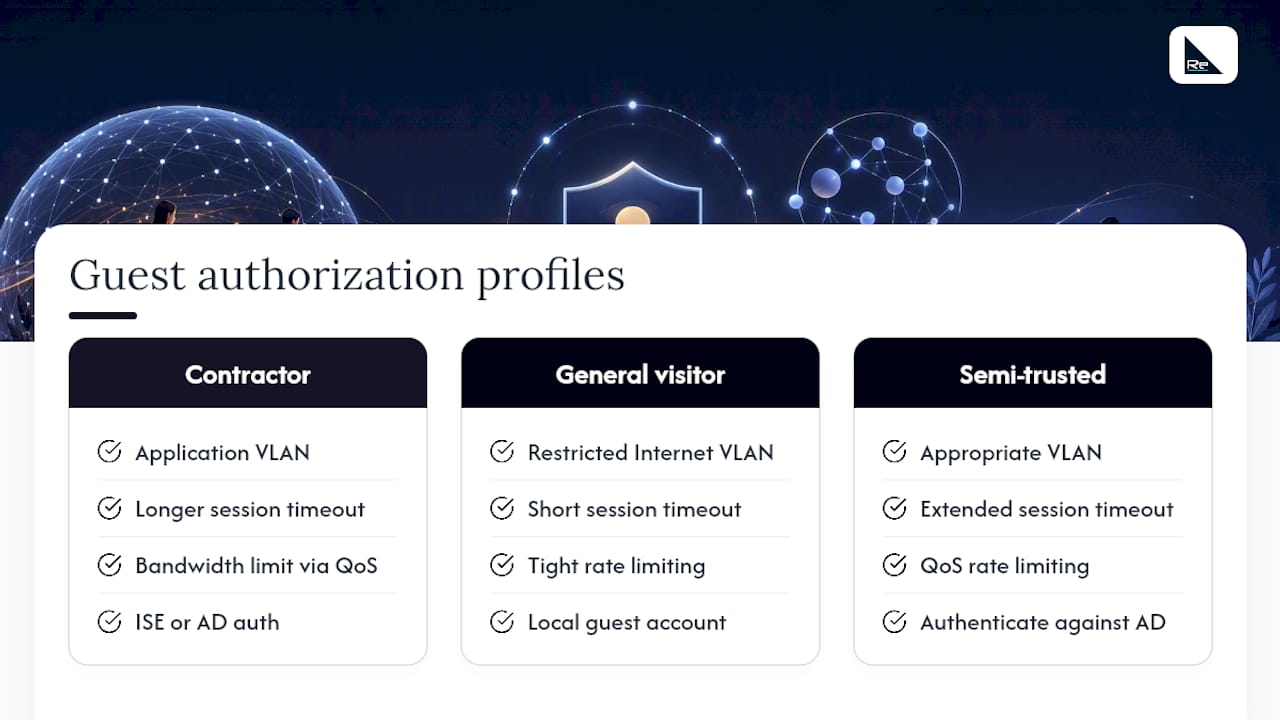
Guest access shouldn’t mean flat, undifferentiated network access for every visitor. Role-based access control lets you differentiate between guest categories using the same authorization policy engine that governs your corporate devices, just applied to a lower-trust population.
Start by defining distinct guest types that map to distinct business roles: a contractor guest type might get access to a specific application VLAN and a longer session duration, while a general visitor guest type gets internet-only access on a heavily restricted VLAN with a short session window, reflecting best practices for access control systems for business. ISE applies these distinctions through authorization profiles attached to each guest type, using attributes like the guest’s assigned sponsor group or the portal they registered through as policy conditions.
Rate limiting and session timeouts belong in this same policy layer. Set session timeout values appropriate to the guest type rather than using one blanket value across all guests. A contractor working a multi-week engagement needs a longer idle timeout than a walk-in visitor using a lobby hotspot for twenty minutes. Where your WLC or switch platform supports it, apply bandwidth rate limiting through the authorization profile’s QoS attributes to prevent a single guest session from consuming disproportionate bandwidth on a shared access point.
Integrating guest authorization with an external identity store such as Active Directory becomes relevant when “guests” are actually semi-trusted contractors who already have corporate credentials of a limited kind. In that case, ISE can authenticate against Active Directory directly rather than issuing a separate local guest account, giving you a single audit trail across both employee and contractor access without duplicating identity management.
When to keep guest access in-house and when to bring in a managed partner
Not every organisation needs outside help to run Guest Flow, and I’d push back on the idea that ISE guest access is inherently a specialist-only project. A single-site deployment with one WLC vendor, modest compliance requirements, and a network team that already understands RADIUS and CoA can absolutely build and maintain this in-house using the checklists above.
The calculation changes with scale, compliance pressure, or integration complexity. A multi-site estate with mixed NAD vendors, an Active Directory integration feeding sponsor permissions, and audit requirements around guest data retention starts to consume disproportionate engineering time for a feature that isn’t your core business. That’s where a partner-managed PoC earns its cost: it compresses weeks of trial-and-error CoA debugging into a structured, evidence-based validation exercise before you touch production.
If you’re staying in-house, the checklist is straightforward: confirm CoA reachability first, always. Validate the certificate chain on real mobile devices, not just a lab laptop. Build your guest type timing around actual visit patterns, not defaults. And treat RADIUS Live Logs as your primary diagnostic tool from day one, not a last resort.
— Jacob
Get help deploying and validating Cisco ISE guest access
Building the Guest Flow architecture described above is straightforward on a single switch in a lab. Getting it right across a multi-site estate, with mixed WLC and Catalyst hardware, Active Directory integration, and compliance sign-off, is where most in-house teams lose weeks to CoA debugging they didn’t budget for. Re-solution runs structured PoCs specifically to catch that class of problem before it reaches production.

Re-solution’s services cover the full lifecycle: a guest access PoC that validates CoA, certificate trust, and sponsor workflows before roll-out; ongoing managed IT services for teams that would rather hand off day-to-day ISE administration entirely; network audits to confirm existing NAD configuration meets guest access prerequisites; and Network as a Service for organisations that want guest infrastructure delivered and supported as a subscription rather than a capital project. A typical PoC engagement runs over a defined number of weeks, with your team providing NAD access and network topology details, and Re-solution delivering a tested, documented guest access design ready for wider deployment. If your Guest Flow rollout has stalled on CoA errors or certificate warnings, get in touch to discuss a discovery call and scope what a PoC would look like for your environment.
Sources
The configuration steps in this article draw on Cisco’s own documentation, which is worth keeping bookmarked for anything beyond the scope covered here.
- ISE Guest Access Prescriptive Deployment Guide
- Guest and Secure WiFi Cisco Identity Services Engine 3.4
FAQ
Which three guest portals are default in Cisco ISE?
ISE ships with hotspot, self-registered, and sponsored guest portals by default, each suited to a different visitor scenario from anonymous lobby access to sponsor-approved contractor accounts.
What is replacing Cisco ISE?
Nothing has formally replaced Cisco ISE; it remains Cisco’s flagship Network Access Control platform, though many organisations now pair it with cloud-managed access control approaches for specific use cases, an area covered in Re-solution’s comparison of Meraki access control versus Cisco ISE.
How do I access the Cisco ISE GUI?
Open a browser and navigate to https://<ise-pan-ip-or-fqdn> on the standard administration port, then sign in with an account that has the appropriate administrative role assigned.
How do I log in to ISE?
Use your assigned administrator credentials at the ISE GUI login screen; if you’re a guest rather than an administrator, you’ll log in through the guest portal URL provided by your sponsor or displayed after connecting to the guest network.
Why does my guest get redirected but never see the login page?
This almost always points to a missing or incorrectly mapped redirect ACL on the NAD, or a missing FlexConnect ACL binding on a branch access point, both of which show up clearly once you check RADIUS Live Logs for the MAB entry and redirect push.
Recommended
- Unleashing Network Security with Cisco ISE | Re-Solution
- Meraki Access Control vs Cisco ISE | Re-Solution Experts
- Engineering Firm Uses Cisco ISE for Compliance | Re-Solution
- Network Access Controller Guide | Secure Network | Re-Solution