Get Cisco help now: call the Technical Assistance Center (TAC) for anything urgent, or open a ticket in Support Case Manager (SCM) using your Cisco.com ID linked to a valid service contract. That single step, entitlement plus authentication, is the gate for almost every official support path Cisco offers.
The route you take depends on urgency. A production outage needs a phone call. A configuration query that can wait a few hours suits an online case. A “has anyone seen this before” question belongs in the community forum, not a TAC queue.
- Severity 1 (network down, no workaround): call your regional TAC number directly.
- Severity 2 or 3 (degraded but working): open a case in Support Case Manager and attach diagnostics.
- Tracking or escalating an open case: use Cisco Support Assistant rather than calling back.
- General “how do others handle this” questions: search or post in Cisco Community first.
Cisco Worldwide Support Contacts lists the UK TAC number as 0800 404 7778, and callers are asked to have their Cisco.com User ID, contract number, and device serial number ready before dialling. Skip that preparation and you will spend the first five minutes of the call being asked for information you could have typed into SCM in thirty seconds.
Key Takeaways
Resolving Cisco issues quickly depends on matching the right contact channel to the right severity, and on having entitlement and diagnostics ready before you make contact.
| Point | Details |
|---|---|
| Match channel to urgency | Call TAC for Severity 1 outages; use Support Case Manager for tracked, non-urgent cases. |
| Prepare before contacting | Have your Cisco.com ID, contract number, serial numbers, and logs ready to avoid delays. |
| Escalate with evidence | Use Support Assistant to attach a specific escalation reason to an existing case number. |
| Check your tier | Standard and Signature contracts get prioritised handling and features like automated RMA. |
| Consider a managed partner | Re-solution complements TAC with monitoring, on-site RMA coordination, and entitlement management. |
Table of Contents
- How to contact Cisco support
- Step-by-step: opening and managing a TAC case
- Key Cisco support portals and tools to try before opening a case
- What Cisco support tiers cover: Basic, Standard and Signature
- Using documentation, TAC knowledgebase and Cisco Community effectively
- Lifecycle of a TAC case: severity, escalation and closure
- When a Cisco partner or managed service is the better option
- Author perspective on working with Cisco support
- Re-solution: managed Cisco support and how we help
- FAQ
How to contact Cisco support
Three channels cover almost every support scenario: phone, the online case portals, and chat or virtual assistant tools. Each has a different speed and a different best use.
Phone support through TAC remains the fastest route for anything genuinely urgent. Cisco runs 24/7 technical support for customers, partners, and resellers holding a valid service contract, with regional lines listed by country. The US and Canada enterprise line is 1-800-553-2447; UK callers use 0800 404 7778. Numbers vary by region and by whether you are calling for enterprise, service provider, or small business support, so check the worldwide contacts page rather than reusing an old number from memory.
Support Case Manager is Cisco’s primary web tool for creating and tracking service requests, and it requires authentication with a Cisco.com ID tied to your service contract. Use SCM when the issue is not an active outage: you can attach logs, set severity, and track progress without sitting on hold. Cisco Support Assistant, by contrast, is built for cases that already exist. It lets you check status, add information, and request escalation with a specific reason tied to your case number, which tends to move a stalled case faster than phoning in again and re-explaining the problem to a new engineer.
Chat and Cisco’s AI-powered virtual assistant tools, accessible through the support site, handle lighter queries such as locating a download, checking entitlement status, or finding the right documentation page. They sit alongside Cisco IQ, the AI interface built into the support experience, which increasingly surfaces relevant fixes before you need to ask a human at all.
Whichever channel you use, have the following ready:
- Your Cisco.com ID and the contract number covering the affected device.
- The device serial number and product ID.
- Relevant logs, a
show tech-supportoutput, and a current topology snapshot if the issue involves routing or connectivity.
Pro Tip: If you already have an open case, use Support Assistant to request escalation with a clear reason (business impact, missed SLA, repeated workaround failure) rather than calling TAC again. Escalation requests tied to a case number get routed to a manager, whereas a fresh call usually starts the triage process over.
Step-by-step: opening and managing a TAC case
Opening a case correctly the first time saves hours of back-and-forth. Support Case Manager walks you through the same structure every time, so following the sequence below avoids the most common delays.
- Sign in to Support Case Manager with your Cisco.com ID, confirming it is linked to the contract covering the affected product.
- Select the product or technology from the case creation wizard, then enter the device serial number and contract number so entitlement is verified automatically.
- Describe the problem clearly, including when it started, what changed beforehand, and whether there is a workaround in place.
- Attach diagnostics: a
show tech-support, relevant syslogs, packet captures if applicable, and current configuration files. Keep individual uploads reasonably sized and use Cisco’s secure upload options for anything containing sensitive configuration data. - Set the severity level honestly. Severity 1 means total loss of a critical function with no workaround, typically a full network or service outage. Severity 2 covers significant degradation, such as one redundant link down or a feature failing intermittently. Severity 3 is a non-critical issue, cosmetic bug, or a question with a viable workaround already in place.
- Submit and note the case number immediately, since it becomes the reference for every future update, escalation, or RMA request.
- Track progress in SCM or Support Assistant, adding new logs or answers to engineer questions as they arrive rather than waiting for a follow-up call.
Getting severity right matters more than most administrators realise. Marking a minor issue as Severity 1 to jump the queue tends to backfire, since Cisco will often ask you to justify the impact before accepting the classification, which costs time rather than saving it. Under classifying a genuine outage has the opposite problem: it sits behind lower-priority cases while your network stays down.
Key Cisco support portals and tools to try before opening a case
Not every problem needs a TAC ticket. Cisco’s self-service tools resolve a meaningful share of common issues faster than waiting for an engineer, and using them first keeps your organisation’s case volume, and support cost, lower over time.
The Support & Downloads portal centralises documentation, software images, security advisories, and field notices for every supported product. Searching a product’s field notices before opening a case is often the fastest way to confirm whether a fault is a known issue with a documented workaround, rather than something unique to your environment.
Cisco IQ sits on top of this, acting as an AI-powered layer across the support experience. It analyses telemetry from connected devices to surface personalised insights and predictive recommendations, flagging misconfigurations, end-of-life risks, or vulnerable software versions before they cause an incident. Industry coverage of the tool has described it as part of a broader shift from reactive troubleshooting toward proactive, telemetry-driven support, meaning fewer surprises land on your desk as emergencies.
Beyond Cisco IQ, a handful of specific tools are worth bookmarking:
- Software Download Center, for verified images and patch releases tied to your entitlement.
- TAC Case Collection, a searchable archive of previously resolved issues and their fixes.
- Support Assistant, for managing and escalating anything already open.
Pro Tip: Search field notices by product family rather than by symptom. A workaround published in an advisory usually resolves the issue in minutes, while opening a new case for something already documented can add a day or more to resolution, purely from the triage queue.
What Cisco support tiers cover: Basic, Standard and Signature
Cisco Support is sold at three tiers, Basic, Standard, and Signature, and the tier attached to your contract determines how much of what you have just read is actually available to you. It is worth checking your entitlement before assuming a feature like automated RMA or Cisco IQ access applies to your environment.
| Feature | Basic | Standard | Signature |
|---|---|---|---|
| TAC access | Yes, standard queue | Yes, prioritised handling | Yes, highest prioritisation |
| Cisco IQ features | Limited | Expanded telemetry insights | Full proactive assessments |
| RMA handling | Standard process | Faster processing | Automated RMA for connected devices |
| Service reviews | Not included | Periodic reviews | Regular, in-depth reviews |
| Cisco U. named learners | None | Limited allocation | Larger allocation |
Higher tiers change case handling as much as feature access. Standard and Signature contracts get prioritised queuing, meaning a Severity 2 case on a Signature contract can move ahead of a Severity 2 case on Basic. Periodic service reviews, available from Standard upward, give a scheduled opportunity to flag ageing hardware or drifting configurations before they turn into incidents, and automated RMA for supported, telemetry-connected devices can shave real time off hardware replacement.
Deciding which tier your organisation actually needs comes down to a short set of questions:
- Does downtime on this network cost you measurable revenue or compliance exposure per hour?
- Do you run enough Cisco hardware that a periodic service review would catch drift you would otherwise miss?
- Would automated RMA meaningfully reduce your mean time to repair?
Pro Tip: If your answer to two or more of those questions is yes, Basic coverage is probably underinsuring your infrastructure. Standard is the common baseline for organisations running production Cisco networks; Signature suits environments where minutes of downtime carry real financial or regulatory weight.
Using documentation, TAC knowledgebase and Cisco Community effectively
Cisco’s own technical services framework is built to balance uptime against operational cost by pushing self-service first, knowledge bases, case collections, and community input, before a TAC case becomes necessary. Learning to search these resources well genuinely reduces how often you need to open a ticket at all.
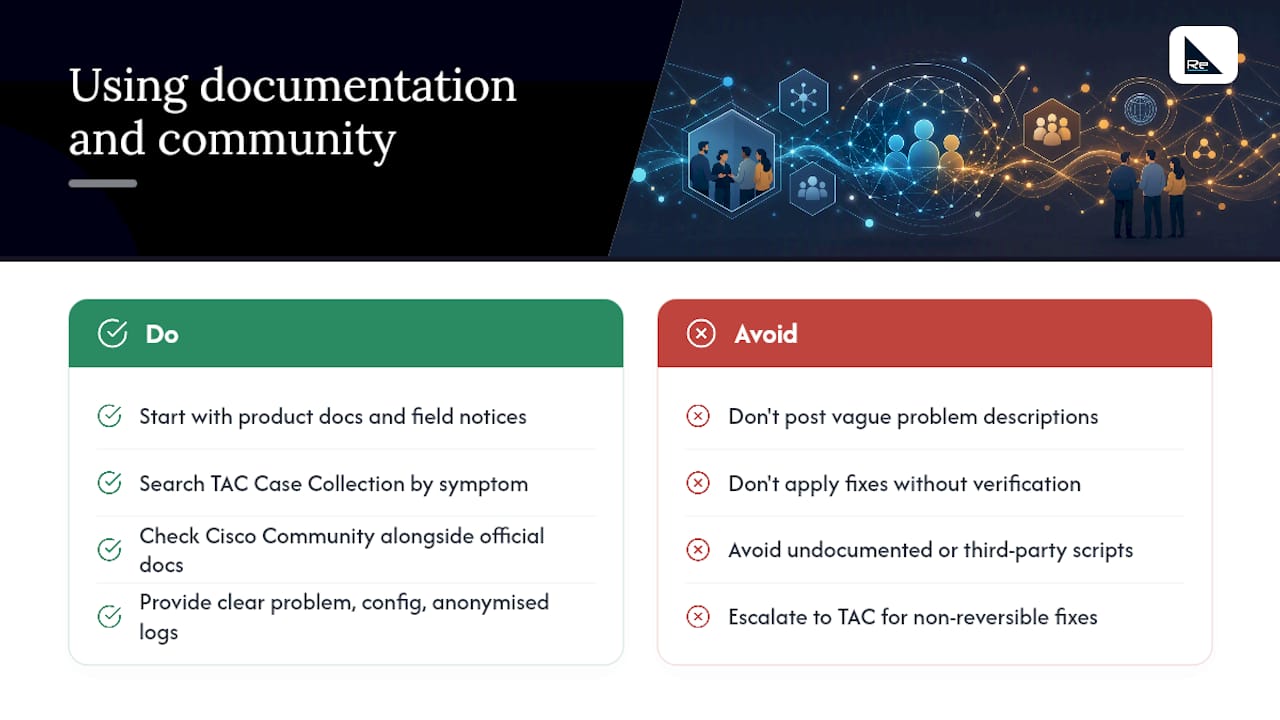
Start with product documentation and field notices for anything that looks like a known bug rather than a unique fault. The TAC Case Collection lets you search previously closed cases by symptom, and a surprising number of “strange” issues turn out to be documented quirks with a published fix.
Cisco Community is a moderated peer forum where engineers, administrators, and Cisco specialists answer product questions, and it is worth checking alongside, not instead of, official documentation. A well-written community post includes a clear problem statement, the relevant configuration snippet, and anonymised logs with any sensitive addressing or credentials stripped out. Vague posts (“my switch isn’t working”) get vague answers; specific posts with actual output attached tend to get a working fix within hours.
Community-supplied fixes are safe to apply when they reference an official Cisco bug ID or field notice, or when the fix is a documented command with a clear, reversible effect. Treat anything involving undocumented commands, third-party scripts, or unverifiable claims about firmware behaviour with more caution, and fall back to TAC if the fix touches production hardware you cannot easily roll back.
Pro Tip: Subscribe to security advisory notifications for every product family you run. Field notices and advisories are published before most administrators notice a problem in their own environment, giving you a head start on patching rather than reacting after an incident.
Lifecycle of a TAC case: severity, escalation and closure
A TAC case follows a broadly predictable path, and knowing the stages helps when you need to update stakeholders or plan a maintenance window around a fix.
- Case creation and triage. The case is logged, entitlement verified, and an engineer assigned based on severity and product area.
- Diagnosis. The engineer reviews attached logs and configuration, and may request additional diagnostics, a live session, or a specific test.
- Workaround or interim fix. For Severity 1 and 2 cases, TAC typically aims to provide a workaround to restore service before pursuing a permanent fix.
- Root cause and permanent fix. This may involve a software patch, a configuration change, or in the case of failed hardware, an RMA.
- RMA, if required. For supported, telemetry-connected devices, automated RMA can significantly cut the time between diagnosis and replacement hardware arriving, compared with a manually processed request.
- Verification and closure. You confirm the fix resolves the issue, and the case is closed with documentation of the root cause.
Escalation can happen at any stage. If a Severity 1 case is not progressing, you can request a duty manager or ask for the case to be expedited, and Support Assistant lets you attach a specific escalation reason tied to the case number rather than starting a fresh conversation. For complex or recurring issues, it is reasonable to request a senior engineer review, particularly where the assigned engineer’s proposed fix does not match what your own diagnostics are showing.
Cisco does not publish a single universal response time across all products and regions, since actual response and restoration targets depend on your support tier and the severity assigned. What is consistent is the principle: Severity 1 cases receive continuous engineering attention until a workaround is in place, while lower severities are worked during business hours with periodic updates. Signature and Standard contracts get prioritised handling that can materially shorten these windows compared with Basic.
When a Cisco partner or managed service is the better option
TAC is built to fix a specific technical fault once you have raised it. It is not designed to watch your network continuously, replace hardware on-site, or manage the commercial side of your Cisco entitlements. That gap is where a managed partner earns its keep.
A few scenarios point clearly toward partner engagement rather than relying on TAC alone:
- 24/7 monitoring and incident response, where someone needs to notice a problem before a user reports it, not after.
- On-site hardware replacement, particularly across multiple sites where remote-hands coordination eats time during an RMA.
- Contract and licence management, keeping entitlements current so a TAC case is never blocked by an expired or misassigned contract.
- Complex, multi-vendor environments, where the root cause sits at the boundary between Cisco kit and something else entirely.
- Ongoing service-level ownership, where a single point of accountability matters more than a case-by-case relationship with Cisco.
A managed partner adds local presence, continuous architecture review, and SLA-backed delivery that sits on top of, not instead of, your Cisco entitlement. Re-solution’s network audits and infrastructure reviews, for instance, are designed to catch the kind of configuration drift or ageing hardware that would otherwise surface as a TAC case months later. When scoping a partner engagement, ask directly how they coordinate with TAC on your behalf, how they handle entitlement verification, and what their own escalation path looks like when a case stalls.
Pro Tip: Ask any prospective partner to walk through a real escalation scenario, not just their SLA document. How they describe coordinating with TAC on a live Severity 1 case tells you more about their actual capability than any brochure.
Author perspective on working with Cisco support
The single biggest time-waster I see in TAC cases has nothing to do with Cisco’s engineers and everything to do with preparation. A case opened with a vague description, no logs, and the wrong severity spends its first cycle just getting to a usable starting point. A case opened with a clear timeline, a show tech-support, and an honest severity assessment often gets a useful response within the hour.
The mistake I see most often during escalation is treating it as a complaint rather than a request with evidence. “This is taking too long” gets you sympathy. “This is Severity 1, it has been open four hours with no workaround, and here is the business impact” gets you a duty manager. Support Assistant exists precisely so that escalation reason and case number travel together, and using it properly gets taken far more seriously than a repeat phone call.
Two habits are worth building into any team’s process. First, preserve logs before you touch the device further, since a second reboot or config change can wipe the exact evidence TAC needs to diagnose a root cause rather than a symptom. Second, standardise how your team writes escalation reasons, so whoever raises the case gives Cisco the same quality of information every time, rather than it depending on who happened to be on shift.
Organisations that pair disciplined case management with a managed partner like Re-solution tend to spend far less time firefighting, because the routine drift that causes half of all support cases gets caught during a scheduled review instead of during an outage.
Re-solution: managed Cisco support and how we help
Cisco TAC fixes the fault in front of it. Re-solution handles everything around that fault, so the same issue does not come back next quarter. As a Cisco-focused partner with over 35 years of combined infrastructure experience, Re-solution sits between your team and Cisco’s own support structure, coordinating entitlements, escalations, and hardware logistics so nothing stalls on a technicality.

Re-solution’s managed services cover the parts TAC does not: continuous monitoring that flags a problem before a user notices it, on-site coordination for RMA and hardware swaps, and active management of the licences and contracts that determine whether your next case even qualifies for support. Network audits identify the configuration drift and end-of-life risk that quietly builds up between incidents, and our Network as a Service model gives IT directors a single accountable partner instead of juggling vendor relationships alone.
If your team is opening the same category of TAC case repeatedly, or entitlement gaps keep slowing down urgent requests, it is worth a conversation. Visit Re-solution’s managed IT services page to scope what a partner engagement would look like for your Cisco estate.
FAQ
How do I contact Cisco customer support?
Call your regional TAC number found on Cisco Worldwide Support Contacts for urgent issues, or open a case in Support Case Manager using your Cisco.com ID for anything non-urgent.
What is Cisco used for?
Cisco builds networking, security, and collaboration hardware and software, including routers, switches, wireless infrastructure, and network security platforms used across enterprise, education, and industrial environments.
What is the Cisco customer support portal?
The main portal is Support Case Manager, used for opening and tracking service requests, alongside the broader Support & Downloads site for documentation, software, and advisories.
How do I open a support case with Cisco?
Sign in to Support Case Manager with a Cisco.com ID linked to a valid contract, select the affected product, attach diagnostics such as logs and configuration files, and set an accurate severity level.
When should I involve a managed partner instead of relying only on TAC?
Bring in a partner such as Re-solution when you need continuous monitoring, on-site hardware handling, or ongoing entitlement management, things TAC handles per case but does not provide proactively.
Recommended
- Cisco Networks Catalyst Overview & Benefits | Re-Solution
- Unleashing Network Security with Cisco ISE | Re-Solution
- Cloud networking in hospitality: a guide for IT leaders
- The Vital Importance of an Infrastructure Review: Insights from Re-solution | Cisco Premier Partner | Cisco Cloud, Security & Datacenter Experts