Network change management is a controlled, auditable process for making configuration and topology changes with minimal risk and a clear rollback path. Done properly, every change carries a documented reason, a tested rollback, and a named approver. Two signals tell you a programme is mature: peer review happens before anything touches production, and every change is tested in a non‑production environment first.
TL;DR:
- Proper classification of change risk depends on the business criticality, number of affected sites, and service dependencies, guiding approval and testing intensity.
- Automated configuration backups, change detection, and version control systems reduce manual errors and streamline rollback procedures during incidents.
- Maintaining a single authoritative source of truth and role-based access control ensures accurate planning, accountability, and minimizes misconfiguration risks.
- High success rates and low mean time to restore indicate an effective change management process, with metrics tied directly to incident attribution and approval times.
- Building proficiency requires consistent external audits and managed services, especially when internal capacity is limited, to enforce discipline and ensure audit compliance.
Table of Contents
- What does network change management cover?
- What are the key components of an NCM programme?
- What are the steps in the change management process?
- How do you classify change risk and blast radius?
- How should you test, validate and roll back changes?
- What role does automation play in network change management?
- Which KPIs prove network change management is working?
- What’s a good pre-change checklist to follow?
- Re-solution’s perspective on operationalising network change management
- Get expert help implementing network change management
- Sources
- FAQ
What does network change management cover?
Network change management (NCM) sits inside the broader discipline of IT change and configuration management, but it focuses specifically on the routers, switches, firewalls, wireless controllers and SD‑WAN fabric that carry traffic. Configuration management tracks what a device’s settings are; change management governs how those settings get altered and by whom.
Not every change needs the same scrutiny. NCM typically applies to:
- Firmware and IOS upgrades across switching or routing platforms
- Firewall rule changes, VLAN reconfiguration, and routing protocol adjustments
- Wireless controller updates and SSID or authentication policy changes
- SD‑WAN policy edits that affect traffic steering across sites
A one‑line ACL tweak on a lab switch is not the same risk category as a core routing change during business hours, and your process should reflect that difference from the outset.
What are the key components of an NCM programme?
A working programme rests on four pillars: policy, roles, a single source of truth and access control.
Policy defines change categories (standard, normal, emergency) and the approval path each one follows. Roles separate the person requesting a change from the person implementing it, with a peer reviewer checking the plan and a Change Advisory Board (CAB) signing off on higher‑risk work. Documentation needs one authoritative record of intended network state, whether that is a network source of truth like NetBox or a well‑maintained configuration management database, so engineers plan changes against reality rather than memory. Access control applies least privilege: implementers get the permissions needed for the task, nothing more, and every login is logged. Centralised configuration control and role‑based access are recommended baseline controls precisely because misconfiguration remains one of the most common causes of network outages and security gaps.
- Written change policy with defined categories and SLAs
- Clear requestor, implementer, reviewer and CAB roles
- One authoritative source of truth for network state
- Role‑based access control and audit logging on every device
Pro Tip: Give your CAB a fixed weekly slot rather than an ad hoc calendar invite. Predictable review cycles stop engineers batching risky changes just to avoid the wait.
What are the steps in the change management process?
A complete change moves through five stages, and skipping any one of them is where most avoidable outages come from.
- Request. The requestor documents scope, business justification, affected devices, a test plan, a rollback plan, and the estimated blast radius (how many endpoints or services are touched if it goes wrong).
- Assess. Risk assessment determines the approval path; for professional assistance with assessing and mitigating network risks, consider Business Cybersecurity NSW services. A change affecting a single access switch outside office hours might need one sign‑off; a core routing change affecting multiple sites needs full CAB review and a scheduled maintenance window.
- Approve. The CAB or a designated approver checks the test plan and rollback plan against the stated risk, not just the technical steps. Five principles reduce failed changes: scope evaluation, risk assessment, peer review, pre‑deployment testing and documentation — approval is where those principles get enforced, not just recorded.
- Implement. Follow the written implementation checklist exactly as tested. Immediately after the change, run the same verification checks used in staging: connectivity, routing tables, service reachability, and log output.
- Review. A meaningful post‑implementation review confirms the change achieved its stated goal, checks for unexpected side effects over the following 24 to 48 hours, and records anything that deviated from the plan.
Each stage produces a record. That record is what makes the change auditable months later, not just on the day it happened.
How do you classify change risk and blast radius?
Classification decides how much testing and approval a change needs before it goes near production. Get this step wrong and you either over‑engineer trivial changes or rush high‑risk ones through a shortcut approval path.
Three criteria drive most classification decisions:
- Business criticality of the affected service, such as a payment gateway versus an internal test lab
- Number of endpoints or sites the change touches, which defines blast radius
- Service dependencies, since a single firewall rule can quietly break an application three hops away
A routine change, like adding a VLAN on an access switch serving a handful of desks, generally needs a lighter approval path and shorter test cycle. A high‑risk change, such as a core routing protocol edit or a firewall policy rewrite affecting multiple sites, warrants full CAB review, a scheduled window, and a rehearsed rollback. Re‑solution’s network infrastructure checklist offers a practical way to map these criteria against your own estate before you build a classification matrix from scratch.
How should you test, validate and roll back changes?
Rehearsed reversibility is the difference between a change that fails safely and one that turns into an incident.
- Mirror production for testing. A staging environment or virtual lab that matches production topology, even at reduced scale, catches problems a desktop simulation misses.
- Run automated validation checks. Confirm routing convergence, interface status, authentication, and application reachability before calling a change complete.
- Design and rehearse rollback. A rollback plan that has never been tested is a guess, not a plan. Documented rollback procedures rehearsed in advance measurably reduce mean time to restore after a failed change.
- Keep manual verification for edge cases. Automated checks confirm the obvious; a human still needs to eyeball anything touching customer‑facing services or safety systems.
Pro Tip: Time your rollback rehearsal, not just the change itself. If restoring a known‑good configuration takes 40 minutes, that number belongs in your maintenance window planning, not as a surprise mid‑incident.
What role does automation play in network change management?

Automation and centralised configuration control cut manual risk and speed up recovery when something goes wrong. Automated tools that maintain configuration backups can restore a known‑good state quickly after a failed change, often turning what used to be an hour of manual recovery into minutes.
Effective NCM tooling typically covers:
- Automated configuration backups before every change
- Change detection that flags unauthorised or drifted configurations
- Policy validation that checks a proposed change against compliance rules before deployment
- Audit logs that tie every configuration line back to a specific change ticket
Some advanced teams borrow version control concepts, branching and merging, from software development to manage network configurations. Applying VCS‑style workflows lets engineers develop and test configuration changes in parallel without one engineer’s work overwriting another’s. The same paper recommends keeping device‑specific detail out of the shared branch and generating device‑level configuration only at deployment time, which avoids merge conflicts across dissimilar hardware. Feeding change tickets and monitoring alerts into your ITSM platform closes the loop, so every network event traces back to a change ID rather than a guess.
Which KPIs prove network change management is working?
Three metrics tell stakeholders whether the process is earning its keep: change success rate, mean time to restore (MTTR) after a failed change, and the frequency of change‑related incidents relative to total changes made.
A consistently high change success rate paired with a short MTTR is the clearest sign that testing, peer review and rollback rehearsal are actually functioning, not just documented on paper.
- Change success rate: percentage of changes implemented without triggering a rollback or incident
- MTTR: how long it takes to restore service after a failed change
- Change‑related incident rate: incidents traced to a change ticket versus total changes
- Time‑to‑approve: how long requests wait in the approval queue, a useful proxy for process bottlenecks
Tying monitoring alerts directly to change IDs lets you attribute an incident to a specific change within minutes rather than hours of log‑trawling.
What’s a good pre-change checklist to follow?
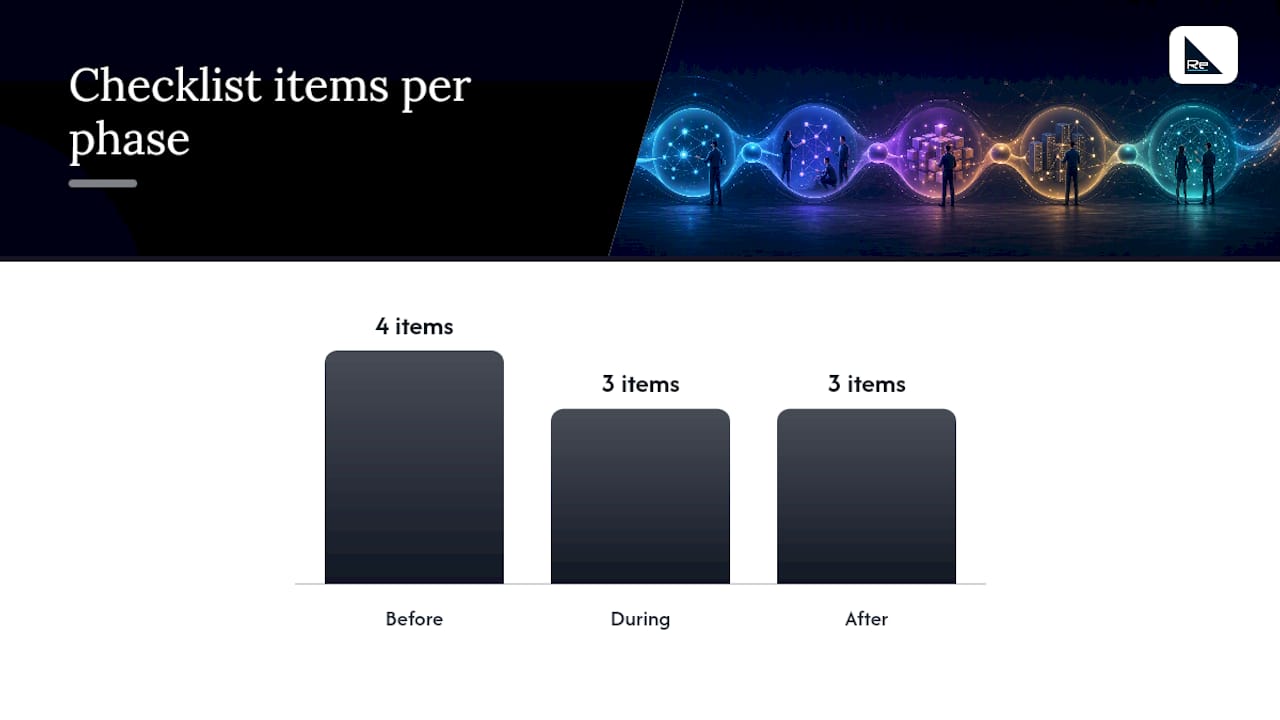
Before scheduling your next change, three phases deserve a checklist each: before, during, and after.
- Before: confirm the device inventory is current, map the impact against dependent services, write a tested plan with a rollback, and secure the right approvals for the change’s risk category.
- During: schedule the work in an approved maintenance window, monitor live metrics as the change goes in, and run quick validation checks the moment it completes.
- After: carry out full verification against the original test plan, update documentation and the source of truth, and log any lessons for the next similar change.
Pro Tip: Build your rollback plan before you write the implementation steps, not after. Engineers who design the way back first tend to write tighter, safer forward plans too.
Re‑solution’s guide on planning network upgrades walks through scheduling logistics in more depth if you’re coordinating a multi‑site rollout rather than a single change.
Re-solution’s perspective on operationalising network change management
Most NCM failures aren’t caused by a missing checklist. They’re caused by a checklist nobody has the bandwidth to follow consistently once the pressure is on. An experienced Cisco partner has observed many internal teams write excellent change policies and then quietly abandon peer review during a busy quarter, because there simply isn’t enough headcount to do it properly every single time.
That’s the practical argument for combining in‑house process with external structure. A managed approach pairs your policy with dedicated tooling, documentation and monitoring, so peer review and testing happen on a schedule rather than when someone finds time. An external audit is particularly worth commissioning before a high‑risk change window, precisely when internal teams are stretched thinest and least able to catch their own blind spots.
— Jacob
Get expert help implementing network change management
Building a mature NCM programme from scratch takes time most IT teams don’t have spare, particularly when day‑to‑day support already fills the calendar. Expert partners work with education, manufacturing, logistics, hospitality and shared workspace organisations to bring Cisco‑grade discipline, tested rollback procedures and audit‑ready documentation to network changes, without needing to hire and train an entire change management function in‑house.

For teams weighing up whether to keep everything internal, Re-solution’s Network as a Service model puts policy, tooling and monitoring into a single managed subscription, so changes go through the same tested process every time rather than depending on who’s on shift that week. If you’re not sure whether your current setup can support that level of consistency, a managed IT services conversation with Re-solution is a sensible next step, and pairing it with a network audit will show you exactly where your existing change process has gaps before your next major upgrade. Get in touch to talk through what a managed approach would look like for your network.
Sources
- 5 principles of change management in networking | TechTarget
- Network Change Management: Best Practices for 2024 | AlgoSec
- Network configuration and change management best practices | FireMon
FAQ
What are the five principles of network change management?
The five principles are scope evaluation (understanding blast radius), rigorous risk assessment, formal peer review, pre‑deployment testing, and systematic documentation of every change.
What are the five types of network management?
Network management is generally split into fault, configuration, performance, security and accounting management, with change management sitting primarily inside the configuration and security disciplines.
What are the four types of change?
In IT service management, changes are usually classed as standard (pre‑approved and low‑risk), normal (requiring assessment and approval), emergency (urgent, fast‑tracked fixes), and major (high‑impact changes needing full CAB review.
What are the core pillars of a change management approach?
For network change management specifically, the core pillars are policy, defined roles and approval gates, a single source of truth for network state, and strict access control, each reinforced by testing and audit logging.
How does emergency change differ from a standard change?
Emergency changes fast‑track the approval path to fix an active outage or security threat, but they still require documentation, a rollback plan and a retrospective review once service is restored.
Recommended
- Network infrastructure checklist: optimise compliance
- Plan network upgrades: step-by-step logistics for success
- Network improvement strategies list: 2026 guide for IT teams
- Network assurance for IT teams: a practical guide