Design IoT VLANs around device function, trust and traffic profile, never physical location. Enforce default-deny between IoT segments and the corporate network, opening only narrowly scoped, documented exceptions for DNS, DHCP, NTP, management and telemetry. Put endpoints on access ports, restrict trunks to genuine multi-VLAN uplinks, and validate everything with a monitor-mode pilot before enforcement. Keep the design flat and simple at small scale; move to identity or group-based segmentation once device mobility or multi-site scale makes static VLANs hard to maintain.
TL;DR:
- Most organizations should create five to eight IoT zones based on device function, trust, and traffic profile rather than location to maintain manageable segmentation.
- Validating VLAN design requires confirming device IP assignment, switch port tagging, and analyzing firewall logs, with pilot-mode monitoring recommended before enforcement.
- Trunk ports should carry only necessary VLANs, management VLANs must be on dedicated links, and wireless SSIDs should be mapped to isolated VLANs to reduce misconfiguration risks.
- Default-deny ACLs must tightly control inter-zone traffic, permitting only documented services like DNS, NTP, DHCP, and specific telemetry endpoints.
- Moving to identity or group-based segmentation is advisable once device mobility or multi-site complexity makes static VLANs difficult to maintain effectively.
Table of Contents
- IoT zone types and how to map them to VLANs
- Step-by-step IoT VLAN design checklist
- Switching, trunking and wireless: getting the configuration right
- Default-deny policy and access controls for IoT VLANs
- How to validate the design and catch failure modes early
- What 35 years of Cisco projects teaches about IoT segmentation
- Integrating IoT VLANs with existing enterprise network design
- Mitigating IoT-specific threats within VLAN segments
- Monitoring inter-VLAN traffic to catch anomalies early
- Automating VLAN provisioning at scale
- Why validation matters more than the diagram
- Get a VLAN design that’s tested, not just diagrammed
- Sources
- FAQ
IoT zone types and how to map them to VLANs
Most IoT VLAN design mistakes start with too few zones or zones drawn around building location rather than what a device actually does. Cisco’s industrial automation design guidance is explicit on this: segmentation should reflect device function, trust and traffic profile, keeping operational assets separated from enterprise services rather than lumped in by floor or wing.
A workable starting set of zones for most organisations looks like this:
- Cameras and physical security — high device count, predictable outbound flows to a recorder or cloud service, no need to reach general IoT or corporate subnets.
- Building management systems (BMS) — HVAC, lighting, access control; typically low bandwidth but high sensitivity if compromised.
- OT/industrial control — PLCs, sensors, SCADA gateways; the most trust-sensitive zone, often requiring a DMZ rather than direct routing to enterprise VLANs.
- General IoT — sensors, smart plugs, environmental monitors with no clear category of their own.
- Voice/video — IP phones and video endpoints, usually already segmented in mature networks.
- Printers and peripherals — narrow, well-understood flows that rarely need broad access.
- Management — switch, AP and controller management interfaces, kept off general trunks entirely.
- DMZ — the controlled handoff point for any traffic that must cross between OT and enterprise zones.
Each zone gets its own VLAN ID, subnet and DHCP scope, with the gateway sitting on a firewall or Layer 3 switch that can enforce policy rather than just route traffic. Monitoring and network management systems (NMS) should sit in their own restricted VLAN with tightly scoped access into every other zone, never the reverse.
Step-by-step IoT VLAN design checklist
Skipping straight to VLAN numbers is the single most common failure engineers describe after the fact. A working design for IoT network segmentation follows a fixed sequence, and each step produces evidence the next one depends on.
- Inventory devices and owners. List every device, its manufacturer, firmware version and the business owner responsible for it. Unowned devices are the ones that get forgotten during a review.
- Classify by function and risk. Group devices into the zones above, then flag anything with known vulnerabilities or unsupported firmware for extra scrutiny.
- Map real flows. Use passive monitoring rather than vendor documentation alone to see what a device actually talks to. NIST’s guidance on trusted onboarding stresses that validated communication patterns reveal maintenance and update flows that spec sheets miss entirely.
- Assign VLAN IDs, subnets, gateways and DHCP behaviour. Record switch-port profiles alongside the addressing plan so the design is auditable later, not just working.
- Build default-deny ACLs. Write rules permitting only the specific services each zone needs.
- Pilot in monitor mode. Log what would be blocked before you block it, then enforce.
Pro Tip: Run the monitor-mode pilot for at least one full business cycle, including a weekend and a firmware update window. IoT devices often reveal their real, less obvious flows only during maintenance events, not day-to-day operation.
Switching, trunking and wireless: getting the configuration right
VLAN design fails as often at the switch port as it does on the whiteboard. Cisco’s VLAN best practice guidance is blunt about the core rule: use access ports for endpoints and trunks only where required — typically uplinks and access point connections carrying multiple SSIDs.
Practical rules worth building into every switch config template:
- Prune trunks so they carry only the VLANs actually needed on that link, not every VLAN in the building.
- Never carry the management VLAN on a general-purpose trunk; give it a dedicated, restricted path.
- Set unused switch ports to a dead-end VLAN with no DHCP scope, so a rogue device plugged into an empty port gets nowhere.
- Map each wireless SSID to its own VLAN, with DHCP relay pointing to an isolated pool for IoT SSIDs rather than sharing scope with corporate Wi-Fi.
- Check PVID and native VLAN alignment on every trunk. A mismatch here is one of the most common causes of VLAN hopping, and it is invisible until someone tests for it.
A wireless site survey is worth commissioning specifically for SSID-to-VLAN mapping in buildings with dense IoT deployment. Getting the RF design and the VLAN design out of sync is a frequent, avoidable source of dropped sensor connections.
Default-deny policy and access controls for IoT VLANs
VLAN separation alone does not secure anything; it just creates boundaries. The policy enforced across those boundaries is what actually matters. MITRE’s network segmentation mitigation guidance recommends a default-deny posture between IoT zones and the corporate network, with exceptions permitted only where a service is documented and necessary.
In practice that means allowing:
- DNS resolution to an approved internal resolver, not the wider internet.
- NTP to a defined time source, since many IoT devices fail certificate validation without accurate time.
- DHCP within the local scope only.
- Telemetry and update traffic to named controller or vendor endpoints, not open outbound access.
Write ACLs with explicit destination IPs and ports rather than broad subnet-to-subnet permits, and set short expiry windows on any temporary exception so it gets reviewed rather than becoming permanent by accident. IoT traffic tends to be highly predictable, which cuts both ways: it makes narrow ACLs practical to write, and it makes any deviation from that pattern easy to flag as an anomaly worth investigating.
VLAN placement is not the same thing as device trust, and treating it that way is a recurring mistake. A device on the “trusted” IoT VLAN can still be compromised. That is why network access control and posture checks matter as a complementary layer, not a replacement for segmentation. As estates grow, identity or group-based policy such as Cisco TrustSec assigns Security Group Tags that follow a device regardless of where it connects, propagating that identity through fabrics like BGP EVPN VXLAN and enforcing it with SGACLs rather than static VLAN membership.
How to validate the design and catch failure modes early
A VLAN design that looks correct on paper can still leak traffic in ways nobody notices until an audit or an incident. Validation needs to happen at three separate layers, not just one ping test.
- Confirm endpoint addressing. Check the device actually received the intended IP and gateway from the correct DHCP scope, matching Cisco’s guidance on VLAN verification.
- Check switch-side tagging. Verify port tagging and PVID match the design, since a silent mismatch here is the single most common cause of devices ending up on the wrong VLAN.
- Inspect firewall and session logs. Look for flows that shouldn’t exist, not just confirmation that expected ones do.
Beyond that, deliberately test DHCP failover, DNS resolution, NTP sync, firmware update paths, and any multicast or discovery protocols the devices rely on. An accidentally permitted trunk or a native VLAN mismatch often surfaces only under one of these specific conditions, not during a general connectivity check. For multi-site estates, keep zone and role names consistent across sites while allowing local addressing, so policy intent travels even when subnet numbers don’t.
What 35 years of Cisco projects teaches about IoT segmentation
A Cisco partner with over thirty years of experience has delivered network audits, managed services and Network as a Service engagements across education, manufacturing, logistics and hospitality. Across those projects, the pattern repeats: teams that measure flows before designing VLANs end up enforcing policy with confidence, while teams that copy a generic IoT VLAN across every site end up firefighting exceptions for months. Pilot before enforcement, every time.
Integrating IoT VLANs with existing enterprise network design
Retrofitting IoT segmentation into a live enterprise network is a different exercise from designing it on a greenfield site. The existing VLAN numbering scheme, routing protocol and firewall rule base all constrain what’s realistically achievable, and ignoring that context is how well-intentioned redesigns stall.
Start by auditing the current VLAN and subnet allocation before assigning new IoT ranges, so there’s no overlap with legacy voice, guest or building services VLANs already in use. Where possible, extend the existing Layer 3 addressing logic rather than inventing a parallel scheme. If corporate VLANs follow a site-plus-function numbering convention, the IoT zones should follow the same logic, just with tighter ACLs attached.
Routing between the new IoT zones and the rest of the network should go through the same firewall or Layer 3 switch already enforcing policy elsewhere, not a separate, forgotten appliance nobody reviews. This keeps logging, alerting and change control consistent across the whole estate instead of creating a parallel security posture that ages differently.
Where the existing network already runs Cisco Identity Services Engine or a similar access control platform, extend its policy sets to cover the new IoT VLANs rather than managing them separately. A network audit beforehand tends to surface these dependencies. Skipping it is the most common reason IoT segmentation projects run over budget once integration issues appear mid-deployment.
Mitigating IoT-specific threats within VLAN segments
IoT devices carry a different risk profile from laptops and servers, and VLAN design needs to account for that difference explicitly rather than assuming standard endpoint controls apply. Many IoT devices ship with firmware that receives infrequent security updates, hardcoded credentials that are rarely rotated, and no meaningful capacity to run an agent or endpoint detection tool.
That absence of on-device defence is precisely why network segmentation for IoT devices carries more weight than it does for managed endpoints. The network becomes the primary control point because the device itself often can’t be one.
Practical mitigations worth building into the VLAN policy layer include disabling unused management protocols like Telnet and unencrypted HTTP on IoT devices wherever the vendor allows it, restricting outbound internet access to named update and telemetry endpoints rather than the open internet, and alerting on any device that suddenly starts communicating outside its established, narrow pattern. CIS notes that IoT traffic predictability actually helps here: because these devices talk to a small, consistent set of destinations, deviation from that pattern is a strong anomaly signal, stronger than it would be on a general-purpose corporate endpoint with varied browsing behaviour.
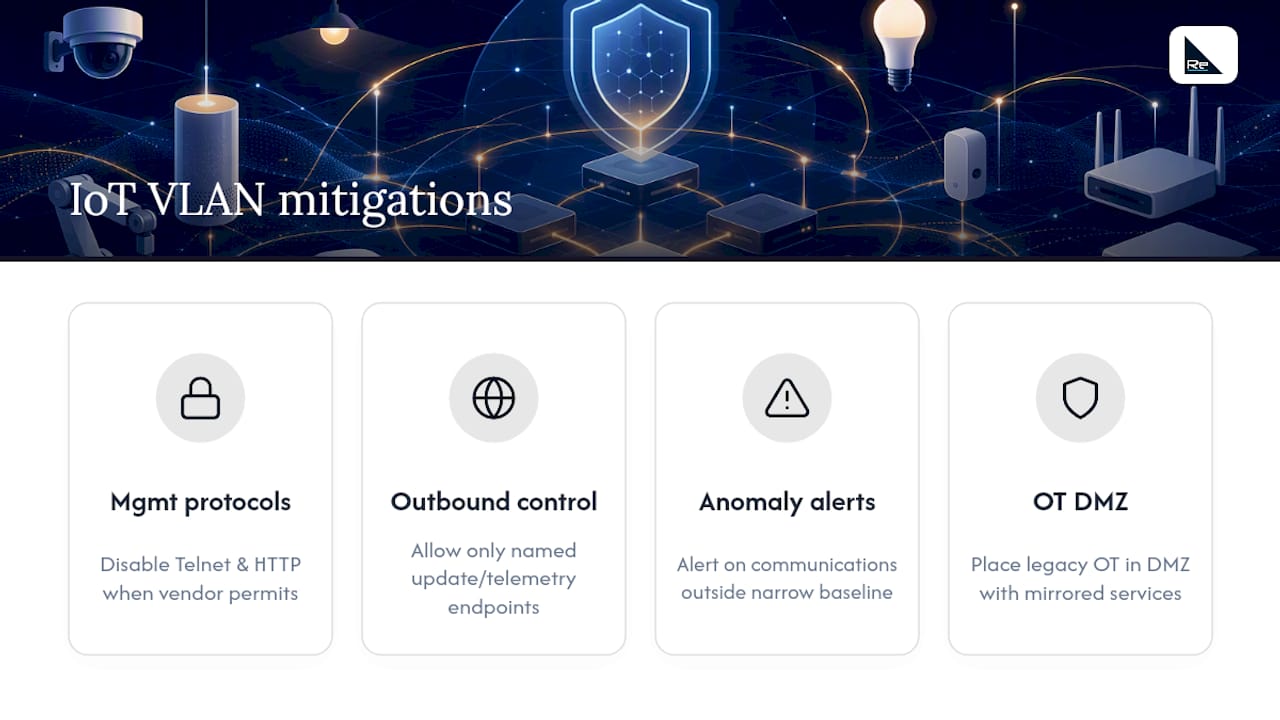
Legacy OT devices that can’t support modern authentication need compensating controls instead, typically a dedicated DMZ segment with mirrored services, matching the industrial automation DMZ pattern Cisco recommends for plant environments.
Monitoring inter-VLAN traffic to catch anomalies early
Segmentation without ongoing visibility is a policy frozen in time. Inter-VLAN traffic between IoT zones and the rest of the network needs continuous monitoring, not just the one-off validation done during the pilot phase, because device behaviour and firmware both change after deployment.
Firewall and Layer 3 switch logging should capture every session crossing a VLAN boundary, with alerts configured for anything outside the documented allow-list rather than relying on someone reviewing logs manually after the fact. Flow-based tools such as NetFlow or its equivalents on non-Cisco gear give a lightweight way to baseline normal traffic volume and destination patterns per zone, which matters because a spike in outbound connections from a camera VLAN is a far more useful early warning than a generic intrusion detection alert.
Pay particular attention to lateral movement attempts, specifically any traffic originating in an IoT VLAN and targeting another IoT VLAN or a corporate subnet that isn’t on the documented exception list. That pattern is one of the clearest indicators of a compromised device attempting to pivot, and it’s exactly the kind of flow a well-scoped default-deny ACL should already be blocking and logging.
Review the exception list itself on a fixed schedule, not just when something breaks. Temporary allow-rules added during a pilot or an urgent fix have a habit of becoming permanent simply because nobody circles back to remove them, and each one left in place quietly widens the attack surface the original design was built to close.
Automating VLAN provisioning at scale
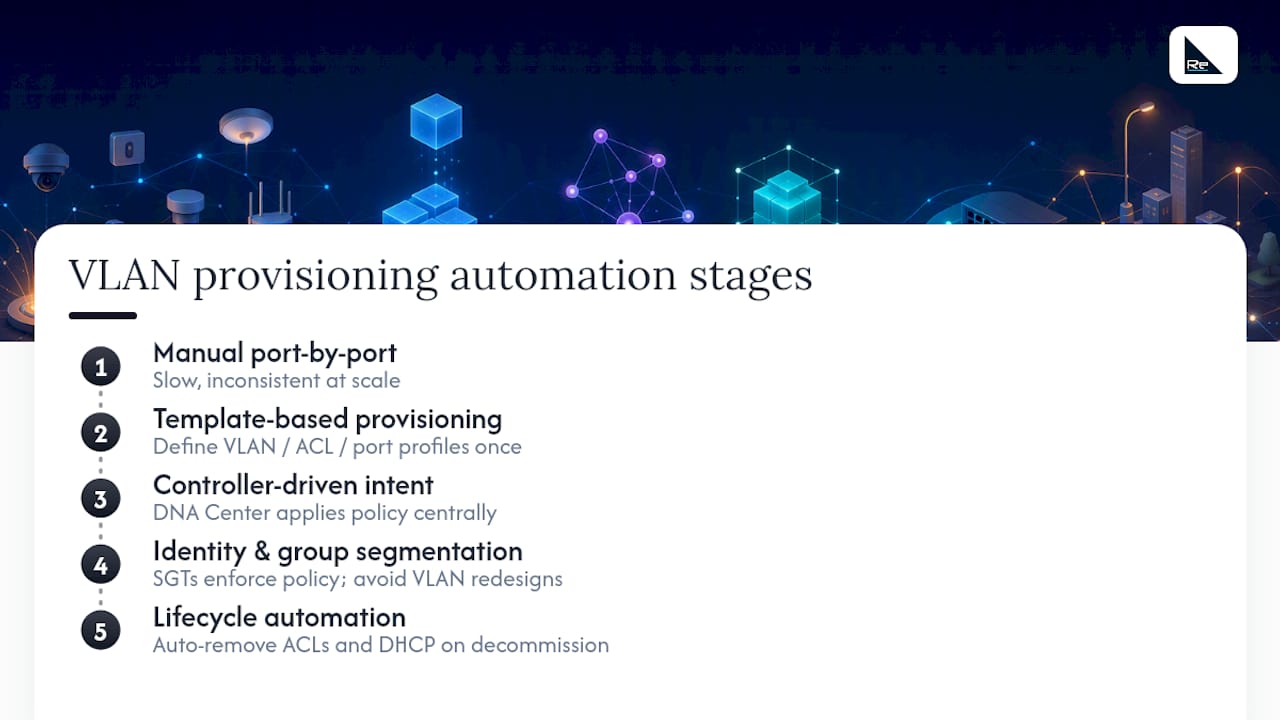
Manually configuring VLANs port-by-port works for a single-site pilot. It falls apart the moment an organisation is rolling out IoT sensors across dozens of sites or provisioning hundreds of devices a month, where manual configuration becomes both slow and inconsistent.
Template-based provisioning is the first practical step: define a standard VLAN, ACL and switch-port profile for each zone type once, then push it via configuration management tools rather than typing commands into each switch individually. Cisco’s DNA Center and similar network controllers extend this further, letting engineers define policy intent centrally and have it applied consistently across every switch and access point in the fabric.
For genuinely large estates, this is where identity and group-based segmentation earns its complexity. Rather than provisioning a new VLAN for every new device category at every site, Cisco’s Software-Defined Access (SDA) approach assigns Security Group Tags centrally and enforces policy through the fabric, so adding a new IoT device category becomes a policy change rather than a VLAN redesign at every location. That shift matters most for organisations with device mobility, frequent site expansion, or IoT fleets that change composition often enough that static VLAN maps become a maintenance burden rather than a stable reference.
Whatever the automation layer, the lifecycle side needs the same attention as provisioning. Decommissioning a device should trigger removal of its ACL exceptions and DHCP reservation automatically, not leave a stale entry in the policy table for the next audit to find.
Why validation matters more than the diagram
The conventional approach to IoT VLAN design spends most of its energy on the zoning diagram: neat boxes, clean lines, a satisfying sense of order. That diagram is worth almost nothing if nobody tests whether the enforced policy matches the intended one, and too many projects treat the drawing as the deliverable rather than the starting point.
What the evidence from segmentation guidance across Cisco, NIST and MITRE actually supports is a shift in priority: spend less time perfecting the theoretical zone map and more time on measured validation. Passive flow monitoring before writing a single ACL, a monitor-mode pilot before enforcement, and a fixed schedule for reviewing exception lists catch the failures that diagrams never reveal, things like a native VLAN mismatch or an accidentally permitted trunk that sits invisible until someone goes looking.
If there’s one thing worth prioritising above all else, it’s this: treat every “temporary” exception as a liability with a deadline, not a convenience. That single discipline, more than any zoning model, is what separates a segmentation design that holds up under audit from one that quietly decays into an unrestricted network wearing a VLAN diagram as decoration.
— Jacob
Get a VLAN design that’s tested, not just diagrammed
This checklist can be turned into a working design rather than a slide deck. Experienced teams run the inventory, flow mapping and pilot phases described above as a structured engagement, not a one-off consultation.

If your current IoT estate has grown faster than your VLAN documentation, a network audit is the fastest way to see exactly what’s talking to what before any redesign work starts. Sites with dense wireless IoT deployment benefit from a wireless survey alongside it, to get SSID-to-VLAN mapping right before switch configuration begins. For estates that need ongoing enforcement and monitoring rather than a one-time project, Network as a Service gives you centrally managed policy without building an in-house NOC. Get in touch to scope an audit or pilot for your site.
Sources
- Networking and Security in Industrial Automation Environments Design and Implementation Guide – Cisco
- Network segmentation, Mitigation M1030 – MITRE / CIS Security
- SP 1800-36 Trusted IoT device network‑layer onboarding and lifecycle management – NIST
FAQ
What is the best VLAN design for IoT devices?
The best approach groups devices by function, trust level and traffic profile rather than physical location, then enforces default-deny policy between each zone and the corporate network. Cisco’s segmentation guidance recommends this over location-based zoning specifically because co-located devices often have very different trust levels.
How many VLANs should I create for IoT devices?
Most organisations need somewhere between five and eight zones covering categories like cameras, building management, OT, general IoT, voice/video and management, rather than one broad IoT VLAN. A single generic IoT VLAN repeated across every site tends to become unmanageable as device types multiply.
How do I test that IoT VLAN segmentation actually works?
Validate at three layers: confirm the endpoint received the correct IP and gateway, check switch port tagging and PVID against the design, and review firewall session logs for unexpected flows, following the verification steps in Cisco’s VLAN best practices. Run a monitor-mode pilot before full enforcement to catch native VLAN mismatches and accidentally permitted trunks.
When should I move beyond static VLANs to identity-based segmentation?
Static VLANs work well at small to moderate scale, but identity or group-based approaches like Cisco TrustSec become more practical once devices move frequently between locations or the estate spans many sites with changing addressing. Microsegmentation approaches assign policy to a security group tag that follows the device, rather than tying policy to a fixed VLAN.
Does Re-solution offer help designing and auditing IoT VLANs?
Yes. Re-solution’s network audit service covers device inventory, flow mapping and VLAN design review, and its Network as a Service offering supports ongoing managed enforcement once the design is validated. Current pricing for both is available directly on the site.
Recommended
- Prove every finding: Network audit checklist for IT managers
- IoT security explained for IT decision-makers
- OT network segmentation for cybersecurity and OT teams
- Secure network design: proven examples for robust protection