A guest WiFi captive portal is the login page that intercepts a device’s first internet request and forces it through terms acceptance or authentication before granting access. IT teams deploy one for three reasons: to isolate guest traffic from internal systems, to capture legally valid consent, and to onboard visitors with branded, controlled access. The rest of this guide covers how portals work technically, which authentication method fits your environment, and the configuration steps that keep a rollout reliable across multiple sites.
TL;DR:
- Captive portals are mainly beneficial for isolating guest traffic, capturing explicit consent, and onboarding visitors with branded access controls, especially in unmanaged or regulatory-sensitive environments.
- Traffic interception is achieved through DNS or HTTP redirects, with the portal granting access upon user authentication or acceptance of terms, often integrated with RADIUS or LDAP for enterprise environments.
- Segmentation with dedicated VLANs and zone-based firewalls is essential for protecting internal networks from guest devices and enforcing rules on bandwidth and session timeouts.
- Proper consent compliance requires separate, clear opt-in options for terms and marketing, with timestamped records and no pre-ticked boxes to meet GDPR standards effectively.
- A reliable multi-site deployment involves thorough site surveys, accurate VLAN and IP planning, valid HTTPS certificates, and cross-device testing to prevent common issues like certificate errors and failed redirects.
Table of Contents
- What a guest wifi captive portal does and common use cases
- How captive portals intercept and redirect traffic
- Authentication and onboarding options compared
- Segmentation, VLANs and firewall policy for guest networks
- Getting consent and compliance right on the portal
- Configuration checklist for deploying a captive portal
- Designing a captive portal page that people actually use
- Fixing the most common captive portal problems
- In-house build or managed guest WiFi: an editorial view
- How Re-solution supports guest WiFi and captive portal rollouts
- Sources
- FAQ
What a guest wifi captive portal does and common use cases
A captive portal sits between an unauthenticated device and the open internet, holding traffic until the user accepts terms, authenticates, or both. Hotels use it to present house rules and Wi-Fi vouchers at check-in; retailers use it to capture marketing consent; offices use it to separate visitor and contractor devices from the corporate LAN; event venues use it for high-density, short-lived access.
Operationally, a well-built portal delivers four things at once:
- Acceptable-use terms presented and logged before access
- Consent capture that satisfies data protection obligations
- Access control tied to time, bandwidth, or device type
- Optional data capture for marketing or footfall analysis
Not every network needs one. A small internal test lab or a single-purpose IoT segment with no human users is often better served by a simple open SSID with MAC filtering. Portals earn their complexity where you have unmanaged devices, walk-in visitors, or a regulatory need to isolate guest traffic from anything that touches payment or student data.
How captive portals intercept and redirect traffic
A captive portal works by exploiting the fact that an unauthenticated client has no route to the wider internet yet. When a device joins the guest SSID, the controller or firewall assigns it an IP address but blocks everything except DNS and traffic to the portal itself. The moment the device tries to reach any other address, the gateway intercepts the HTTP request and issues a redirect to the login page. Some platforms use DNS interception instead, resolving every lookup to the portal’s own address until the session is authenticated.
Vendor documentation describes this splash page as the mechanism that intercepts initial client requests and redirects users to an authentication or terms screen before internet access is granted. Some operating systems also read captive portal hints, a signal (documented in platforms like OPNsense) that tells the device’s built-in captive network assistant to pop up the login page automatically rather than relying on the user to open a browser.
Once the user authenticates, the controller grants a session, usually tied to a MAC address and time limit, and lifts the firewall restriction. In enterprise deployments, this handoff often integrates with RADIUS, using a Change of Authorization (CoA) message to move the device from a restricted pre-auth VLAN into the open guest VLAN without forcing a reconnection.
Authentication and onboarding options compared
Choosing an onboarding method is a trade-off between friction, data capture, and administrative overhead. Get it wrong and you either annoy guests or leave the network exposed.
- Click-through terms pages ask for nothing but agreement. Fastest to deploy, weakest for accountability, since you capture no identifying detail beyond a MAC address and timestamp.
- Email, voucher, and SMS verification add a data capture step and some accountability, but each extra field costs you conversion and adds support overhead when codes fail to arrive.
- Social or one-tap logins reduce friction but raise their own privacy question: you are now relying on a third party’s data practices, which needs scrutiny before you enable it under UK GDPR.
- RADIUS, 802.1X, and platforms such as Cisco ISE suit organisations that need per-user policy, sponsor approval workflows, or integration with an existing identity provider. Meraki’s own documentation notes that sign-on splash pages integrate with RADIUS, LDAP or OAuth and support options including prepaid PINs and SMS authentication.
For multi-site estates with contractors or sponsored guests, an ISE-based guest access playbook removes most of the manual voucher administration that clogs up smaller deployments.
Segmentation, VLANs and firewall policy for guest networks
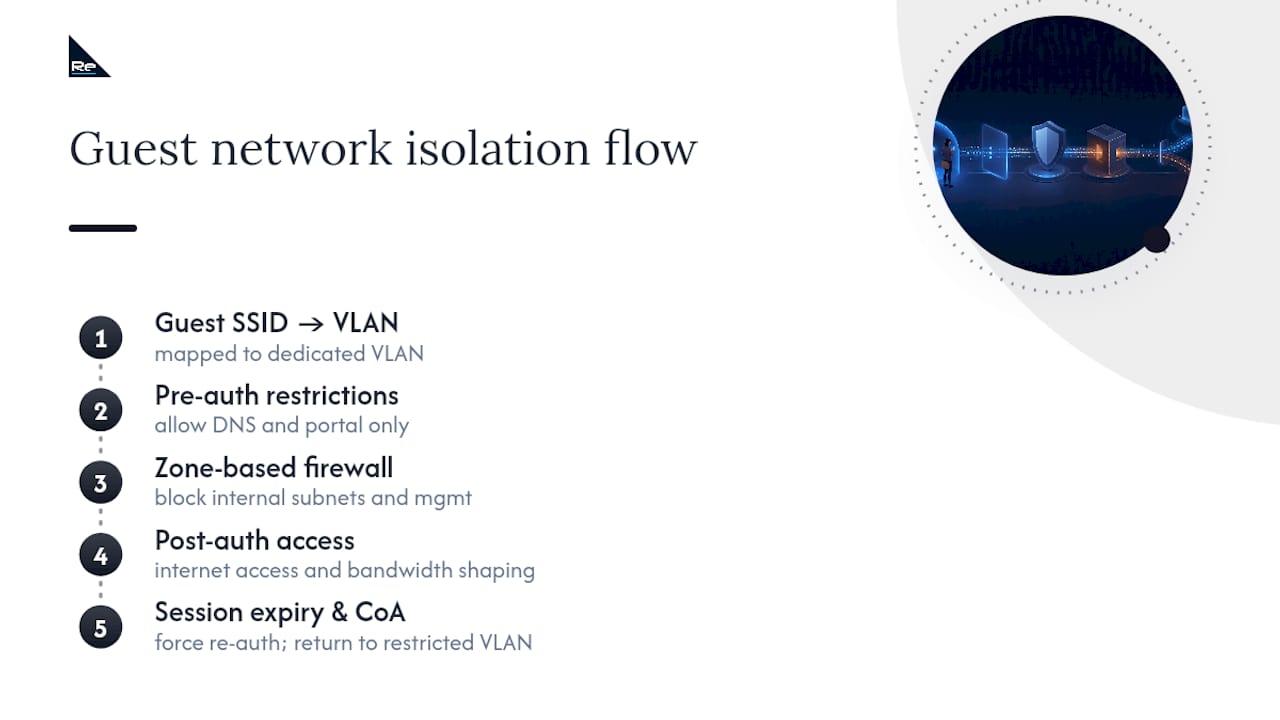
Isolation is the part of a captive portal deployment that actually protects your network, and it happens before anyone sees the login page. The standard enterprise pattern uses a dedicated guest SSID mapped to its own VLAN, with zone-based firewall rules permitting only DNS and portal traffic until authentication completes. Everything else, including access to internal subnets, printers, and management interfaces, stays blocked by default.
This pattern matters because segmenting guest traffic with an SSID, VLAN and zone-based firewall reduces the lateral risk if a guest device is already compromised. A guest laptop carrying malware should never be able to reach a file server just because it joined the same physical access point as staff devices.
Group policies and bandwidth shaping protect internal resources from noisy neighbours: a single guest running a large download should never degrade a boardroom video call. Session termination needs the same attention as session grant. Expired sessions should force re-authentication, and CoA should be used to actively push a device back into the restricted VLAN rather than relying on it to time out gracefully. If your guest network shares infrastructure with anything in scope for PCI DSS, a formal segmentation review is worth doing before, not after, go-live.
Getting consent and compliance right on the portal
Consent capture is where captive portals most often fail an audit, usually because the legal team and the network team never spoke to each other. Under UK GDPR, consent has to be explicit, freely given, and granular. That means a single “I agree” checkbox covering both network terms and marketing communications is not valid consent for the marketing part.
Practical steps that satisfy this without wrecking conversion:
- Separate the acceptable-use terms checkbox from any marketing opt-in checkbox
- Keep the on-screen legal text short, with a link out to the full policy rather than reproducing it
- Timestamp every consent event and store it in an exportable format, so you can provide proof of consent if needed
- Avoid pre-ticked boxes; UK GDPR treats them as invalid consent
None of this needs to slow the guest down. A well-designed portal separates the mandatory terms tick from the optional marketing tick visually, so the guest sees in one glance which is compulsory and which is not.
Configuration checklist for deploying a captive portal
Reliable multi-site rollouts follow the same sequence every time, in this order:
- Survey the site. A proper wireless site survey tells you AP placement and expected client density before you plan IP addressing.
- Plan IP addressing and VLANs. Size the guest subnet for peak concurrent devices, not average load, and confirm DHCP scope and lease times.
- Provision certificates and DNS. The portal must resolve cleanly and serve over valid HTTPS, since browsers and captive network assistants both reject portals with certificate errors.
- Build the SSID and VLAN, then the portal itself, setting splash type, session duration, and bandwidth caps.
- Write the firewall rules that permit only DNS and portal traffic pre-authentication.
- Integrate RADIUS or your identity provider if you’re using enterprise authentication rather than click-through.
- Test across a device matrix, covering iOS, Android and Windows, since each renders the captive network assistant differently.
- Confirm failover behaviour if the portal server or controller becomes unreachable.
Pro Tip: Set a health check to monitor certificate expiry and portal reachability separately from your general network monitoring. Most portal outages trace back to an expired certificate nobody flagged, not a network fault. Serving assets from the portal controller or a reachable local server with valid TLS avoids the CNA rendering issues that generate most support tickets.
Designing a captive portal page that people actually use
Guests decide whether to bother within seconds, so page weight and layout decide your opt-in rate before the copy does. Design the layout mobile-first: most guest devices are phones, and a desktop-style form with multiple fields will lose people. Purple’s implementation guidance recommends keeping portal page weight small because the page has to load before full internet access exists, so heavy images or scripts stall on a connection that isn’t fully open yet.

Offer one clear primary action, whether that’s a single social login button or a simple email field, with a fallback for anyone who can’t or won’t use it. Research across large volumes of portal sessions confirms that mobile-first design and one-tap authentication materially reduce drop-off, and the same research is unambiguous that CAPTCHA should be avoided entirely, since it filters out real guests without stopping the bots it was meant for. Keep branding visible but light, and save any request for extra data until after access is granted.
Fixing the most common captive portal problems
Blank or endlessly loading portals almost always trace back to a certificate error or a captive network assistant that failed to render the page correctly, an issue that shows up differently on iOS and Android because their WebView implementations differ. If the portal is unreachable entirely, check DNS resolution, the firewall rule permitting portal traffic, and whether the access point has a bypass rule accidentally blocking redirect. Session or timeout problems usually sit in the RADIUS logs or the token lifetime setting, so check CoA delivery before assuming the portal itself is broken.
In-house build or managed guest WiFi: an editorial view
Running a portal in-house gives full control over branding and policy, but it also makes you the one fixing certificate expiries at 2am across every site. Once you’re managing guest access across more than a handful of locations, the operational burden usually outweighs the control benefit, and a managed network service with defined SLAs becomes the more defensible choice for the business, not just the easier one for IT.
— Jacob
How Re-solution supports guest WiFi and captive portal rollouts
A company with extensive Cisco networking experience can provide support for segmentation, RADIUS integration, and certificate strategy as described above, handling these configurations routinely.

If you’re planning a multi-site guest WiFi rollout, a wireless survey confirms AP placement and capacity before a single VLAN gets built, and a network audit will flag segmentation gaps if your guest network needs to stay demonstrably isolated from payment or student systems. For teams that want the portal built and then left alone, Managed Services covers ongoing operation, certificate renewal, and monitoring, while Network as a Service suits organisations that would rather subscribe to guest connectivity than own the infrastructure outright. Get in touch through our services page to scope your next rollout.
Sources
- Captive Portal Solution Guide – Meraki Developer Hub – Homepage
- OPNsense Captive Portal documentation
- Captive Portal UX: 12 design patterns that convert — MyWiFi Networks
- Enterprise cloud captive portal software for guest WiFi — Purple
FAQ
How do I access a WiFi captive portal?
Join the guest SSID and the portal should launch automatically through your device’s built-in captive network assistant. If it doesn’t appear, open a browser and try navigating to any non-HTTPS site, which usually triggers the redirect manually.
Are guest WiFi networks monitored?
Most organisations log session data such as connection times, device identifiers, and data volume for security and capacity planning, and portals routinely capture consent records as part of that process. The extent of monitoring depends on the operator’s policy, which should be stated in the terms shown on the portal itself.
Why does my WiFi say “captive portal” when it shouldn’t?
This usually means your device’s captive network assistant has detected a redirect or DNS interception that resembles a login gate, sometimes triggered by an ISP redirect page, a router update page, or a misconfigured firewall rule rather than an actual guest network. Restarting the router or checking for a stuck DNS override on your device usually clears it.
Is there a free captive portal solution available?
Several open-source platforms, including OPNsense, include captive portal functionality at no licensing cost, though you still need hardware, certificates, and ongoing administration. For organisations running guest WiFi across multiple sites, a managed approach through Managed Services is usually more cost-effective than the hidden labour of self-hosting once you factor in certificate renewals and support tickets.
What’s the difference between click-through and RADIUS authentication?
Click-through simply asks the guest to accept terms with no identity check, while RADIUS ties access to a verified username, sponsor approval, or identity provider login. Enterprises needing per-user policy or audit trails typically use RADIUS or 802.1X rather than a plain click-through page.
Recommended
- Cisco ISE guest access: a practical configuration playbook
- Wireless Aruba for IT directors: a decision-maker’s guide
- Network Access Controller Guide
- Network security for shared spaces: IT manager’s guide