A hotel network should be treated as a technical project with measurable outcomes, not an afterthought bolted on after the building is finished. The design sequence that delivers reliable results runs from requirements gathering through a proper site survey, predictive modelling, active validation and ongoing monitoring. Non-negotiables include in-room coverage, Cat6A cabling, multigig uplinks with PoE++ readiness, VLAN separation between guest and house traffic, and a data protection impact assessment wherever large-scale personal data processing is involved.
TL;DR:
- For premium or long stay rooms, prioritize access points inside each room; corridor placement costs less to cable but shares capacity across neighboring rooms.
- Specify Cat6A or better, multigigabit switch uplinks, and PoE++ with calculated power headroom to avoid replacing cabling as access points advance.
- Use separate VLANs for guest and staff traffic, isolate devices between rooms, and complete a privacy impact assessment before extensive data processing or integrated surveillance.
- Treat predictive heat maps as drafts: validate them onsite, then test throughput, latency, roaming, and voice handoffs before approving the installation.
- Conference spaces can host hundreds of simultaneous connections, so calculate their access point density separately and add temporary capacity before major events.
Table of Contents
- Requirements gathering: define coverage, capacity and services
- Site survey and predictive modelling: what to do and when
- Access point placement and density: practical options and rules of thumb
- Cabling, PoE and backhaul: infrastructure that prevents bottlenecks
- Network segregation, security and regulatory obligations
- Optimisation, validation and operational monitoring
- Power backup and resilience planning for uninterrupted Wi-Fi service
- Maintenance and upgrade planning to future-proof the network infrastructure
- Handling high-density event scenarios and scalability planning
- Integration with hotel property management systems (PMS) for seamless guest experience
- What experience teaches about hotel Wi-Fi projects
- How we can help with your hotel Wi-Fi project
- FAQ
- Sources
Requirements gathering: define coverage, capacity and services
Every reliable hotel network starts with a clear picture of who uses it and what they expect from it. Guests stream video, join video calls and expect their devices to reconnect instantly when they move between the lobby and their room. Staff rely on the same infrastructure for property management systems, point-of-sale terminals and, increasingly, mobile housekeeping and maintenance apps. Conference and event spaces bring sudden spikes in connected devices that the rest of the building never sees.
Before any design work begins, we recommend capturing:
- Target signal strength for reliable performance, typically -65 to -70 dBm depending on the application.
- Expected devices per guest and per staff member, including phones, laptops and streaming sticks.
- Peak throughput requirements by area, such as conference rooms versus guest corridors.
- Voice and roaming requirements for any VoIP handsets used by staff.
- Service separation needs: guest access, house systems and any paid or tiered connectivity tiers.
This stage also sets cabling and switch headroom. Specifying capacity for Wi-Fi 7 now, even where Wi-Fi 6 remains the current standard, avoids a second cabling project within a few years.
Site survey and predictive modelling: what to do and when
A wireless site survey turns requirements into a workable design, and skipping it is the single most common reason hotel Wi-Fi underperforms after installation. The process generally follows four stages:
- Gather architectural plans, noting construction materials, lift shafts, electrical risers and anything likely to cause interference.
- Run predictive RF models across 2.4, 5 and 6 GHz, producing coverage and capacity heat maps that simulate device density and channel reuse before any hardware goes in.
- Carry out on-site active and passive measurements to validate the model and catch issues a desktop survey cannot, such as unexpected noise from neighbouring equipment.
- Use the combined results to finalise access point positions, antenna types, transmit power and channel assignments.
Predictive tools speed up design, but modelling should be treated as a hypothesis to verify on site rather than a finished answer. A partner guide to Wi-Fi site surveys covers the same plan, test and validate sequence in more technical depth if you want a second reference point.
Access point placement and density: practical options and rules of thumb
Hospitality buildings force a choice between two placement philosophies, and the right answer depends on budget, cabling access and guest expectations. In-room access points deliver the best guest experience) because each room gets dedicated, unshared capacity, though they require cabling to every room. Corridor or hallway designs cost less to cable but share capacity across several rooms and perform worse once walls, furniture and plumbing attenuate the signal.
A few starting points help frame the decision:
- Enterprise baseline density sits around one access point per area of moderate size, though hotel room layouts and wall materials usually require a higher density.
- Thick masonry, fire doors and concrete floors all reduce effective range, so treat any baseline as a starting estimate rather than a fixed rule.
- For voice and fast-roaming reliability, plan for at least two 5 GHz access points in any coverage spot, targeting -67 dBm with 10 to 15 dB of overlap between cells.
- Mounting location matters as much as AP count: ceiling-mounted units generally outperform wall mounts, but aesthetics and listed-building restrictions sometimes force compromises.
Pro Tip: Where cabling is limited, prioritise in-room access points for premium and long-stay rooms first, then use corridor designs for lower-occupancy areas.
Cabling, PoE and backhaul: infrastructure that prevents bottlenecks
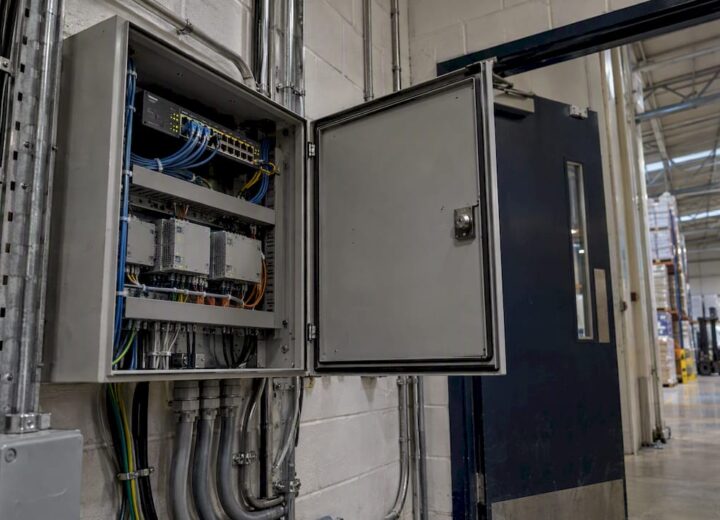
The access points get the attention, but cabling and switching decide whether the network can actually deliver what they promise. Older Cat5e or Cat6 runs cap throughput and often cannot carry the power budget that modern access points need, which turns an otherwise well-designed wireless layer into a bottleneck nobody notices until occupancy rises.
We recommend specifying:
- Cat6A or better throughout, which supports multigigabit speeds and higher PoE classes without re-cabling later.
- Switch uplinks at 2.5G, 5G or 10G depending on access point density, with link aggregation for resilience on critical paths.
- PoE++ (802.3bt) support wherever access points draw high power, plus a power budget calculation that includes headroom for future hardware.
- Redundant power feeds for switches serving reception, back-of-house systems and any life-safety-adjacent equipment.
- Rack ventilation, spare patch capacity and clear labelling, finished with proper cable test certification before sign-off.
Structured cabling choice directly affects AP throughput and operational lifespan: Cat6A or better with multigigabit switching is the baseline recommendation for networks expected to support Wi-Fi 7 capabilities. Our Wi-Fi 7 readiness guidance covers how much extra access point density to plan for as that standard becomes mainstream.
Network segregation, security and regulatory obligations
Guest and house traffic should never sit on the same broadcast domain. A two-SSID approach, with each SSID mapped to its own VLAN, keeps the property management system, point-of-sale terminals and building controls isolated from whatever guests bring onto the network.
Key design elements include:
- Guest SSID with VLAN segregation and a captive portal, choosing between open access, OWE or WPA3 depending on how much friction you want at check-in.
- House SSID protected by network access control for staff devices and systems.
- Per-room isolation or private network segments where guests need local access to in-room devices such as an Apple TV, preventing one room’s devices from reaching another’s.
- A data protection impact assessment completed before deployment wherever large-scale guest data processing or integrated CCTV is involved, with periodic review afterwards.
Our guest Wi-Fi captive portal deployment guide walks through the practical steps for setting this up.
Optimisation, validation and operational monitoring
A network is only proven once it has been tested under real conditions, not just modelled on a screen. Before sign-off, run:
- Active throughput tests across representative rooms and public areas.
- Latency, jitter and packet loss checks, particularly where voice or video conferencing is expected.
- Roaming and voice handoff tests to confirm devices move between access points without dropping calls or streams.
Once live, track client density, airtime utilisation, top talkers, noise floor and channel utilisation as ongoing KPIs. Build in change control and firmware management, and schedule a re-survey after any major renovation or recurring large event. Many modern platforms now include automated anomaly detection and capacity forecasting, which helps flag a struggling access point before guests complain.
Pro Tip: Treat the acceptance test results as your baseline: any future performance complaint should be measured against those original figures, not guesswork.
Power backup and resilience planning for uninterrupted Wi-Fi service
Guests and staff expect the network to stay up through a power cut, a plant failure or a scheduled maintenance window, and a design that ignores this fails exactly when it matters most. Resilience planning starts with uninterruptible power supplies on core switches, wireless controllers and any gateway equipment, sized to bridge the gap until backup generation takes over or power is restored.
For properties with a standby generator, confirm that the network cabinets are on the protected circuit, not just life-safety and emergency lighting. A UPS without generator backup only buys minutes, which is enough for a graceful shutdown but not for keeping guests connected through an extended outage.
Redundancy should extend beyond power. Dual uplinks from access switches to the core, resilient fibre or copper paths between buildings on larger properties, and spare access points held in stock all reduce the time between a fault and a fix. Where the network supports critical operations such as door access control or point-of-sale, consider a secondary internet circuit from a different provider so a single carrier fault does not take the whole property offline.
Monitoring ties resilience together: alerts on power state, battery health and uplink status let IT teams respond before guests notice anything, rather than finding out from a complaint at reception. Documenting failover procedures and testing them periodically, rather than assuming they will work when needed, closes the gap between a resilience plan on paper and one that holds up during an actual outage.
Maintenance and upgrade planning to future-proof the network infrastructure
A hotel network installed today will face a different load profile within a few years as device counts rise and new wireless standards arrive. Planning for that now costs far less than re-cabling or re-architecting later. Firmware updates on access points, switches and controllers should follow a scheduled cadence rather than running reactively, with testing in a non-critical area before a property-wide rollout.
Maintenance planning should also include a hardware lifecycle view: access points, switches and wireless controllers typically have a five to seven year useful life before performance or vendor support starts to lag behind demand. Budgeting for phased replacement avoids the expense and disruption of replacing an entire estate in one go.
Capacity headroom matters as much as hardware age. Cabling and switch ports specified with multigig and higher PoE classes, as covered earlier, give several years of runway before the physical infrastructure needs touching again. Reviewing coverage and capacity annually, or after any significant renovation, keeps the original design assumptions honest as occupancy patterns and device types change.
Documentation is often the weakest link in long-term maintenance. Keeping an up-to-date asset register, network diagram and configuration backup means that a fault, an upgrade or a change of IT supplier does not start with weeks of rediscovery. A network audit at this stage gives an independent, documented baseline to plan upgrades against.

Handling high-density event scenarios and scalability planning
Conference rooms and ballrooms present a different engineering problem to guest bedrooms: instead of a handful of devices per room, a single space can suddenly host hundreds of simultaneous connections. Designing for everyday occupancy and hoping it stretches to cover a conference is the most common cause of event Wi-Fi failures.
High-density spaces need their own access point density calculations, separate from the rest of the building, with placement optimised for capacity rather than pure coverage. That often means more access points at lower transmit power, tighter channel reuse, and band steering configured to push capable devices onto less congested 5 GHz or 6 GHz channels rather than crowding 2.4 GHz.
Scalability planning should also cover temporary demand: a wedding, a product launch or a large conference might need additional access points or a temporary SSID with its own bandwidth allocation, provisioned ahead of the event and removed afterwards. Switch and uplink capacity sized with headroom, as outlined in the cabling section, means these temporary loads do not degrade service in the rest of the building.
Monitoring tools that show real-time client counts and airtime utilisation let on-site staff spot a struggling access point during an event and react immediately, rather than fielding complaints after the fact. Building this flexibility into the original design, rather than treating every large event as a one-off engineering exercise, is what separates a network that scales from one that buckles under its own success.

Integration with hotel property management systems (PMS) for seamless guest experience
Wi-Fi design does not stop at the radio layer. The network increasingly needs to talk to the property management system to deliver the experience guests now expect: automatic access tied to a room booking, single sign-on across devices, and usage tied to a guest profile rather than a generic login screen.
A captive portal that integrates with the PMS can authenticate guests using their booking reference or room number, removing the friction of a shared password printed on a key card wallet. This also gives reception and IT a clear audit trail of who connected when, which supports both guest service and the record-keeping expected under data protection obligations.
Integration extends to other building systems too: door access control, in-room entertainment and energy management often sit on the same network infrastructure, which is another reason VLAN segregation between guest, house and building systems traffic matters. A poorly segmented network risks a guest device interfering with, or gaining visibility of, critical hotel systems.
Planning this integration during the design phase, rather than retrofitting it after installation, avoids a second project to join up systems that should have been considered together from the outset. It also means the captive portal, VLAN structure and PMS integration are tested as one system before go-live, rather than three separate projects that each work individually but fail when combined.
What experience teaches about hotel Wi-Fi projects
The biggest gap we see between hotels that get Wi-Fi right and those that do not is rarely the hardware. It is the sequence: skipping the survey, under-cabling to save cost, or treating guest and house networks as an afterthought rather than a design decision made on day one. A predictive heat map without an on-site validation pass is a guess dressed up as a plan, and a network specified for today’s device count rarely survives three years of guest expectations rising around it.
The uncomfortable truth is that most Wi-Fi complaints in hotels trace back to decisions made before a single access point was mounted: cabling that could not carry enough power, a density calculation based on bedrooms rather than conference spaces, or a VLAN structure bolted on after the fact. Getting the sequence right the first time costs less than fixing it twice.
— Jacob
How we can help with your hotel Wi-Fi project
We work with hotels, hospitality groups and property developers to turn the workflow above into a working network rather than a theoretical one. Our wireless surveys combine predictive heat maps with on-site validation, providing access point placement plans, PoE and uplink sizing reports, and a view of where your current infrastructure falls short.

If you are planning a new property, a renovation or simply want an independent view of an existing network, we offer:
- Wireless Surveys to model and validate coverage and capacity before you commit to hardware.
- Network Audits for an independent assessment of your current infrastructure and where it needs investment.
- Network As A Service for hotels that prefer an ongoing managed arrangement rather than a one-off project.
The most useful next step for most properties is a wireless survey, since it gives you a documented baseline before any cabling or hardware decisions are made.
FAQ
What is the recommended Wi-Fi coverage target for hotel rooms?
A reliable signal for streaming and video calls typically needs an RSSI of -65 to -70 dBm throughout the room, including corners furthest from the door. Voice and fast-roaming applications benefit from a tighter target, closer to -67 dBm with overlap between adjacent access point cells.
Should hotels use in-room or corridor access points?
In-room access points generally deliver the best guest experience because each room has dedicated capacity rather than sharing it with neighbours. Corridor designs cost less to cable but perform worse once walls and furniture attenuate the signal, so the choice usually comes down to cabling budget and guest expectations.
Do hotels need a DPIA for guest Wi-Fi?
A data protection impact assessment is likely required where large-scale personal data processing or integrated surveillance systems are involved, which covers many hotel captive portal and CCTV setups. It should be completed before deployment and reviewed periodically as systems change.
What cabling should a hotel use for its Wi-Fi network?
Cat6A or better is the baseline recommendation, since it supports multigigabit speeds and higher PoE classes that modern and future access points need. Older Cat5e or Cat6 cabling often becomes the limiting factor once access point density and power requirements increase.
How often should a hotel re-survey its Wi-Fi network?
A re-survey is generally worthwhile after any major renovation, a significant change in guest device density, or recurring large events that stress the network beyond everyday use. Between those triggers, ongoing monitoring of client density, airtime utilisation and noise floor flags most performance issues before a full re-survey becomes necessary.
Sources
- Regulation (EU) 2016/679 (UK GDPR) — Article 32
- Wi‑Fi 7 RF planning: principles and deployment best practices — Cisco
- Future‑ready workspaces: Wi‑Fi 7, smart switches and Panduit infrastructure — Cisco white paper
Recommended
- Cloud networking in hospitality: a guide for IT leaders
- Wireless Network Safety Tips for Home & Office
- Meraki Wi‑Fi Design: 5 Field Tested Decisions for UK Enterprise Engineers