The Microsoft AI Cloud Partner Program (formerly the Microsoft Partner Network, or MPN) is the formal framework through which Microsoft delivers product access, skilling resources, and go-to-market support to technology businesses that build, sell, or manage Microsoft-based solutions. For UK managed-service providers, ISVs, and systems integrators, it is the primary mechanism for accessing Azure credits, internal-use licences, technical advisory hours, and co-sell pathways with Microsoft’s own sales teams. Membership is managed through the Partner Centre dashboard, and the programme’s headline credential is the Solutions Partner designation, which signals verified capability to customers and opens higher-value incentives. This article covers the programme’s structure, benefit packages, eligibility requirements, enrolment steps, and how a UK managed-services firm can extract practical value from membership.
Key takeaways
The Microsoft AI Cloud Partner Program is a structured growth framework that delivers Azure credits, product licences, skilling resources, and co-sell pathways to UK technology businesses willing to invest in verification, certification, and active benefit management.
| Point | Details |
|---|---|
| Enrolment is free but structured | Initial enrolment costs nothing; package fees (Core, Expanded) and designation fees apply as you progress. |
| Skilling is now a baseline requirement | Solutions Partner designation requires certified individuals across sales, pre-sales, and technical roles — not optional. |
| Azure credits scale with package level | Credits start at USD 350 at Launch and increase at Core, with significantly higher allocations at designation and ISV levels. |
| Verification requires exact legal details | UK businesses must match Companies House records precisely; mismatches are the most common cause of enrolment delays. |
| Re-solution supports full activation | Re-solution’s managed services and infrastructure practice helps UK firms align partner benefits with live client engagements. |
Table of Contents
- What does the Microsoft Partner Network programme give you?
- Which UK businesses benefit most from joining?
- How is the programme structured?
- What are the eligibility and skilling requirements?
- How do you join the Microsoft Partner Network programme?
- What entitlements do partners actually receive?
- How do partners convert membership into revenue?
- How should a UK managed-services firm use the programme?
- Why the programme matters more than most UK partners realise
- How Re-solution can help you activate your Microsoft partnership
- Sources
What does the Microsoft Partner Network programme give you?
The headline benefits span four categories: cloud resources, product licences, technical support, and go-to-market tooling.
- Azure credits: starting with an amount at Partner Launch level and increasing at Partner Success Core, with larger allocations for Solutions Partner and ISV designations
- Internal-use product licences: Microsoft 365, Dynamics 365, and other workloads for internal enablement and proof-of-concept work
- Technical advisory hours: pre-sales and technical presales support that partners can apply to customer engagements
- Signature Cloud Support incidents: for escalated technical issues
- Partner Marketing Center Pro: co-branded campaign assets and demand-generation tools
- Partner Concierge: advisory support for planning go-to-market activity
- Commercial Marketplace access: listing and transact capabilities for software solutions
- Co-sell pathways: visibility with Microsoft field sellers for joint customer engagements
Benefit availability varies by region. UK and EEA partners should verify current licence entitlements directly in Partner Centre, as some product SKUs and credit denominations differ from US-listed figures. Azure credits are denominated in USD in official benefit tables regardless of billing currency.
Which UK businesses benefit most from joining?
The programme is designed for technology companies at different stages, and the value proposition shifts considerably depending on your business model.
Managed-service providers (MSPs) gain the most from the Solutions Partner designation combined with Azure credits and advisory hours. The designation signals verified delivery capability on proposals, and advisory hours can be applied directly to customer cloud migrations or security assessments. MSPs typically prioritise Partner Success Core or Expanded packages to access larger credit pools and Signature Cloud Support.

Independent software vendors (ISVs) should look beyond the standard packages. ISV Success and ISV Success Advanced are invite-based programmes that can include high-value Azure credits and, at the Advanced tier, substantial cash incentives. The commercial marketplace listing is the primary monetisation route for ISVs, making marketplace publishing readiness a prerequisite.
Systems integrators (SIs) benefit from co-sell visibility and technical advisory hours, which accelerate complex customer engagements. Skilling investment in solution areas such as Data and AI or Digital and App Innovation directly supports designation eligibility.
Resellers use the programme primarily for product access, deal registration, and partner-led sales tooling through the Partner Go-to-Market Toolbox.
Training and advisory partners find value in the Partner Skilling Hub’s structured learning paths and the credibility that Microsoft Learn certifications carry with enterprise buyers.
Startups can access Partner Launch benefits at no cost and use Azure credits for product development, with a clear progression path toward Core and Expanded as the business scales.
How is the programme structured?
The Microsoft AI Cloud Partner Program operates through three interconnected layers: a membership workspace in Partner Centre, a set of benefit packages, and Solutions Partner designations that sit above the base membership.
Benefit packages
The three packages are designed for different business stages and are not automatically cumulative. Selecting and managing the correct package is an operational task in Partner Centre.
- Partner Launch: entry-level package focused on early growth assets, limited Azure credits, and foundational marketing tools. Free to enrol.
- Partner Success Core: for businesses expanding their cloud practice. Larger Azure credit allocation, more advisory hours, and access to Signature Cloud Support incidents.
- Partner Success Expanded: for scaling businesses deepening their Microsoft partnership. The highest standard entitlements, broader licence bundles, and enhanced go-to-market support.
Solutions Partner designations
Solutions Partner designations are the primary market differentiation mechanism. They align to six solution areas: Data and AI, Digital and App Innovation, Infrastructure, Modern Work, Security, and Business Applications. Each designation requires partners to meet thresholds across three dimensions: performance (net new customer adds, revenue growth), skilling (certified individuals across sales, pre-sales, and technical roles), and customer success (consumption growth and deployment metrics).
Earning a designation unlocks additive benefits on top of the base package, including higher advisory hour allocations, larger licence bundles, and co-sell eligibility. Microsoft positions designations as the mechanism through which partners signal verified capability to enterprise buyers, not simply membership status.
The programme is designed as a growth ladder. Microsoft’s own guidance recommends partners progress from Launch through Core and Expanded, then pursue designations and specialisations to unlock higher-value incentives and co-sell visibility. Treating membership as a static subscription misses most of the programme’s commercial value.
What are the eligibility and skilling requirements?
Eligibility centres on two prerequisites: a verified legal entity and a qualified Global Admin account.
Account and legal entity requirements
The enrolling user must hold the Global Admin role in the organisation’s Azure Active Directory (now Microsoft Entra ID) tenant and must have authority to sign the Microsoft AI Cloud Partner Program agreement on behalf of the company. Microsoft verifies legal entity details against formal business registries, so the information submitted must match Companies House records for UK businesses precisely.
Common causes of verification delays include:
- Using a personal Microsoft account (MSA) rather than a work or school account
- Mismatches between the registered company name and the name on the billing account
- Missing or incorrect company registration number
- Insufficient admin authority of the enrolling user
- Incomplete address details that do not match registry records
Once submitted, verification status is visible in Partner Centre under Account Settings → Legal info. Enrolment moves to Active only once vetting is authorised. Microsoft proactively monitors for non-compliant accounts, and incomplete documentation will stall access to internal-use licences and support incidents.
Skilling requirements for Solutions Partner status
Skilling has moved from an optional differentiator to a baseline requirement for designation eligibility. The Partner Skilling Hub centralises all learning resources, including Microsoft Learn certification paths, Titan Skilling Academy, LevelUp workshops, and AI Tour for Partners events. Partners pursuing a Solutions Partner designation must demonstrate certified individuals across sales, pre-sales, and technical roles relevant to the chosen solution area.
Pro Tip: Assign skilling responsibilities to specific team members before starting the designation process. Waiting until enrolment is complete to begin certification planning adds months to your timeline. Map each required role to a named individual and track progress in Partner Centre from day one.
How do you join the Microsoft Partner Network programme?
Enrolment in the Microsoft AI Cloud Partner Program follows a three-step process and initial enrolment is free.
Step-by-step enrolment
- Create a work account. Use an organisational account tied to your company’s Azure AD/Entra ID tenant. Personal Microsoft accounts are not accepted and will cause verification failure.
- Start enrolment in Partner Centre. Navigate to partner.microsoft.com and begin the enrolment flow. Select or confirm your billing and legal entity details, including registered company name, address, and Companies House registration number for UK businesses.
- Accept the MAICPP agreement. The enrolling Global Admin must accept the Microsoft AI Cloud Partner Program agreement. This step requires the admin to have formal signing authority.
- Submit and monitor verification. After submission, Microsoft begins the verification process. Monitor Account Settings → Legal info in Partner Centre for status updates and any requests for additional documentation.
- Assign roles and activate benefits. Once enrolment is Active, assign the Microsoft AI Cloud Partner Program partner admin role to the individuals responsible for managing membership, selecting packages, and redeeming entitlements.
Timeline and cost expectations
Verification typically completes within a few business days for straightforward applications, though documentation issues can extend this significantly. Partner Launch enrolment is free. Partner Success Core and Expanded packages carry fees published in Partner Centre; Solutions Partner designations have their own fee structure. Check current pricing in Partner Centre before committing, as fees are subject to change.
Document checklist before you start:
- Global Admin credentials for your company’s Entra ID tenant
- Companies House registration number and registered address
- Verified work email address (not a personal account)
- Billing account details matching your legal entity
- Authority confirmation that the enrolling admin can sign agreements
What entitlements do partners actually receive?
The official benefit tables published in Partner Centre give the most current figures. The examples below reflect published guidance and illustrate the scale of entitlements at each level.
| Package / Level | Azure credits | M365/product licences | Advisory hours |
|---|---|---|---|
| Partner Launch | Entry-level credit amount | Limited internal-use licences | Foundational allocation |
| Partner Success Core | Increased credit amount | Expanded internal-use bundle | Increased pre-sales hours |
| Partner Success Expanded | Higher than Core | Larger licence bundle | Highest standard allocation |
| Solutions Partner (additive) | Includes additional credits and benefits | Large certified bundle | Significant additional hours |
| ISV Success Expanded | Includes high-value benefits | GitHub Enterprise, Visual Studio | Varies by offer |
Azure credit figures are denominated in USD as published in official benefit tables. UK partners receive credits at these USD values regardless of GBP billing currency.
Regional considerations for UK partners:
- Some product licence SKUs available in US benefit tables may differ in the UK/EEA due to licensing agreements. Always verify current entitlements in your Partner Centre dashboard rather than relying on generic published lists.
- Data privacy and compliance obligations apply to internal-use licences deployed within UK/EEA environments, particularly for data residency and GDPR alignment.
- ISV Success Advanced cash incentives are invite-only and not universally available; eligibility criteria are assessed by Microsoft on a case-by-case basis.
The packaging logic is straightforward: smaller or newer partners use Launch for marketing assets and limited credits while building their practice. Scaling partners move to Core or Expanded for larger cloud resources and advisory hours. Designation-level benefits are additive, meaning a Solutions Partner with an Expanded package receives both sets of entitlements.
How do partners convert membership into revenue?
Practical monetisation rarely comes from a single benefit. Advisory hours, Azure credits for proof-of-concept work, and Partner Concierge marketing typically need to be coordinated together to accelerate sales cycles.
The main monetisation channels are:
- Co-sell with Microsoft sellers: Solutions Partners with verified customer success metrics gain visibility with Microsoft’s field sales teams. Co-sell opportunities are not automatic; they require a published solution in the commercial marketplace and active engagement with Microsoft account teams.
- Commercial Marketplace listing: transact-capable listings generate marketplace rewards and, for ISVs, access to cash incentives. Discoverability requires certified solutions and publishing readiness, including a completed offer profile and verified technical validation.
- Partner Go-to-Market Toolbox: pre-built campaign assets, email templates, and social content that partners can deploy independently or through Partner Concierge advisory support.
- Partner Concierge: advisory hours for planning co-branded campaigns, identifying target accounts, and structuring go-to-market activity around specific solution areas.
- Marketplace rewards and ISV incentives: incremental financial benefits tied to transacted revenue through the marketplace; ISV cash incentives at the Advanced tier are by invitation.
Co-sell takes maturity. Microsoft expects partners pursuing co-sell to have documented customer success stories, a verified solution in the marketplace, and a track record of deployment. Partners who treat co-sell as an immediate revenue channel without that foundation typically see limited results. The more reliable near-term route is using advisory hours and Azure credits to accelerate existing customer engagements, then building the evidence base for co-sell over 12–18 months.
How should a UK managed-services firm use the programme?
For a UK MSP or infrastructure consultancy, the programme’s value is most tangible when benefits are mapped directly to active client engagements rather than held in reserve.
Benefit package selection:
- Start with Partner Launch to access marketing assets and foundational credits while completing enrolment and verification.
- Move to Partner Success Core once you have active cloud or managed-services engagements that can absorb advisory hours and larger Azure credit allocations.
- Target a Solutions Partner designation in Infrastructure or Security once your delivery team holds the required certifications and you have documented customer success metrics.
Practical application of entitlements:
- Use advisory hours to accelerate a customer’s cloud migration assessment or infrastructure audit, reducing the time-to-proposal on complex projects.
- Allocate Azure credits to proof-of-concept environments for prospective clients, demonstrating solution capability before contract signature.
- Use Partner Concierge to plan co-branded campaigns targeting specific verticals, such as education or manufacturing, where Re-solution already has sector depth.
- Present the Solutions Partner designation on proposals and tender responses as verified evidence of Microsoft-assessed capability, not just a logo.
Integration with Re-solution’s service portfolio:
Re-solution’s managed services, NaaS, and network infrastructure capabilities align directly with the Infrastructure and Security solution areas. Skilling investment in these areas simultaneously builds designation eligibility and deepens delivery capability for clients. The benefits of digital connectivity that Re-solution delivers to UK organisations map naturally to the customer success metrics Microsoft uses to assess designation eligibility.
Pro Tip: When preparing a Solutions Partner designation application, document customer outcomes in the format Microsoft expects: net new workloads deployed, consumption growth percentages, and named customer references. Informal case studies are not sufficient. Structure evidence collection as an ongoing operational process, not a one-off exercise before application.
Why the programme matters more than most UK partners realise
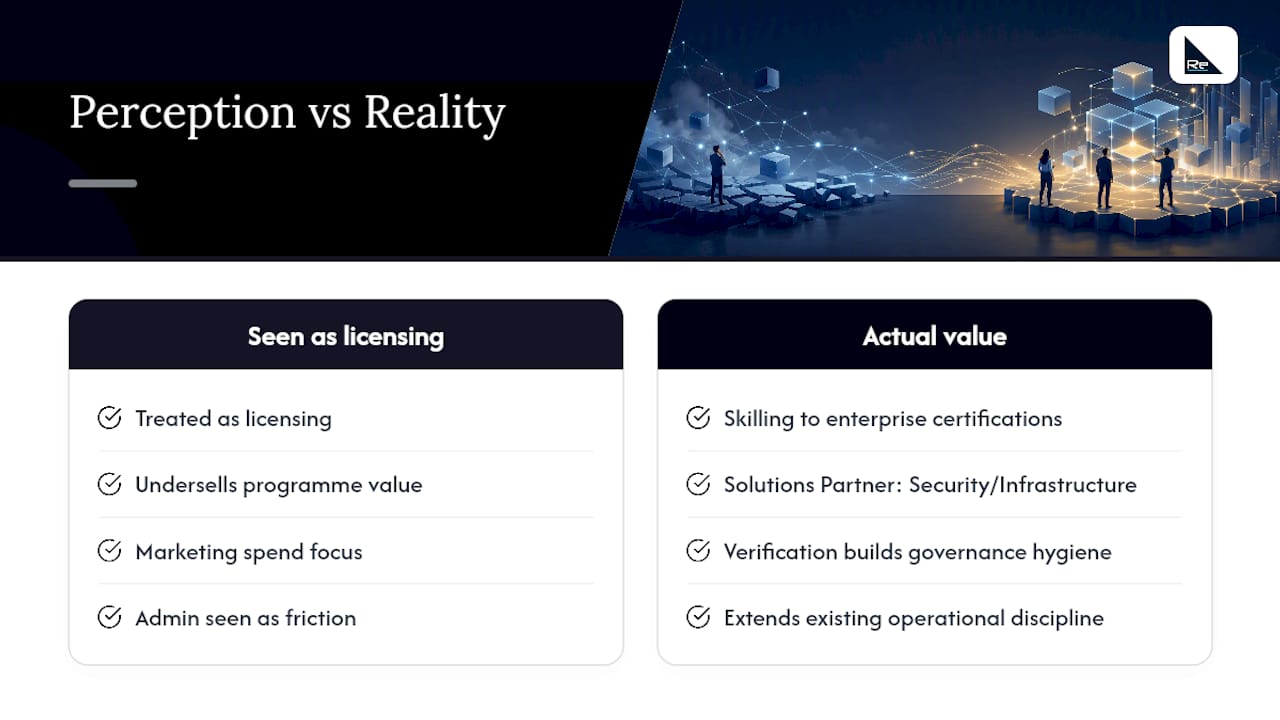
The Microsoft AI Cloud Partner Program is frequently treated as a licensing mechanism. That framing undersells it considerably. The skilling infrastructure alone, through the Partner Skilling Hub and Microsoft Learn, represents a structured pathway to certifications that carry genuine weight with enterprise procurement teams. For a UK MSP competing on technical credibility, a Solutions Partner designation in Security or Infrastructure is a more defensible differentiator than most marketing spend.
The more overlooked point is the verification discipline the programme imposes. Partners who go through the legal entity verification process, assign proper admin roles, and maintain accurate Partner Centre records are also building the governance hygiene that enterprise clients increasingly audit. The programme’s administrative requirements are not bureaucratic friction; they are evidence of operational maturity.
Re-solution’s 35-year track record as a Cisco partner means the operational discipline required for Microsoft partnership is already embedded in how the business runs. Applying that same rigour to Microsoft programme management, from skilling investment to benefit redemption to co-sell readiness, is a natural extension of existing practice rather than a new capability to build from scratch.
How Re-solution can help you activate your Microsoft partnership
UK technology businesses that understand the Microsoft AI Cloud Partner Program in theory often stall at the operational level: choosing the right benefit package, ensuring the correct admin roles are in place, or structuring skilling investment to meet designation thresholds. Re-solution’s managed IT services and infrastructure consulting practice covers exactly this gap.

Re-solution works with UK organisations to align Microsoft partnership benefits with live infrastructure projects, from proof-of-concept environments funded by Azure credits to managed NaaS deployments that generate the customer success metrics needed for Solutions Partner designation. With over 35 years of experience delivering Cisco-based infrastructure and managed services across education, manufacturing, logistics, and hospitality, Re-solution brings the sector depth and operational discipline that Microsoft partnership activation requires. To discuss how your business can get more from its Microsoft partnership, speak to the Re-solution team about your current infrastructure and go-to-market priorities.
Sources
The following official Microsoft resources are the authoritative references for enrolment, benefit selection, and programme management:
- How to enroll in partner program – Partner Center | Microsoft Learn
- Partner benefits packages – Microsoft Partner
Check Partner Centre regularly after enrolment. Verification messages, benefit activation confirmations, and package renewal notices all appear under Account Settings and the Membership workspace. Missing a verification request is one of the most common reasons benefit access is delayed or suspended.
Recommended
- Benefits of digital connectivity for UK IT decision makers
- IP connect for UK IT teams: what to choose
- Cloud networking in hospitality: a guide for IT leaders
- Network Solutions Explained: What You Should Know | Re-Solution