A good hotel VLAN design gives every class of device its own virtual network: guests, staff, payments, building systems and in-room entertainment. A firewall then decides what each may reach, and everything not explicitly allowed is denied. The VLANs share the same cabling and switches, so the work is in the plan, the addressing and the rules between segments. For multi-site or multi-floor properties, it is worth having a Cisco specialist such as Re-Solution design and validate that plan before cabling is pulled.
TL;DR
- Separate by function and risk: guest Wi-Fi, staff and PMS, payment terminals, CCTV and door access, building controls, and in-room devices each get their own VLAN.
- A VLAN is only a boundary. The firewall rules between VLANs, written as default deny, are what make it secure.
- UK NPSA guidance recommends segregating by function, sensitivity or criticality, and warns that misconfigured VLANs can be bypassed.
- Design the VLANs before the cabling and access points go in. Retrofitting is slower and more disruptive.
- Test the segmentation from each VLAN after build, and again after every change.
Table of Contents
- Why hotels need segmentation
- Which VLANs a hotel should have
- Addressing and routing
- Firewall rules between VLANs
- Plan the VLANs with the cabling and Wi-Fi
- Implement, test and monitor
- Common mistakes
- Our perspective
- How Re-Solution can help
- FAQ
- Sources
Why hotels need segmentation
A hotel runs very different traffic on one estate. Guests stream, game and work remotely. Reception uses the property management system (PMS). Card terminals take payments. Cameras, door locks, lighting and heating controllers run around the clock, often with weak built-in security. Put them on one flat network and a single compromised guest laptop or a vulnerable camera can see all of it.
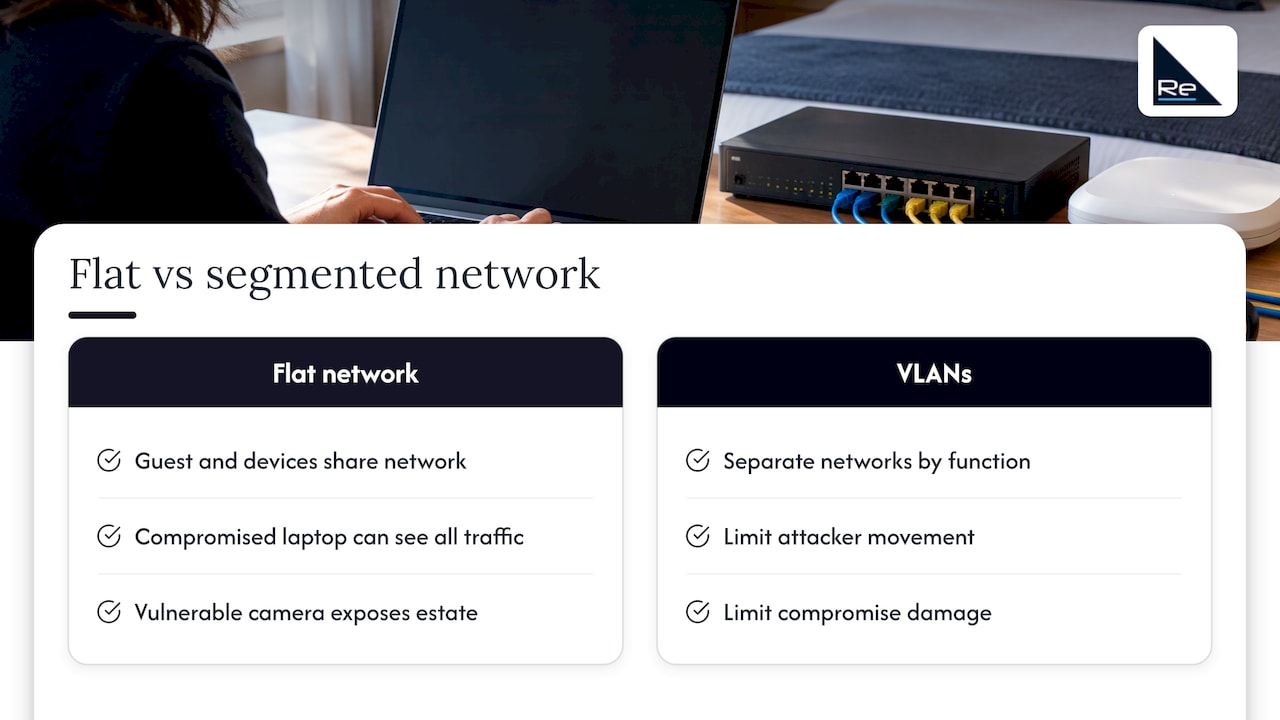
VLANs (virtual LANs) split one physical network into several logical ones. The NPSA, the UK government’s protective security authority, recommends separating networks by function, information sensitivity or criticality. The aim is to make it harder for an attacker to move between systems and to limit the damage if one is compromised.
The same guidance cautions that VLANs can be misconfigured in ways that allow VLAN hopping, where traffic crosses into a segment it should not reach. So logical separation is a starting point, not an assurance on its own. The rest of this article is about making it hold.
Which VLANs a hotel should have
Official UK guidance does not prescribe a VLAN count or a standard hotel subnet plan, so the design follows your estate. The following structure suits most independent hotels and scales to larger groups.
| VLAN purpose | What sits on it | Typical access policy |
|---|---|---|
| Guest Wi-Fi | Guest phones, laptops, tablets | Internet only, client isolation on |
| Public area Wi-Fi | Lobby, bar, restaurant, conference guests | Internet only, separate from room guests if usage differs |
| Staff and PMS | Reception PCs, PMS server, back office | Controlled access to PMS and printers, internet via filtering |
| Payments | Card terminals, EPOS | Outbound only to named payment gateway addresses |
| Security systems | CCTV, NVR, door access controllers | Reachable only from a small management group |
| Building controls | HVAC, lighting, energy, BMS | Reachable only from the controls supplier or BMS server |
| In-room devices | Smart TVs, casting devices, voice units | Own policy, no access to staff or payments |
| Management | Switch, access point and firewall admin interfaces | Admin workstations only |
Small properties can start with three or four: guests, staff and systems, payments, and security or building devices. Add segments as the estate grows rather than creating dozens at the start. Fewer VLANs with clear rules beat many VLANs nobody can document.
Guest Wi-Fi
The guest VLAN should have a route to the internet and nothing else: no file shares, printers or internal DNS. Enable client isolation on the wireless network so one guest’s device cannot talk to another’s. Guest traffic should never be able to reach the PMS, card terminals or cameras.
For filtering and outbound control on guest traffic, the decision rules for HTTP and HTTPS proxies show how network admins weigh what to inspect and what to pass through.
Payments
Card terminals and EPOS should sit in their own segment. Allow outbound HTTPS only to the addresses your payment provider specifies, and block inbound connections from every other VLAN. A tightly scoped payment VLAN also reduces what a PCI DSS assessment has to cover. Our guide to PCI network segmentation for assessors explains how to evidence that boundary.
CCTV, door locks and building systems
The NPSA lists building-control, security and voice systems among the network-connected technologies that need proper security consideration. These devices are long-lived and rarely patched, so isolate them and let only a named management host reach them. See our guides on IoT VLAN design and BMS network segmentation for the validation steps.
In-room devices
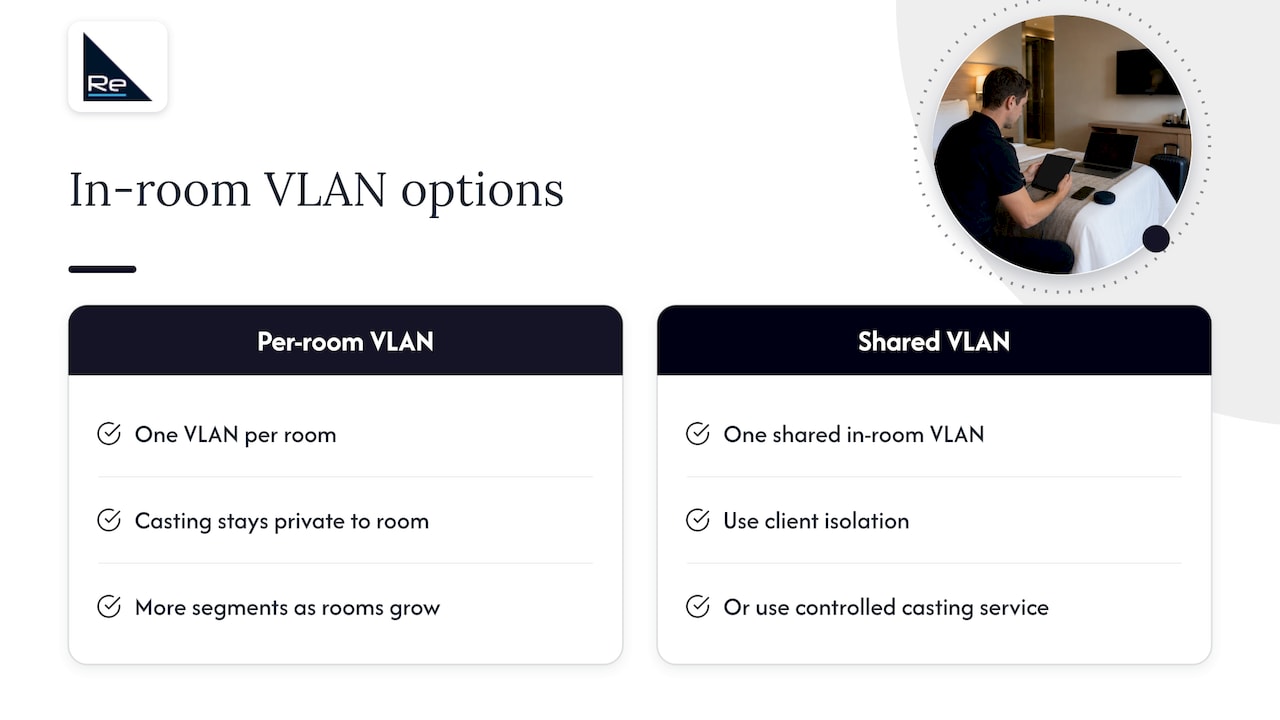
Smart TVs and casting devices are where room-level separation questions arise. Some hotels give every room its own VLAN, which keeps a guest’s casting device private to their room but multiplies the number of segments. The alternative is a shared in-room VLAN with client isolation or a controlled casting service. The right choice depends on room count, switch and access point capability and how your guest services work. Our article on VLAN per tenant sets out the limits of the per-room approach and when routing separation (VRFs) is the better tool.
Addressing and routing
Keep addressing simple enough to read at a glance. A common pattern is one private /24 per small VLAN, with the third octet echoing the VLAN ID, for example VLAN 20 on 10.20.20.0/24. Larger guest pools need bigger ranges: a 300-room hotel with several devices per guest will exhaust a /24 quickly, so size guest and in-room subnets for peak occupancy.
Some habits prevent most common faults:
- Do not use VLAN 1 for live traffic or management. Remove it from trunks and move the native VLAN on trunk ports to an unused ID.
- Allow only the VLANs each trunk needs, rather than every VLAN on every port.
- Disable unused switch ports and place them in a parking VLAN with no route.
- Document each VLAN: name, ID, subnet, owner, purpose and permitted flows.
Firewall rules between VLANs
A VLAN design stands or falls on the routing between segments. Route inter-VLAN traffic through a firewall, not a permissive layer 3 switch, and write the policy as default deny. Every permitted flow is then a deliberate, recorded exception.
A workable rule set for the segments above:
- Guest to internet: permit web, DNS and DHCP. Deny every internal subnet.
- Staff to PMS and printers: permit only the ports required.
- Payments to gateway: permit outbound TCP 443 to the provider’s listed addresses only.
- Security and building VLANs: permit inbound only from the management host, and outbound only to what the system needs, such as a vendor cloud service.
- Everything else: deny and log.
The Cyber Essentials requirements for IT infrastructure v3.2 treat a sub-set segregated by a firewall or VLAN as a recognised scope boundary. They also expect a correctly configured firewall that blocks unauthenticated inbound connections by default, with inbound rules approved and documented against a business need, and administrative interfaces protected by multi-factor authentication or an IP allow list. If your hotel certifies to Cyber Essentials, your segment documentation and your rule documentation serve the same evidence trail. Our explainer on firewall policies covers how to structure and review them.
Plan the VLANs with the cabling and Wi-Fi
The cheapest time to design VLANs is before the build. Cable routes, switch port counts, access point positions and power-over-Ethernet budgets all depend on which devices need which segment. Adding cabling or containment after a refit is far more disruptive than specifying it at the outset. A wireless survey confirms where access points go and how many SSIDs and VLANs the radio design can carry well. Our guide to hotel Wi-Fi design for UK hotels walks through the cabling and data-risk decisions, and why invest in a wireless site survey explains what the survey settles before installation.
Groups with several properties should also plan how VLANs and policies repeat across sites. SD-WAN for hospitality covers consistent policy across multi-site operators.
Implement, test and monitor
Build in stages and test at each one.
- Inventory. List every device class, who supports it and what it must reach. Include supplier remote-access routes, which are often forgotten.
- Define segments and flows. Draw the VLAN table and the permitted-flow matrix before touching configuration.
- Configure switches and wireless. Map SSIDs to VLANs, set trunks to carry only required VLANs, and enable client isolation on guest networks.
- Apply firewall policy. Default deny, then add each documented flow.
- Test from each VLAN. From a guest device, try to reach the PMS, a camera, a payment terminal and the switch management address. All must fail. Repeat from each other segment against the flow matrix.
- Monitor. Log denied traffic, review it for unexpected devices, and re-test after firmware upgrades and any new system install.
The NPSA’s point about VLAN hopping is why step 5 matters: configuration that looks right on paper can still leak. Our network audit checklist and firewall audit checklist show what evidence to collect for each finding.
Common mistakes
- One shared trunk with every VLAN allowed. Limit each trunk to the VLANs it needs.
- Permissive inter-VLAN routing on the core switch. Route through the firewall instead.
- New systems added to the nearest VLAN. A new lock or camera system gets its own place in the plan.
- Supplier access left open. Give contractors named, logged, time-limited access rather than a flat route to the network.
- No re-test after changes. Segmentation drifts as rules are added.
Our perspective
Most hotel networks we would expect to review have grown device by device: a Wi-Fi system here, a lock system there, a card terminal added later. The VLAN diagram is rarely the problem. The rule set between the VLANs and the evidence that it works are.
Our approach rests on more than 35 years working with Cisco infrastructure and on a transparent, tailored method. We start from the hotel’s actual device classes and guest experience, design the segments around them, and validate that guest, payment and building traffic is genuinely separated. Wireless surveys, network audits and managed services let a hotel keep that separation in place as the estate changes, rather than treating segmentation as a one-off project.
Hotels do not need the most complex design. They need one their team can document, test and keep.
Jacob
How Re-Solution can help
Re-Solution is a Cisco partner with more than 35 years of experience, working with hospitality and other sectors on connectivity, security and compliance. For a hotel VLAN project, our Wireless Surveys establish coverage and capacity before design, our Network Audits review the segmentation you already have, and our Managed Services keep policies and monitoring maintained after go-live.
To discuss a new build or a review of an existing hotel network, start from our services overview.
FAQ
How many VLANs does a small hotel need?
There is no official figure, as UK guidance supports segmentation without prescribing a count. Three or four cover most small hotels: guests, staff and systems, payments, and security or building devices. Add more when a device class needs a different policy.
Should every hotel room have its own VLAN?
It is one option for keeping in-room casting and smart devices private to each room. It adds many segments to manage, so it suits properties whose switches, wireless and operations team can support it. Otherwise a shared in-room VLAN with client isolation can meet the need.
Is a VLAN enough to protect the PMS and card terminals?
No. A VLAN separates traffic logically, but the firewall rules between segments provide the protection, and misconfigured VLANs can allow VLAN hopping. Pair the VLAN with default-deny rules, restricted trunks and testing.
Does VLAN segmentation help with Cyber Essentials?
It can. The Cyber Essentials requirements recognise a sub-set separated from the rest of the organisation by a firewall or VLAN, so a well-documented segment can define a narrower scope. Inbound firewall rules still need approval and a documented business need.
Sources
- NPSA Network Connected Security Technologies (NCST) guidance
- Cyber Essentials Requirements for IT Infrastructure v3.2
Recommended
- VLAN per Tenant: Design, Limits and When to Add VRFs
- Hotel WiFi Design for UK Hotels: Avoid Cabling Rework and Data Risks
- BMS Network Segmentation: A Practical Guide for UK Organisations
- Validation First IoT VLAN Checklist for Network Engineers (35 Years)